In this article, you’ll learn how to keep your Thrive Leads installation compliant, fast, and error-free.
GDPR Compliance
To ensure your forms are GDPR compliant, you may need to add an explicit consent checkbox or “Legal text” to your forms.
- Open your form in Thrive Architect.
- Click the Lead Generation element.
- In the left sidebar, add a new field type: GDPR Checkbox.
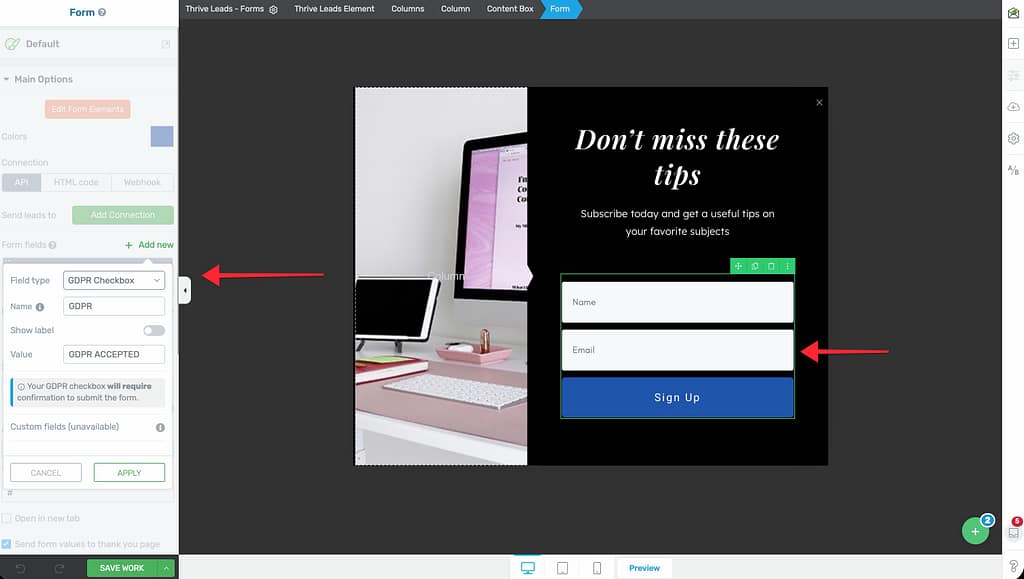
- Label it “I agree to the Terms & Conditions” (link to your privacy policy).
- Mark it as Required.
- This ensures no one can sign up without explicitly checking the box.
Performance Optimization
Thrive Leads is built for speed, but you can optimize it further.
Lazy Load Forms
This is the most impactful setting for Core Web Vitals.
- Go to Thrive Leads Dashboard > Settings > Lazy Load Forms.
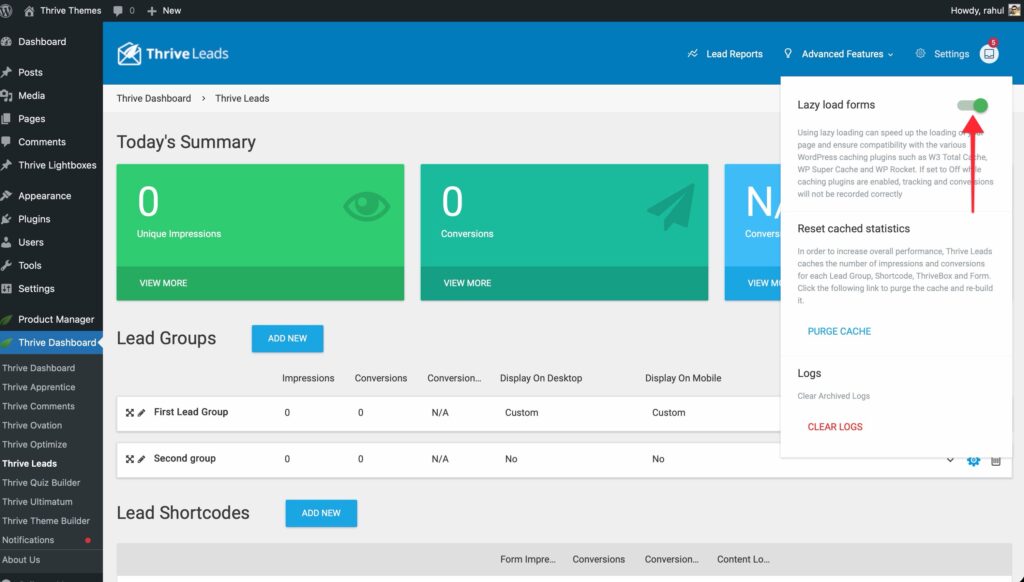
- Toggle it ON.
- What it does: It waits until your website’s main content is fully loaded before loading the Thrive Leads scripts and forms. This prioritizes your content and improves PageSpeed scores.
Caching Compatibility
If you use caching plugins (like WP Rocket or W3 Total Cache):
- HTML Forms: Thrive Leads forms are compatible by default.
- A/B Testing: If you are running tests, ensure your caching plugin is not caching the specific form output, or rely on Thrive Leads’ AJAX loading (which Lazy Load handles) to ensure the correct variation is shown to each visitor.
Troubleshooting
“My Form Isn’t Showing Up”
Check these common culprits:
- Display Settings: Did you select the correct posts/pages?
- Display Frequency: Is it set to “Show every 7 days”? Set it to 0 for testing.
- Active Status: Is the switch for Desktop/Mobile toggled ON? Is the Lead Group itself toggled ON?
- Already Subscribed: Are you testing from a browser where you already subscribed? (Thrive Leads might be hiding the form). Test in Incognito mode.
Leads Export
If your autoresponder connection fails, your leads are safe.
- Go to Advanced Features > Leads Export.
- Filter by date or source.
- Click Export to download a CSV file of all collected data.
That’s it! You can now maintain a healthy and compliant Thrive Leads setup.
Related Resources
- Dashboard: Understanding the Thrive Leads Dashboard
- Autoresponders: Connecting Autoresponders and Email Services