A Splash Page is an optional introductory screen that helps set the stage for your quiz. In this article, you’ll learn when to use a Splash Page and how to customize it to increase completion rates.
What is a Splash Page?
The Splash Page is the first thing a user sees before they answer any questions. Its primary goal is to “hook” the reader, explain what they’ll get from the quiz, and provide a clear starting point.
When to use a Splash Page
- Context: If your quiz topic needs explanation.
- Motivation: To highlight the benefits of completing the quiz (e.g., “Find your perfect skincare routine in 2 minutes”).
- Branding: To establish a visual style before the interaction begins.
How to Add and Customize a Splash Page
- Navigate to your Thrive Quiz Builder dashboard.
- In the Quiz Structure area, locate the Splash Page card.
- Click Manage.
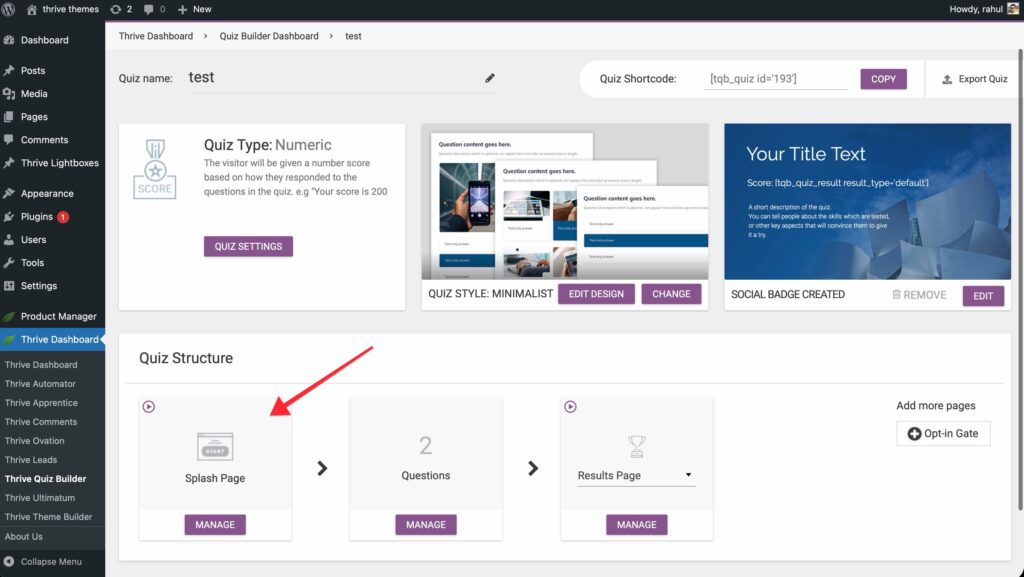
- Choose a template that matches your quiz’s goal.
- Navigate to your Thrive Quiz Builder dashboard.
- In the Quiz Structure area, locate the Splash Page card.
- Click Manage.
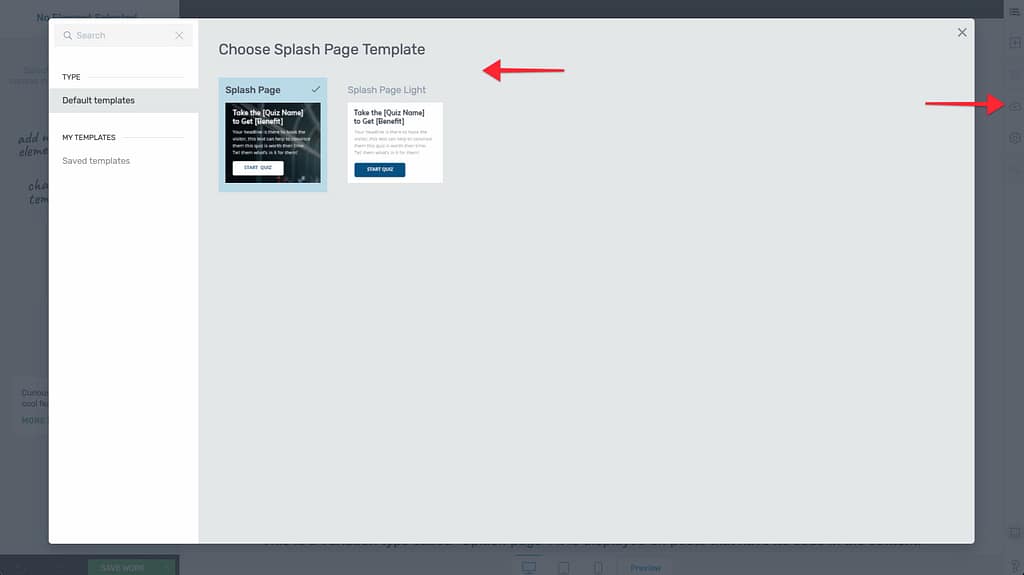
- Click the Edit with Thrive Architect button (or the pencil icon).
- Choose a template that matches your quiz’s goal.
Key Customization Steps
- Headline: Use a compelling H1 title that promises a specific outcome.
- Call to Action (CTA): Every Splash Page needs a button to start the quiz.
- Dynamic Linking: If you add a custom button, make sure it is linked to the Next step in quiz (see our guide on Navigation & Flow).
- Visuals: Add high-quality images or icons that represent the quiz topic.
Technical Tips
- A/B Testing: You can A/B test different Splash Pages to see which headline or image leads to more quiz starts.
- Minimalist Design: If you want users to start immediately, keep the Splash Page simple with just a headline and a large “Start Quiz” button.
- Skipping: If you don’t need an introduction, you can leave the Splash Page card empty, and the quiz will start directly with the first question.
Related Resources
- Opt-in Gates: Using the Opt-in Gate in Thrive Quiz Builder
- Questions: How to Add and Manage Quiz Questions
- Templates: Choosing and Customizing Quiz Templates
- Thrive Quiz Builder Documentation: Explore the full Thrive Quiz Builder knowledge base