Data privacy is a critical consideration when collecting information from your users. In this article, you’ll learn how to ensure your quizzes are compliant with GDPR, particularly when using automated profiling features.
What is Profiling?
According to GDPR, profiling is any form of automated processing of personal data used to evaluate certain aspects of an individual, such as their interests, behavior, or personality.
In Thrive Quiz Builder, you are “profiling” whenever you:
- Assign users to a Category based on their answers.
- Give users a specific Score that results in personalized feedback.
- Apply Tags to users based on individual answer selections.
Technical Requirements for Compliance
To be GDPR compliant while profiling, you must be transparent and obtain explicit consent. Thrive Quiz Builder makes this easy through the Opt-in Gate.
1. The Opt-in Gate
The Opt-in Gate is your primary compliance tool. It ensures that data collection happens transparently before results are delivered.
2. Adding the GDPR Checkbox
When designing your Opt-in Gate in the Thrive Architect editor:
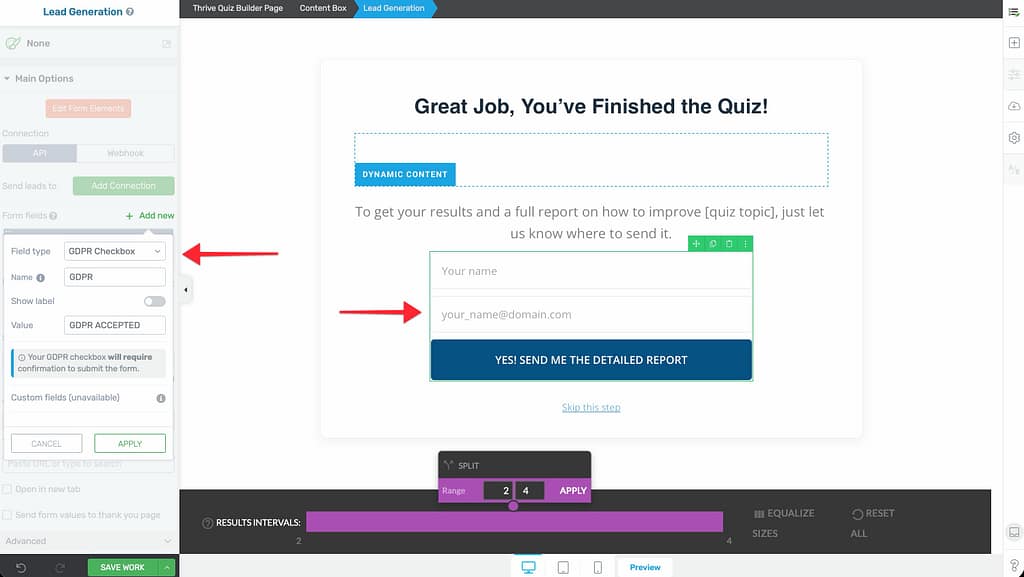
- Select the Lead Generation element.
- In the sidebar, click on Form Fields.
- Click Add New and select the GDPR Checkbox field type.
- Customize the Text: Explicitly state what the data will be used for (e.g., “I agree to receive personalized marketing emails and product recommendations based on my quiz results”).
User Rights and Transparency
Under GDPR, users have specific rights regarding automated processing:
- Right to be Informed: You must clearly explain how their quiz answers are used to determine their result.
- Explicit Consent: Users must manually check the GDPR box; it cannot be pre-checked.
- Right to Object: Users should be able to unsubscribe or request their data be deleted at any time.
Best Practices for Privacy
- Privacy Policy: Always link to your site’s full Privacy Policy from the footer of your quiz pages.
- Data Minimization: Only ask for the information you absolutely need to provide the quiz result.
- Security: Ensure your site uses HTTPS and that your email marketing service is also GDPR compliant.
Related Resources
- Opt-in Gates: Using the Opt-in Gate in Thrive Quiz Builder
- Tagged Answers: Building Tagged Answers for Audience Segmentation
- Delivering Results: Delivering Results Directly to Users
- Thrive Quiz Builder Documentation: Explore the full Thrive Quiz Builder knowledge base