Would you like to change the card that pays for your Thrive Suite subscription? In this guide, we’ll walk you through updating your payment method from your Thrive Themes account, and through PayPal if that’s how you pay. All you need is access to your account and your new card details.
Updating Your Card in Your Thrive Themes Account
If you pay by card, you can update your payment method directly from your account dashboard.
1. Log in to your account at thrivethemes.com/login and click the Billing tab in the menu at the top of your account dashboard:
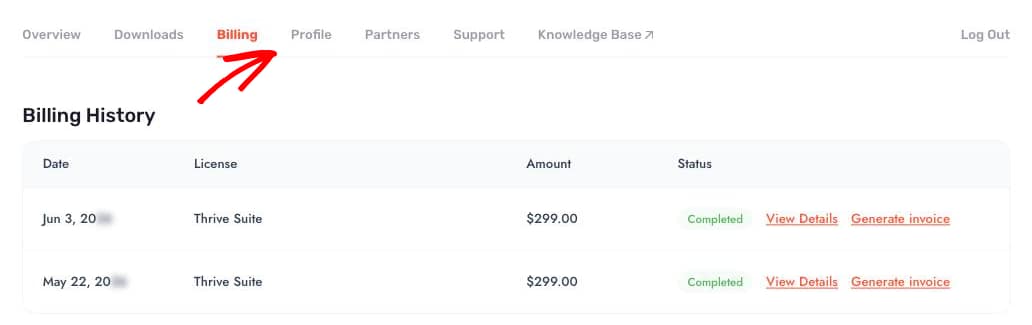
2. Find your active subscription and click the Update Payment Method button next to it.

3. Enter your new card details and click Update Payment Method to save the changes.

4. Once the update is complete, you will see a confirmation message: “Subscription payment method updated.”

Note: If you do not see the “Update Payment Method” button, or your subscription is already overdue, reach out to our team from the Support tab of your account dashboard, and we’ll help you update the card and collect any outstanding balance.
Updating Your Card Through PayPal
If you purchased your Thrive Suite subscription with PayPal, card changes need to be made in your PayPal account.
Changing the Card on an Existing Payment Agreement
Log in to your PayPal account and open the Banks and cards section, then click the listed card. On the page that opens, scroll down and click Update card. You can also reach this view from the Wallet tab of your PayPal dashboard.
Adding a New Card
To add a new card, click the settings cogwheel in PayPal and choose Payments. Click Manage your Automatic Payments, and select whitesquare GmbH in the list (this is the billing entity for Thrive Themes subscriptions). Click the listed credit card, then use the Add a new card option to link your new card.
Requirements: PayPal payments for Thrive Suite must be backed by a credit or debit card. You cannot use your PayPal balance to complete the transaction.
That’s it! Your subscription will now bill your new card. Next, you can double-check your payment history in our guide on finding invoices for your purchases.