


TL;DR: Let Me Show You the SEO Content Optimization Tools You Need
This article dives into the SEO content optimization tools I actually use to make content work harder on my WordPress websites, not just exist. If you're looking to cut through the noise and get your content seen by the right people, you'll want to know about these.
Three Key Takeaways for Skimmers:
- Tools aren't magic, they're strategy: They help you understand your audience and the search landscape, turning guesswork into informed decisions.
- AI is your co-pilot: It speeds up research, outlines, and gives real-time feedback, letting you focus on the human touch.
- You don't need everything: Pick the tools that solve your biggest problems right now, whether that's keyword research, on-page optimization, or understanding performance.
Ready to make your content an asset? Let's dig in.
In my twelve years creating content and doing SEO on WordPress, I've watched the right tools turn a decent strategy into a genuinely good one. Today, SEO content optimization tools are about precision, understanding your audience, and using data to make smart decisions.
But with so many options, how do you even begin to choose?
It's easy to get lost in the sea of features and pricing plans. So, I've distilled my experience into a guide that cuts straight to what works. This isn't just a list; it's a strategic breakdown of what I genuinely use and recommend, focusing on how each tool helps you make better content decisions, reduce confusion, and quietly position you for success.
Here's a quick look at the top tools I'll be exploring, giving you a clear snapshot of which ones to check out based on your immediate needs.
Tool | Best For | Standout Feature | WordPress-Native? | Starting Price |
|---|---|---|---|---|
Thrive Architect | Creators who want SEO-friendly pages without coding | Drag-and-drop editor with conversion-focused templates | Yes | $199/year (part of Thrive Suite) |
SEOBoost | Writers needing real-time content optimization and topic insights | AI-powered topic and content scoring system | Web tool, WP-focused | $30/month |
All in One SEO | WordPress users of all levels looking for easy SEO setup | TruSEO analysis and rich snippet schema generation | Yes | Free / $49.60/year |
MonsterInsights | WordPress site owners who want easy analytics integration | Google Analytics data directly in your WordPress dashboard | Yes | Free / $99.60/year |
ChatGPT by OpenAI | Ideation, outlining, and quick content expansion support | Flexible keyword brainstorming and prompt-driven assistance | No | Free / $20/month (Pro) |
Semrush | Advanced SEO strategists and agencies needing a full suite | All-in-one SEO toolkit with deep competitor analysis | No | $129.95/month |
WPBeginner Keyword Generator | Beginners doing quick, free keyword research | 300+ instant keyword suggestions for a seed keyword | Web tool, WP-focused | Free |
Clearscope | Teams with a strong budget and focus on content quality | Real-time content grading and optimization briefings | No | $170/month |
If you're still figuring out what content marketing even means, we've got a quick guide that breaks down the basics of content marketing in about 8 minutes.
Why Use SEO Content Optimization Tools?
You could write great content and cross your fingers. I did that for years, until I realized hoping isn't a strategy. It's just stressful.
Even genuinely useful content disappears if search engines can't make sense of it. That's where these tools pull their weight. They're not magic wands, but they do three things I can't efficiently do alone: show me what my audience actually searches for (not what I think they search for), tell me what's already ranking so I'm not reinventing wheels, and catch the technical stuff I'd otherwise miss.
Here's what I've gotten better at since I started using them:
These tools turn guesswork into decisions. They don't write your content for you, but they make sure what you write has a fighting chance.
What Makes a Great SEO Content Optimization Tool? (Selection Criteria)
I've tested dozens of SEO content tools, and the difference between a good one and a money pit comes down to a few things I won't compromise on:

I used these criteria to evaluate every tool on this list. Some excel at one area, others check every box. But every recommendation here meets the baseline: accurate data, usable interface, fair pricing, and a team that gives a damn.
How I Tested These Content Optimization Tools (Methodology)
I've used all of these tools over months, so I'm speaking from experience. Here's what that looked like in practice.
I used a mix of existing blog posts (performance already established) and new content (to see how well these tools predicted success). The content spanned was mainly marketing, eCommerce, WordPress and branding because I wanted to see if these recommendations held up across niches or fell apart.
Each tool got the same treatment. I fed it a target keyword, analyzed its suggestions, and applied the recommendations to see what actually improved rankings. I tracked organic traffic, keyword positions, and click-through rates over 60 days post-publication. Some tools confidently promised page-one rankings. Most delivered something more modest but still useful.
Beyond rankings, I looked at:
So you can be assured that a lot of thought and effort went into this process.
How to Categorize Your SEO Toolkit: Finding the Right Fit
When it comes to SEO content optimization tools, we all have varying needs. To make your decision easier, I've grouped these tools by their primary function and how they might fit into your workflow. This way, you can quickly find what matters most to you right now.
Comprehensive SEO Suites: The All-in-One Powerhouses
These tools are for those who want a broad view of their SEO, from keyword research to technical audits and competitor analysis. They're often a bigger investment but offer immense value for a holistic strategy.
Semrush is the Swiss Army knife of SEO tools — except instead of a tiny blade and a nail file, you get keyword research, technical audits, competitor intel, PPC tracking, and about fifteen other things that would cost you a fortune to license separately.
It has a learning curve. But if you're juggling multiple clients, running an in-house content team, or you've stopped tolerating surface-level data, this is where you end up. It's built for people who want the full picture: what's ranking, why it's ranking, and what you can do about it.
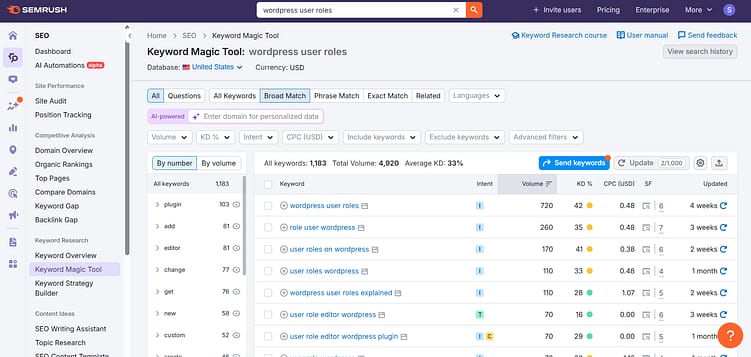
What you actually get:
- Keyword research. Search volume, keyword difficulty, related terms, and question-based queries, so you stop guessing what people type into Google.
- Competitor analysis. See what your competitors rank for, which keywords they're bidding on, and where their backlinks come from. It's reconnaissance, but legal.
- Site audit. A full technical SEO health check that flags broken links, slow pages, duplicate content, and all the invisible stuff that tanks your rankings.
- Content marketing platform. Topic research, content briefs, and on-page SEO recommendations. Think of it as an editor who's obsessed with search algorithms.
- Backlink analysis. Track who's linking to you, spot toxic links before they hurt you, and find new link-building targets based on what's working for competitors.
Pros
Cons
Ideal User/Use Case:
Agencies, advanced SEO strategists, large businesses, or anyone who needs a complete, detailed overview and execution platform for their entire digital marketing strategy. If you're running complex campaigns and need to track everything, this is your tool.
Pricing Tiers & What They Include:
- Pro: Starts at $129.95/month. Good for freelancers and small in-house teams. Includes core SEO, keyword research, competitor analysis, and site audit features.
- Guru: Starts at $249.95/month. Adds historical data, content marketing platform, and extended limits. Ideal for growing agencies and larger businesses.
- Business: Starts at $499.95/month. For large agencies and enterprises, offering API access, white-label reports, and higher limits.
Alternatives: Ahrefs, Moz Pro
Content Optimization & Grading Platforms: Making Your Words Rank
These tools focus specifically on helping you craft content that performs well in search results by analyzing your text against top-ranking pages and providing actionable feedback.
I use a lot of on-page SEO tools, but SEOBoost keeps earning its spot in my workflow. It handles content research, scoring, and management in one place, which matters when you're trying to publish without second-guessing every keyword decision.
You get topic-level intel and real-time feedback as you write, so instead of guessing what Google wants to see, you're working off data from pages that already rank. It cuts down the "am I doing this right?" anxiety that usually comes with content creation.
The interface doesn't feel like homework. You can audit existing posts, track changes over time, and get actionable suggestions without getting buried in technical SEO. If you write first and worry about search performance later, this is the tool that closes the gap.
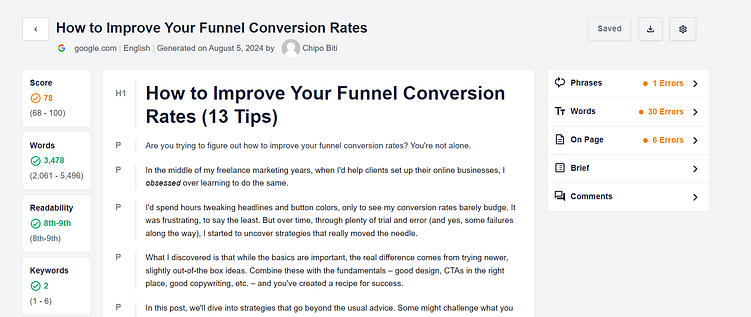
Key Features:
- Topic Reports are where I start — they break down what the top-ranking pages actually cover for your target keyword. You get a clear view of the content landscape before you write a word.
- Real-time Content Editing gives you suggestions as you type. It's like having an SEO analyst looking over your shoulder, minus the awkward breathing. The tool flags missing phrases, thin sections, and areas where you could add more depth.
- Content Audits help you figure out what's dragging down your existing pages. I've used this to resurrect old posts that were sitting on page three of Google. It shows you exactly where the gaps are — missing subtopics, weak keyword coverage, structural issues.
- Content Scoring gives you a grade based on how well your piece matches what's already ranking. It's not perfect — a high score doesn't guarantee traffic — but it helps you know when you're in the ballpark versus when you're still in the parking lot.
Pros
Cons
Ideal User/Use Case:
Writers, content managers, and small to medium businesses who want to make sure their content is thoroughly optimized before publishing. It’s particularly useful if you’re aiming for specific keyword rankings and want detailed guidance on what to include.
Pricing Tiers & What They Include:
- Essential: Starts from $30 per month. Good for individual creators or small teams.
- Team: Starts from $60 per month. Offers more topic reports and user seats.
- Agency: Starts from $100 per month. Designed for agencies managing multiple clients.
Alternatives: Surfer SEO, MarketMuse
Clearscope sits at the premium end of the market, and I see it chosen most often by teams that have real money to spend on content and expect results that justify the cost. Think established B2B companies, SaaS teams with serious SEO programs, or agencies working with enterprise clients.
What Clearscope does well is take the guesswork out of comprehensive coverage. You're not just chasing keywords — you're building content that matches what the top-ranking pages actually cover. The tool analyzes the competitive landscape and tells you which concepts, terms, and angles you need to hit. It won't write for you, but it'll make sure you're not missing obvious gaps that could cost you rankings.
The price point keeps casual bloggers and bootstrapped startups away, which is fine. Clearscope works best when you've got a team that can actually use the insights — editors who understand content strategy, writers who know how to weave recommended terms into readable copy, and stakeholders who care about measurable SEO wins. If you're just starting out or testing the waters with content, you probably don't need this level of sophistication yet.
Key Features:
- Content Grading: Real-time score based on relevance, comprehensiveness, and readability.
- Keyword & Topic Suggestions: Provides a list of terms and concepts to include based on top-ranking content.
- Content Briefs: Generates detailed outlines for new content, making sure all important subtopics are covered.
- Integrations: Works with Google Docs and WordPress for a smoother workflow.
Pros
Cons
Ideal User/Use Case:
Content teams, larger businesses, and agencies who prioritize producing high-quality, deeply optimized content and have the budget to invest in a premium tool. If you're aiming for thought leadership and strong organic performance, Clearscope helps you get there.
Pricing Tiers & What They Include:
- Essentials: Starts around $170/month (pricing can vary based on custom quotes). Includes core content optimization features and a set number of reports.
- Business/Enterprise: Custom pricing for larger teams with higher usage needs and advanced features.
Alternatives: MarketMuse, Surfer SEO
WordPress-Specific SEO Tools: Making Your Site Search-Friendly
If your website runs on WordPress (and many do!), these tools integrate directly into your dashboard, making on-page and technical SEO management much simpler.
I've used Thrive Architect for years, both before and during my time with the Thrive Themes team. It's become my page builder of choice because it genuinely makes the writing and design process so much easier, especially when I'm aiming for SEO-friendly pages.
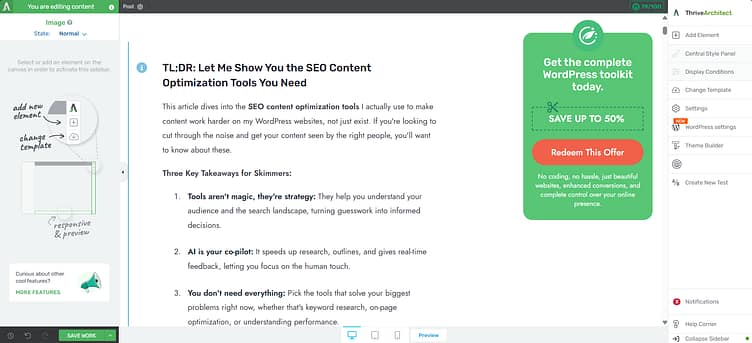
Key Features:
- Drag-and-Drop Editor: Visually build pages and posts without touching a line of code.
- SEO-Optimized Templates: Access pre-built designs that are structured for search engines and conversions.
- Conversion-Focused Elements: Includes elements like call-to-action buttons, testimonials, and lead generation forms.
- Mobile Responsiveness: Tools to make sure your content looks good on any device.
Pros
Cons
Ideal User/Use Case:
Bloggers, small business owners, and marketers who use WordPress and want to create professional, SEO-friendly pages and posts quickly and efficiently. If you value design control and conversion elements alongside your content, this is a strong choice.
Pricing Tiers & What They Include:
- Thrive Architect (standalone): $97/year. Includes the page builder plugin and all its features.
- Thrive Suite: $199/year. This is where I find the most value. It includes Thrive Architect plus all other Thrive plugins (like Thrive Leads, Thrive Quiz Builder, etc.), offering a complete marketing toolbox for WordPress.
Alternatives: Elementor, Beaver Builder (though these are more general page builders, less specifically tied to SEO templates out of the out of the box)
I've worked with multiple WordPress SEO plugins over the years, and AIOSEO consistently stands out for its ease of use and helpful guidance. We even use it here at Thrive, and it's made a real difference in how we handle the backend optimization of our posts and pages.
Key Features:
- TruSEO Analysis: This is the feature I use most. It gives you a real-time checklist as you write — keyword placement, readability issues, title length. Think of it as having an SEO editor looking over your shoulder, minus the awkwardness.
- Smart Sitemaps & Schema Markup: AIOSEO generates your XML sitemap automatically and handles schema markup without making you touch code. I've added FAQ schema, recipe markup, and local business details all through their interface. Google picks it up immediately.
- Local SEO Module: If you run a local business, this matters. You can add business hours, service areas, and location details that help you show up in "near me" searches. It's built specifically for companies with physical locations.
- Link Assistant: Points out internal linking opportunities you'd otherwise miss. I'll be writing about Topic A, and it'll surface three older posts that naturally connect. Saves time and strengthens site structure.
- Redirection Manager: Handle 301 redirects directly in WordPress. When you delete a page or change a URL, you can set up the redirect right there instead of hunting through server files or paying for another plugin.
Pros
Cons
Ideal User/Use Case:
WordPress users of all experience levels – from bloggers to small business owners to larger enterprises. If you want a strong, easy-to-manage SEO solution directly integrated into your WordPress dashboard, AIOSEO is a solid pick.
Pricing Tiers & What They Include:
- Basic: Free. Includes fundamental SEO features like title/meta descriptions, sitemaps.
- Pro: Starts at $49.60/year. Adds TruSEO analysis, local SEO, smart schema, redirection manager, and more.
- Elite/Agency: Higher tiers offer more site licenses and advanced features like client management.
Alternatives: Yoast SEO, Rank Math
While not strictly a content optimization tool in the writing sense, MonsterInsights is absolutely essential for understanding how your optimized content is performing. It brings your Google Analytics data directly into your WordPress dashboard, making it incredibly easy to see what's working.
Key Features:
- Google Analytics Dashboard: View key metrics like page views, bounce rate, and traffic sources directly in WordPress.
- Content Reports: See your most popular posts and pages, helping you identify what content resonates.
- E-commerce Tracking: Integrates with WooCommerce to track sales, conversion rates, and revenue.
- Real-time Stats: See who's on your site right now.
Pros
Cons
Ideal User/Use Case:
Any WordPress site owner who wants to easily monitor their website's performance and understand how their content is resonating with their audience. If you're optimizing content, you must track its impact, and MonsterInsights makes that simple.
Pricing Tiers & What They Include:
- Lite: Free. Basic Google Analytics integration and dashboard.
- Plus: Starts at $99.60/year. Adds advanced tracking, content reports, and more.
- Pro/Agency: Higher tiers offer e-commerce tracking, custom dimensions, and more site licenses.
Alternatives: ExactMetrics, Site Kit by Google
Keyword Research & Ideation Tools: Finding What People Are Searching For
Before you even start writing, you need to know what to write about. These tools help you uncover the terms and questions your audience is using.
Sometimes, you just need a quick list of ideas without diving into a full-blown SEO suite. The WPBeginner Keyword Generator is perfect for that. It’s a simple, free tool that does exactly what it says: generates keywords.
Key Features:
- Instant Keyword Suggestions: Enter a seed keyword and get hundreds of related terms.
- Google Autocomplete Integration: Uses Google's own suggestions for relevant phrases.
- Question-Based Keywords: Often provides common questions related to your seed keyword, great for content ideas.
Pros
Cons
Ideal User/Use Case:
Beginners, bloggers, or anyone who needs quick, free keyword ideas for content brainstorming. If you're just starting out or need a rapid burst of inspiration, this tool is a gem.
Pricing Tiers & What They Include:
It's completely free to use.
Alternatives: Google Keyword Planner (requires an Ads account), AnswerThePublic (free for limited use)
I've found ChatGPT to be an incredibly versatile tool for the very early stages of content creation, especially for ideation and outlining. It's not an SEO tool in the traditional sense, but its ability to process and generate text makes it a powerful assistant.
Key Features:
- Keyword Brainstorming: Ask it for related keywords, long-tail variations, or even keywords based on a specific niche.
- Content Outlining: Provide a topic, and it can generate a detailed content outline, including potential headings and subheadings.
- Idea Generation: Stuck for blog post ideas? Ask it for a list of topics around a specific theme.
- Drafting Support: Can help write introductions, conclusions, or expand on specific points (always review and rewrite for your voice!).
Pros
Cons
Ideal User/Use Case:
Writers, content strategists, and marketers looking for an AI assistant for brainstorming, outlining, and drafting support. It's fantastic for speeding up the initial research and structuring phases of content creation.
Pricing Tiers & What They Include:
- Free: Access to the standard GPT-3.5 model.
- ChatGPT Plus: $20/month. Access to the more advanced GPT-4 model, faster response times, and priority access during peak times.
Alternatives: Google Bard, Jasper AI (more focused on long-form content generation)
Four More Worth Knowing: Ahrefs, Surfer, Frase and MarketMuse
I realized after testing those eight tools that I'd left out some heavy hitters. If you're comparing SEO content optimization tools, you need the full picture — not just the popular names that show up in every listicle.
Here's what I found when I dug into the tools that didn't make my original list but absolutely deserve your attention.
Ahrefs
You probably know Ahrefs as a backlink monster, but their Content Explorer and Site Audit tools make them a serious player for content work. I use Ahrefs when I need to find content gaps — topics my competitors rank for that I'm completely missing. Their keyword difficulty scores feel more honest than most tools (they don't just give you easy greens to make you feel good), and the SERP analysis shows you exactly what's ranking and why.
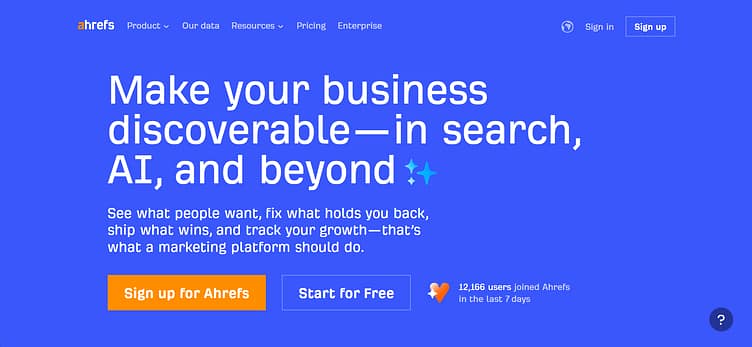
The big win: Ahrefs tells you how many backlinks competing pages have. That sounds obvious, but when you're deciding whether to target "email marketing software" or "best email tools for startups," knowing one requires 47 backlinks and the other needs 200+ changes your strategy fast.
Pricing starts at $129/month for Lite. Not cheap, but you're getting keyword research, site audits, content gap analysis, and backlink tracking in one place.
Surfer SEO
I mentioned Surfer earlier as an alternative, but it deserves a full breakdown. Surfer treats content like a recipe — it tells you how many headings to use, how long your paragraphs should be, which keywords to sprinkle in, and even suggests images. Some writers hate this (feels too paint-by-numbers), but if you're managing a content team or working with freelancers who don't have SEO instincts, Surfer keeps everyone on track.

The Content Editor scores your draft in real-time. Write a paragraph, watch your score climb from 52 to 68. Add a subheading with the right keyword, jump to 74. It gamifies optimization in a way that actually works.
Surfer's outline generator is where I get the most value. Plug in your target keyword, and it pulls all the common H2s and H3s from top-ranking pages. You're not copying — you're seeing what search engines expect to find when someone searches that term.
Starts at $99/month for Basic (30 articles). They also sell one-time credits if you just need to optimize a few pieces.
Frase
Frase positions itself as an "AI research assistant," which sounds vague until you use it. The tool scrapes the top 20 Google results for your keyword, pulls out common questions, extracts stats and quotes, and organizes everything into a brief you can hand to a writer.
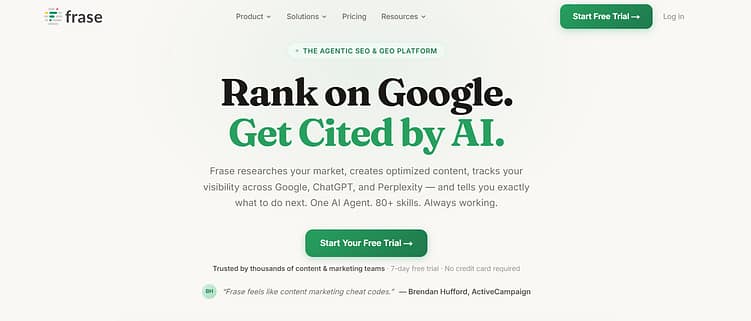
I like Frase when I'm writing about topics I don't know deeply. Need to write about "construction project management software" but you've never managed a construction project? Frase shows you what experts are saying, what questions people ask, and which features matter most.
The AI writing tool inside Frase is fine — not as good as ChatGPT for original thinking, but solid for intros, FAQs, and meta descriptions. The real strength is the research dashboard. You can build a content brief in 10 minutes that would take an hour manually.
Starts at $15/month for Solo (one user, limited AI words). If you're producing volume, the Team plan at $115/month makes more sense.
MarketMuse
MarketMuse is the most expensive tool on this list, and they don't apologize for it. This is what enterprise content teams use when they're playing the long game — building topic clusters, mapping content to buyer journeys, and treating SEO like a strategic chess match instead of a keyword scavenger hunt.
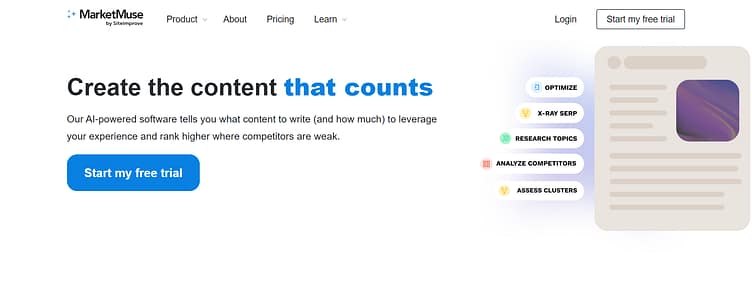
The tool's content inventory feature is insane. It scans your entire site, scores every page on topic authority, and tells you where you have gaps. You might think you "own" the topic of CRM software, but MarketMuse will show you that you're missing 18 subtopics competitors cover.
I don't recommend MarketMuse if you're just starting out or running a small site. But if you're managing 200+ articles and need to understand which pieces to update, which to consolidate, and which topics you're ignoring entirely, this tool earns its price tag.
Pricing is custom (they don't publish it), but expect $1,500+/month for serious access. They offer a limited free plan that's useful for testing the interface.
Free vs. Paid SEO Content Optimization Tools: What You Really Need
The pattern I see most often with SEO content optimization tools: people start with free tools, get frustrated by the limits, then overspend on premium subscriptions they barely use. The skill is knowing which category you're in right now.
If you're publishing fewer than 10 pieces of content per month, free tools will get you surprisingly far. Google Search Console shows you what's working, what's broken, and which keywords already bring traffic. Pair that with Ubersuggest's free tier for basic keyword research, and you've got enough data to write smarter content. Yoast SEO (the free WordPress plugin) handles on-page basics like meta descriptions, readability scores, and internal linking suggestions. You won't have the depth of a paid tool, but you'll avoid the obvious mistakes that tank rankings.
The problem with free tools shows up when you scale. You hit query limits fast. Ubersuggest caps you at three searches per day. Answer the Public throttles results. Google Keyword Planner gives vague search volume ranges instead of exact numbers. If you're researching five topics in one afternoon, you'll burn through your free allowances before lunch. The friction is speed, not features.
You'll know it's time to pay when one of these things happens:
- You're writing content based on gut instinct because free tools don't give you enough data to make confident decisions.
- You're spending more time stitching together insights from four free tools than you would analyzing one paid report.
- You're publishing content that ranks on page two instead of page one, and you can't figure out why, because free tools don't show you competitive gaps.
When a paid tool pays for itself
Let's say you're considering Surfer SEO at $89/month. Here's the math on one well-ranked post:
- 500 visitors per month from a top-three ranking
- 2% conversion rate → 10 new leads
- $500 average customer value, 20% close rate → $1,000
The tool paid for itself in month one. If it helps you rank three posts like that per year, you're ahead by over $30,000. The math works if you're already publishing consistently. It doesn't work if you're writing two posts per quarter.
Free tool workflows that actually work
Some free tool combinations are more powerful than people realize if you use them together. My weekly workflow:
- Check Google Search Console for existing posts ranking between positions 8-15 (the easiest content to push onto page one).
- Cross-reference those URLs in Google Keyword Planner to find related terms I'm not targeting yet.
- Add those terms to the post, tighten the intro, fix broken links, and republish.
That workflow is completely free and often moves posts up 5-8 positions. You don't need Ahrefs for that.
But competitive analysis is where free tools fall short. If you're trying to figure out why a competitor ranks and you don't, free tools can't show you their backlink profile, compare content depth, or break down keyword distribution. You're guessing. That's where paid tools like Semrush or Ahrefs earn their price. They show you the exact blueprint: which keywords the top post targets, how many words it uses, how many backlinks it has, and what related topics it covers. You're not guessing anymore.
The middle ground most people miss
Quarterly subscriptions. Instead of committing to a year of Surfer or Clearscope, pay for one month, analyze your 20 most important pages, build a content plan based on those insights, then cancel. Resubscribe three months later when you need fresh data. You're spending $300 per year instead of $1,200, and you're still getting the competitive intelligence that moves the needle.
The biggest waste of money I see is people subscribing to three or four overlapping tools. You don't need Semrush and Ahrefs and Moz all at once. Pick one workhorse tool for competitive research and backlink analysis, then fill gaps with free or low-cost plugins. My stack:
- Ahrefs for backlinks and keyword research
- Surfer for content briefs
- Google Search Console for performance tracking
That's it. Everything else is noise.
If you're just starting out — launching a blog, building your first ten posts — stick with free tools for six months. Learn what questions you need answered. Then invest in one paid tool that solves your biggest recurring frustration. That's smarter than buying a full suite because a guru on YouTube said you "needed" it.
Frequently Asked Questions About SEO Content Optimization Tools
SEO content optimization tools all promise the same thing: higher rankings. What they actually do varies wildly, and pricing ranges from free to $500+/month for features you may not need. These are the questions that come up most often when people are trying to pick one.
What are SEO content optimization tools?
SEO content optimization tools analyze your content against top-ranking pages and tell you what to add, cut, or restructure to compete for a target keyword.
Most work by scraping the top 10 or 20 results for your keyword, pulling out shared terms, topics, word counts, and structural patterns, then scoring your draft against that benchmark. The better tools also surface related questions, entity coverage, and semantic gaps — the stuff Google's algorithms actually look for beyond keyword matching. Popular names in this category include Surfer SEO, Clearscope, Frase, MarketMuse, and NeuronWriter.
What's the best SEO content optimization tool overall?
Surfer SEO and Clearscope come up most often as the top picks, though "best" depends on whether you're optimizing for speed, depth, or budget.
Surfer SEO is the default recommendation for most content teams because it balances on-page scoring, keyword research, and a content editor in one interface. Clearscope is the pick for agencies and enterprise teams that want the cleanest recommendations and don't mind paying for them. Frase wins on research speed and AI briefs. NeuronWriter is the value pick at around a third of Surfer's price. MarketMuse is the heavyweight for content strategy across a whole site, not just single pages.
How much do SEO content optimization tools cost?
Pricing runs from about $19/month on the low end to $500+/month for enterprise tools, with most solid options sitting between $49 and $149/month.
NeuronWriter starts around $19/month and covers the basics well. Frase runs $45 to $115/month depending on tier. Surfer SEO sits in the $89 to $219/month range. Clearscope starts at $189/month and scales up from there. MarketMuse pricing is custom but typically starts north of $500/month. Most tools limit you by number of articles or queries per month, so the real cost depends on your publishing volume, not just the sticker price.
Do SEO content optimization tools actually work?
Yes, when used as guidance rather than a checklist to hit 100% on.
The tools work because they surface patterns in ranking pages you'd miss by eyeballing SERPs manually. Teams that use them well typically see faster briefs, more consistent topical coverage, and measurable lifts on optimized pages. Teams that use them badly chase content scores at the expense of readability and end up with keyword-stuffed drafts that read like they were written for a robot. The score is a signal, not a goal.
What's the difference between SEO tools and SEO content optimization tools?
SEO tools like Ahrefs and Semrush cover the whole SEO picture — keyword research, backlinks, technical audits, rank tracking. Content optimization tools focus narrowly on making individual pages rank better.
There's overlap. Ahrefs and Semrush both have content optimization features built in, and most content optimization tools include some keyword research. The practical split: if you're doing SEO strategy for a whole site, you need a tool like Ahrefs or Semrush. If you're writing articles and want to know what to put in them, you need a content optimization tool. Most serious content teams use both.
Can I do SEO content optimization without a paid tool?
You can, but it takes significantly more time and you'll miss things the tools catch automatically.
The manual version works like this: search your target keyword, open the top 10 results in tabs, note shared headings and topics, run each through a free word counter, check People Also Ask for related questions, and build your outline from the overlap. Free tools like Google's Keyword Planner, Answer the Public, and the SERP itself cover the research side. The gap is speed and pattern recognition — a paid tool does in two minutes what takes 45 manually, and surfaces semantic connections that are hard to spot by hand.
Which SEO content optimization tool is best for beginners?
Frase and NeuronWriter are the easiest entry points for people new to content optimization.
Both have clean interfaces, reasonable pricing, and enough guidance built in that you're not staring at a blank scoring dashboard wondering what to do next. Surfer is also beginner-friendly but costs more. Clearscope and MarketMuse are powerful but assume you already know how to read the recommendations — probably not where to start if this is your first tool.
Do SEO content optimization tools integrate with WordPress?
Most of them do, either through a native plugin or a copy-paste workflow from their editor into yours.
Surfer, Frase, and NeuronWriter all have WordPress integrations that let you optimize drafts without leaving your CMS. Clearscope integrates with Google Docs and WordPress. The integration quality varies — some push full content with formatting intact, others just surface the optimization panel next to your editor. If you write directly in WordPress using a page builder, check for specific compatibility before committing. Tools that play well with the classic editor sometimes break inside visual editors.
How do SEO content optimization tools compare to AI writing tools?
They solve different problems. AI writing tools generate content. SEO content optimization tools tell you whether your content (AI-generated or not) is competitive for a keyword.
The two categories have been converging. Most optimization tools now include AI drafting features, and most AI writing tools have added some SEO scoring. They're still not substitutes. An AI writer will happily produce 2,000 words that rank for nothing. An optimization tool will tell you exactly what's missing but won't write the piece for you. Teams that get good results use both, with a human editor making the final calls on tone and accuracy.
What should I look for when choosing an SEO content optimization tool?
Look for accurate SERP analysis, recommendations you can actually act on, a content editor that doesn't fight your workflow, and pricing that matches your publishing volume.
The specifics that matter: how fresh the SERP data is (some tools cache results for weeks), whether you can optimize for multiple keywords on one page, how well the tool handles non-English content if you need it, and whether the score correlates with actual ranking improvements when you test it. A free trial or demo is worth more than any comparison post here — spin up two or three, run the same draft through each, and see which recommendations match your judgment about what that article actually needs.
Choosing Your Toolkit: A Smart Next Step
You don't need to use every tool I've talked about here. The point is picking the right one or two that actually solve the problem you're dealing with right now.
What's your biggest content headache at the moment?
If your articles aren't showing up in search results, you need stronger on-page optimization. SEOBoost or Clearscope will walk you through exactly what to improve, no guessing required.
Running a WordPress site that feels clunky for search engines? All in One SEO handles the technical stuff so you don't have to think about meta tags at 11 PM.
If you're building landing pages and want them to actually convert without hiring a developer, Thrive Architect makes that simple. Drag, drop, publish.
Staring at a blank screen because you don't know what to write about? The WPBeginner Keyword Generator or ChatGPT can get you unstuck in five minutes.
Want to know if anyone's actually reading your content? MonsterInsights pulls your Google Analytics data into WordPress where you can see what's working and what's flopping.
Want the full picture — keywords, backlinks, competitor research, the works? Semrush gives you everything, though it's overkill if you're just starting out.
Don't collect tools like trophies. Pick one that fixes your most annoying problem today. Look at where you're stuck, and pick something that makes your life easier. You'll know soon enough if it's helping.


