


TL;DR: How to Repurpose Video Content Like a Pro
If you are skimming this because you have a mountain of video content and zero free time, I get it. This article lays out my complete, strategic framework for taking one long-form video and turning it into 20 high-impact assets designed to maximize your reach and conversions. Stop thinking of repurposing as an afterthought; start treating it as the core of your content strategy.
Here are the three essential takeaways you need to multiply your content output without doubling your workload:
- Audit First, Repurpose Later: Don't waste effort on videos that already failed. Use data (retention, conversion rate, search potential) to identify the "High-Value Core" videos that deserve the full repurposing treatment.
- Use the Atomization Matrix: Break your video down based on your audience’s journey (Awareness, Consideration, Decision). Every resulting asset must have a specific job for a specific channel. I aim for 20 assets per 30-minute video.
- Set Up the Assembly Line: Strategy fails without execution. I walk you through my 4-Stage Scaling System—from transcription to scheduled distribution—using the right tools (like Descript and Thrive Suite) to automate the tedious parts and focus on high-value creation.
If any of that sounds like the missing piece in your content machine, grab a coffee and read on. The system is simpler than you think.
You know the feeling. I certainly do. You spent a week scripting, filming, and editing a 30-minute video—a masterpiece, really—only to watch the views plateau after 72 hours. It feels like you’re constantly feeding a content beast that demands more and more just to stay alive. If you’re exhausted by the content treadmill, I have good news: the secret to scaling your output isn't working harder; it’s learning how to repurpose video content strategically so that one piece of effort generates 10 times the results. This is the core of a smart repurposing strategy.
This is about respecting the value you've already created and making sure it reaches the right audience in the right format. When I look at a video, I see intellectual property, not just a file format. If you only publish it once, you’re leaving 90% of its potential audience on the table, and that’s just bad business. It’s the opposite of content scaling.
I want to move past the basic advice—yes, you can turn a video into a blog post, we all know that—and give you a strategic framework. This framework makes sure your valuable insights reach your audience wherever they are, in the format they prefer, without sacrificing your weekends to the algorithm gods.
If you want to dive deeper into the general concepts, check out this guide on How to Repurpose Content Like a Marketing Pro (Key Tips).
Stop Thinking "More Content," Start Thinking "More Value Distribution"
The biggest mistake I see creators make is treating repurposing as an afterthought—a desperate scramble to squeeze one more post out of a video. That's backward. You should be planning the atomization of your content before you even hit record.
My approach is simple: we’re going to build a system that takes your long-form video and systematically breaks it down into high-impact, channel-specific assets. This is the only way to achieve true content scaling.
Let’s start at the beginning, which, counterintuitively, isn't the video you just finished.
It’s smart to keep an eye on your bottom line, because sometimes the Content Marketing ROI: Uncomfortable Truths You Should Know can be surprising.
Before you start chopping up every video you’ve ever made, you need to identify the content that actually warrants the effort. Repurposing poor-performing content only results in more poor-performing content. It’s like trying to make gold out of lead—a waste of time and resources.
This is also why it's so important to learn How to Avoid Content Decay & SEO Optimize Your Old Posts, so your efforts aren't wasted later. How to Avoid Content Decay & SEO Optimize Your Old Posts
You need to identify your "High-Value Core."
Why a Repurposing Strategy is Essential for Content Scaling
When I look at a client's video library, I focus on three key metrics to select the winners. These metrics tell me the topic is inherently engaging and valuable, regardless of the original video's production quality. If you skip this step, you’re just creating more noise.
1. Look for High Audience Retention Rates (The "Stickiness" Factor)
If people watch 70% or more of a long-form video, that means the core topic and structure are engaging. The audience is hooked. Repurposing these topics guarantees that the resulting short-form assets will also perform well because the underlying message is already validated.
By the way: understanding the different phases of What is the Buyer’s Journey: Everything You Need to Know is crucial for making sure your content hits the right spot.
2. Identify Videos That Drive Key Conversions (The "Action" Factor)
Which videos lead to email sign-ups, product page views, or demo requests? These are the topics that move your audience down the funnel. They are ideal candidates for high-impact, Consideration and Decision-stage repurposed assets, like downloadable checklists or sales enablement materials.
3. Find Videos with Strong Search Volume Potential (The "Longevity" Factor)
If you have a video that answers a specific, high-intent question, you can easily turn that into a pillar blog post or a series of SEO-improved short-form answers. This content works for you long after the initial social media buzz dies down.
I recommend creating a simple scorecard. Don't overthink this—just score your top 10 videos on a 1–5 scale (5 being the highest) for each metric. If the total score is 10 or above, that video is worth the full repurposing treatment.
If you're still figuring out the big picture, this Content Marketing Blueprint: How to Plan It Like a Pro will help you lay the groundwork.
A Note on Publishing Strategy
When you turn that video transcript into a pillar blog post, you need a publishing platform that doesn't fight you. I use the tools inside Thrive Suite to make sure my content looks great, loads fast, and is designed to capture leads right from the start. A beautiful website shouldn't be a bottleneck; it should be an asset.
Content Atomization is the process of breaking down one large piece of content into many smaller, channel-specific assets. To do this effectively, you must link each resulting asset to a specific stage in your audience’s journey.
This is the strategic heart of how to repurpose video content effectively. We aren't just making clips; we're creating assets designed for a purpose.
It's the same principle we use when figuring out How to Turn a Podcast Episode into a Blog Post (And Vice-Versa) — it's all about format shifting.
Break Down Long-Form Video into Specific Audience Stages
When you watch your long-form video, segment the content into sections that align with these three goals.
The Content Atomization Matrix
Audience Stage | Goal of the Asset | Format Examples | Distribution Channel Focus |
|---|---|---|---|
Awareness | Stop the scroll, introduce a pain point, pique curiosity. | 15–60 second vertical clips, surprising statistics, controversial quotes, audiograms. | TikTok, Instagram Reels, YouTube Shorts, X (Twitter). |
Consideration | Provide detailed explanation, establish authority, nurture interest. | Full blog posts, email newsletter segments, downloadable checklists, short audio clips (podcast). | SEO/Blog, Email List, LinkedIn Articles. |
Decision | Focus on the solution, overcome objections, prompt action. | Case studies, testimonial quotes, specific product feature demos, FAQ sections for a landing page. | Sales Team, Landing Pages, Email Automation Sequences. |
Use the "1-to-20 Rule" for Maximum Output
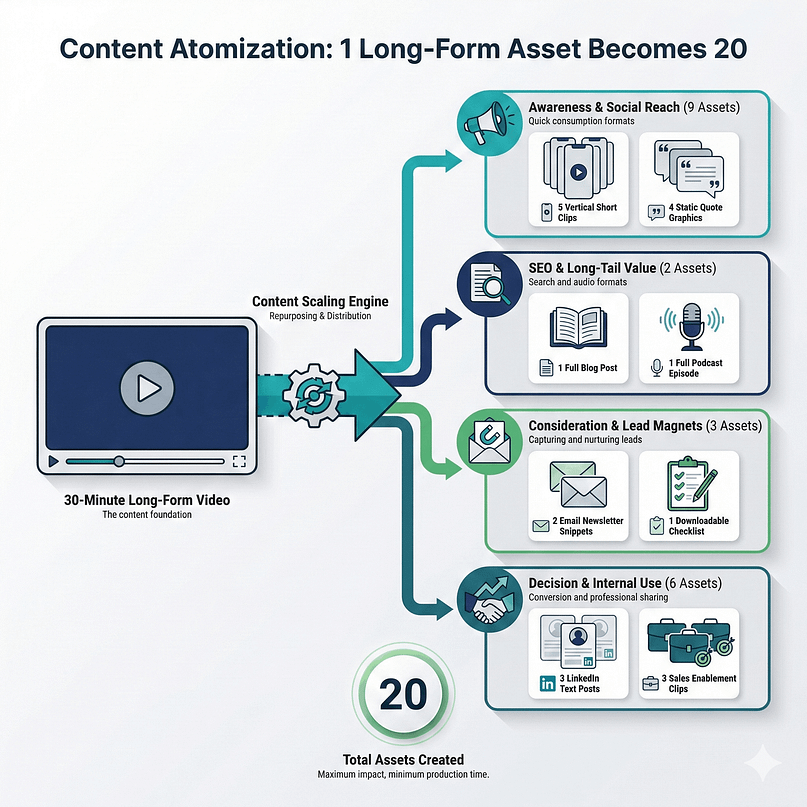
For every 30-minute long-form video, I challenge you to aim for a minimum of 20 distinct, channel-specific assets.
This might sound aggressive, but once you set up the assembly line (Step 3), you'll see how quickly these assets stack up. A single 30-minute video can easily yield:
That’s 20 assets from one piece of work. Now you see how you achieve content scaling without doubling your production time.
For that checklist, you'll want to follow this guide on How to Create a Downloadable PDF Lead Magnet (The Easy Way) to make sure it looks professional.
Strategy is useless without a repeatable system. If you try to manage all 20 assets manually, you will fail. You need a simplified, low-friction process—an assembly line that churns out finished content with minimal human intervention.
Stage 1: Transcription and Text Extraction
The foundation of all smart repurposing is text. Period.
The first step is turning spoken word into written word. Text is the easiest format to manipulate, search, and improve. It’s also the key to getting SEO value from your video.
Action: Use AI tools like Descript or Otter.ai to generate a clean, time-stamped transcript.
Immediate Asset: That raw transcript instantly becomes the foundation for your pillar blog post, saving you hours of writing. It also provides the captions and text overlays needed for all your short-form video assets.
Stage 2: Visual and Audio Isolation
Next, we isolate the core media elements needed for distribution.
- Audio First: Extract the full audio track. Congratulations, you just created a podcast episode. Then, use the transcript to identify 3–5 key sections (3-5 minutes each) for audio-only audiograms. These are fantastic for social media teasers.
- Visual Snippets: Identify 5–10 key visual moments—a graphic you showed, a key screen share, or a powerful facial expression—that can be pulled as static images or GIFs. These are your quote cards and visual hooks.
Stage 3: Channel-Specific Formatting and Improvement
This is where you stop thinking about the original video and start thinking about the destination platform. Every platform has different rules, aspect ratios, and engagement norms. You must tailor the asset to the channel.
Improve for Vertical Video (TikTok, Reels, Shorts)
Take those 15–60 second clips identified in the Awareness stage and reformat them to the 9:16 aspect ratio. Importantly, add engaging captions and text overlay in the first three seconds—that’s your hook. Use platform-native music or sounds where appropriate.
Why this works: You are meeting the audience where they are with content designed specifically for their feed, not just a cropped YouTube clip. The algorithm rewards native content.
Improve for Search Engines (Blog Post and Landing Pages)
Use the full transcript as the draft for a comprehensive, SEO-improved blog post. Embed the original video, add relevant H2/H3 headings based on keyword research, and use the isolated images to break up the text.
Why this works: You satisfy both video preference and text preference, doubling your chances of ranking. You also capture high-intent searchers who prefer reading over watching a 30-minute video.
Stage 4: Scheduled Distribution and Tracking
If you try to publish 20 assets in one day, you’ll overwhelm your audience and burn yourself out. Use a centralized content calendar and scheduling tools to stagger the distribution over a period of 4–6 weeks.
This staggered release maximizes the lifespan of the original video and keeps your channels fresh without requiring constant new video production.
Action: Track which repurposed assets perform best (e.g., Did the LinkedIn text post or the Instagram Reel get more engagement?). This data feeds directly back into your planning process—which brings us to the next, often overlooked, step: the technology that makes this possible.
Ad Break: This Is Your Missing Link in Repurposing
You’ve mastered the art of creating 20 assets from one video. Congratulations. But what happens when those 20 assets start driving traffic back to your website?
Most creators spend 99% of their time on content creation and 1% on conversion strategy. That’s a mistake. If your repurposed assets are working—if they are generating clicks from LinkedIn, TikTok, and Google—your website needs to be ready to catch those leads and turn them into subscribers or customers.
Think about the downloadable checklist you created in Step 2. Where does that live? Is it hidden behind a clunky, ugly form?
This is why I rely on a unified marketing system like Thrive Suite.
When you’re doing high-volume content repurposing, you need tools that are designed to convert. I use the landing page builder to create dedicated, high-converting pages for every lead magnet I generate from my videos. I use the quiz builder to turn complex video topics into engaging quizzes that capture emails. And I use the testimonial tool to turn those positive comments on my repurposed assets into social proof on my sales pages.
The goal of repurposing isn't just reach; it's conversion. Thrive Suite gives me the tools to design the entire conversion path, from the moment a user clicks a repurposed Instagram Story to the moment they become a paying customer. You don't just need content; you need a machine that turns content into cash.
[See how Thrive Suite helps you turn content reach into conversions.]
Most creators see repurposing as a one-way street: long-form video generates short-form assets. True scaling happens when you use the performance of those short assets to inform your next long-form video. I call this Reverse Repurposing, and it’s how you guarantee relevance.
Use Short-Form Data to Validate Long-Form Ideas
When you launch 10 different short clips derived from one video, you get immediate, unfiltered feedback on which concepts resonate most strongly with your audience. You are essentially using your social channels as a massive, free focus group.
Interpreting Micro-Winner Data: What the Metrics Mean
If one 30-second clip about "The 3 Biggest Mistakes in Content Strategy" goes viral, you know that specific angle is a high-demand topic. That clip is a "micro-winner." But how do you know it’s a winner?
You need to look past the vanity metrics (like total views) and focus on indicators of intent and resonance.
Micro-Winner Data Metrics for Validation
Metric to Watch | Platform Focus | Why It Matters for Long-Form Validation | High-Resonance Threshold |
|---|---|---|---|
Share Rate | TikTok, Reels, Shorts | People share content they feel strongly about—either because it’s highly relatable or deeply useful. High shares mean the topic has emotional or practical utility. | 3%+ Share Rate |
Comment Volume | All Platforms (especially LinkedIn) | High comment volume indicates controversy, confusion, or strong agreement. These are excellent signals that the topic needs a deeper, long-form explanation to address the discussion points. | 5%+ Comment-to-View Ratio |
Watch Time / Completion Rate | Reels, Shorts | If a 30-second clip has a 90% completion rate, the hook was perfect and the delivery was tight. This proves the audience is willing to consume that topic in depth. | 75%+ Completion Rate |
Saves/Flags | Instagram, TikTok | A save means the user intends to return to the content later. This is the ultimate signal of utility. They see the clip as a resource, which is exactly what a pillar video should be. | 2%+ Save Rate |
The Reverse Repurposing Loop
- Do not just repeat the topic. Create a new, dedicated long-form video that expands only on that micro-winner.
- Example: If the viral clip was Section 4 of your original video, your next video should be "A 45-Minute Deep Dive into the 3 Biggest Mistakes in Content Strategy," treating the micro-winner as the new core topic.
When you use short-form content as a testing ground, you eliminate the risk of spending 10 hours producing a long-form video that nobody wants to watch. You are pre-validating your topics based on real audience engagement data before you commit serious resources. It’s the ultimate content insurance policy.
Step 5: Expand Your Reach Beyond the Usual Distribution Channels
When you think about how to repurpose video content, most people only think of social media. If you want to blow up your value, you must look at distribution channels that your competitors ignore.
Turn Video Content into Internal Assets
If you are in the B2B space, your sales and marketing teams are hungry for content that addresses customer pain points.
Sales Enablement Materials
Take short, high-value clips that address common customer objections and package them into a dedicated folder for your sales team.
Asset: A 2-minute video explaining a complex product feature can be sent directly by a salesperson, replacing a lengthy email explanation or a confusing slide deck. This is high-impact, high-trust content.
Employee Onboarding and Training
Repurpose educational videos into internal training modules.
Asset: Turn a 15-minute "How We Handle Customer Service" video into a mandatory training course for new hires. You just saved your HR department time and delivered consistent messaging.
Use Email and Messaging Platforms
Email is still the highest converting channel for many businesses, yet most people just drop a link to the video and call it a day.
The "Video Breakdown" Email Series
Instead of just linking to the video, send a 3-part email series derived from the repurposed assets:
The 3-Part Video Breakdown Email Series
- Email 1: The text summary (Consideration Asset).
- Email 2: The key quote or statistic as a graphic (Awareness Asset).
- Email 3: The direct link to the video with a strong Call to Action (Decision Asset).
Turn Quotes into Native LinkedIn Posts
Extract 5–10 powerful, controversial, or insightful quotes from the transcript and format them as native text posts on LinkedIn. Do not link back immediately; focus on generating discussion. LinkedIn prioritizes native text posts that drive conversation, giving your repurposed insight maximum organic reach and positioning you as a thoughtful leader.
The difference between a content strategist and a content hamster is the system they use. You cannot scale 20 assets per video without automation. The right tools don't just save you time; they make the entire process repeatable and less prone to human error.
Here are the tools I rely on to turn a single video into a content empire.
1. Automated Distribution and Workflow
These tools handle the tedious, repetitive task of taking a finished asset and pushing it out to multiple social channels, often reformatting it along the way.
Automated Distribution Tools
Tool | Primary Function | Why I Use It |
|---|---|---|
Repurpose.io | Automated Content Distribution | This is the gold standard for taking content from one source (like a YouTube channel or podcast) and automatically pushing it to others (TikTok, Facebook, Pinterest) with correct formatting. It’s like having a virtual assistant whose only job is distribution. |
Zapier/Make (formerly Integromat | Custom Workflow Automation | When you need specific, non-standard actions—like sending a clip to a specific Dropbox folder after it's been transcribed—these tools connect your entire tech stack. They are the plumbing of your content system. |
Buffer/Later | Scheduling and Analytics | Once the assets are created, you need a smart scheduler. These tools help you stagger the 20 assets over 4–6 weeks and give you clean analytics on how each platform is performing. |
2. Transcription, Editing, and Clipping
If you’re still manually transcribing video, you’re losing money. These tools use AI to handle the heavy lifting of text extraction and video editing based on the transcript.
Transcription and Editing Tools
Tool | Primary Function | Why I Use It |
|---|---|---|
Descript | Text-Based Video Editing and Transcription | Descript is revolutionary. You edit the video by editing the text transcript. This makes pulling out those 15-second "micro-clips" incredibly fast and accurate. It also handles filler word removal and overdubbing easily. |
Otter.ai / Rev | Accurate Transcription Services | While Descript is great for editing, if you need a pristine, time-stamped transcript for a pillar blog post, dedicated transcription services like Otter or Rev are highly accurate and fast. |
3. Visual Formatting and Audiograms
Not every asset is a video clip. You need tools to turn audio into visual teasers and to create static quote graphics that stop the scroll.
Visual Formatting Tools
Tool | Primary Function | Why I Use It |
|---|---|---|
Canva | Graphic Design and Quote Card Creation | Canva is non-negotiable for quickly creating branded quote cards, resizing images for different platforms (like LinkedIn vs. Instagram Stories), and designing those downloadable checklists derived from the video. |
Headliner | Audiogram Creation | This tool takes your audio clips and turns them into animated waveforms with captions, making them visually engaging for social media platforms like X (Twitter) or Instagram where pure audio often gets ignored. |
You should aim to repurpose core long-form videos immediately upon publication, distributing the resulting assets over the following four to six weeks. This staggered release maximizes the content's lifespan and keeps your channels fresh without requiring constant new video production.
Final Thoughts on Scaling Your Content
If you take one thing away from this, let it be this: your content production strategy should be focused on quality input and maximized output. Stop aiming for 10 average videos a month, and start aiming for 2 high-quality videos that each generate 20 high-impact assets.
Learning how to repurpose video content isn't a shortcut; it’s a strategic business decision. It is the difference between being a content creator stuck on the treadmill and being a strategist who understands content scaling through a disciplined repurposing strategy.
Now that you have the framework and the essential tools, the next step is simple: pick one high-performing video from your library, run it through the 4-Stage Scaling System, and start multiplying your reach today.
If you are serious about turning this reach into revenue, you’ll need more than just a website; you’ll need a conversion machine. I recommend looking at Thrive Suite—it gives you the tools to design landing pages, build quizzes, capture leads, and manage your entire conversion funnel, making sure every repurposed asset doesn't just get seen, but converts.
[Start building your content conversion machine with Thrive Suite.]


