


If you’ve ever fallen down a “Which [X] Are You?” quiz rabbit hole, you already know the pull. Quizzes grab attention in a way few other tools can — but when I decided to use them for lead generation, I quickly discovered the real challenge wasn’t writing the questions. It was finding quiz software that actually did what I needed without driving me mad.
I’ve tested more quiz plugins and platforms than I care to admit. Some were powerful but overcomplicated. Others looked good on the surface but collapsed the second I tried to connect them with my email list. And then there were the ones that felt like they hadn’t been updated since dial-up internet.
So this isn’t just another roundup of “top tools.” This is my filtered list — the ones that have proven themselves when the goal is clear: capture leads, segment your audience, and turn engagement into sales.
TL;DR: Quick Picks
If you just want the fast version, here’s how I’d break it down:
- Thrive Quiz Builder – The best all-around choice for WordPress users. Unlimited quizzes, advanced logic, and solid integrations — all in one plugin.
- Formidable Forms – Great if you need more than quizzes. It doubles as a powerful form builder with tons of templates.
- Quiz and Survey Master – A strong option for educators or trainers who need detailed reporting and flexible question types.
- WP Quiz – Ideal for fun, social-style quizzes like Buzzfeed personality tests and swiper-style formats.
- Interact Quiz Maker (not on WordPress) – Best for marketers who want professional, ready-to-go quiz designs and AI quiz generation.
- Outgrow (not on WordPress) – Best for teams that want calculators, assessments and quizzes in one tool.
- Typeform (not on WordPress) – Best for conversational quizzes that show one question at a time.
Quiz Funnel Software at a Glance
Software | Best For | AI Features | Free Plan | Starting Price |
|---|---|---|---|---|
Thrive Quiz Builder | WordPress power users | No | No | $99 first year, then $199/year |
Formidable Forms | Multi-purpose forms + quizzes | No | No | $199.50/year (Business plan, needed for quizzes; first year) |
Quiz & Survey Master | Education & training | No | Yes | $149/year |
WP Quiz | Social-style, interactive quizzes | No | No | $57/year |
Interact | Professional marketers + templates | Yes | Yes (100 completions/month) | $27/month, billed yearly |
Outgrow | Calculators, assessments + quizzes | Not advertised | No | $14/month, billed yearly |
Typeform | Conversational quizzes | Yes | No | $28/month, billed yearly |
Quick Takeaway
Every tool here has its strengths: some shine for marketers, others for teachers, and some are perfect for hobby projects. If you want the most complete, marketing-focused solution inside WordPress, Thrive Quiz Builder is the clear winner. But if your needs are more niche — like running a classroom quiz or creating fun personality tests — you’ll find a match on this list.
How I Picked These Quiz Tools (And What I Looked For)
I know how frustrating it is to sift through generic lists that just restate features. That’s not what you’ll find here. To make this roundup genuinely useful, I evaluated each tool against four key criteria:
- Ease of Use – Can you build and launch a working quiz without hours of setup?
- Lead Generation Power – Does it capture leads smoothly and connect with your email tools?
- Customization – How well can you brand your quiz to match your site?
- Integrations – Does it play nicely with your marketing stack (email, CRM, analytics)?
And here’s where I bring a different perspective: as the creators of Thrive Quiz Builder, we live and breathe quiz funnels. That means we don’t just compare features — we know what actually drives results in the real world, because we’ve built and tested these systems with the 22,000+ entrepreneurs who build their businesses with Thrive Suite.
The Best Quiz Funnel Software for WordPress (My Picks)
After trying out several WordPress quiz funnel tools, I've put together a list of the ones that stood out. These plugins cover a range of needs and budgets, from a couple of basic – but solid – tools to more feature-rich paid options. Here's a rundown of what I think are the best WordPress quiz plugins right now:
1. Thrive Quiz Builder
Thrive Quiz Builder is a powerful quiz funnel tool that gives you everything you need to engage your website visitors and turn them into leads and customers.
I went deeper on it in my full Thrive Quiz Builder review, including what it costs and who should skip it.
What I Like About Thrive Quiz Builder
Thrive Quiz Builder, to me, is the perfect balance of simplicity, quality, and functionality. You get a user-friendly interface, a drag-and-drop editor to customize your quiz's appearance, and the freedom to create as many quizzes as you like.
Once you get this tool, you get everything you need. A lot of options on this list limit the number of responses you can receive or quiz question type – which while I understand, I do find a bit frustrating.
Thrive Quiz Builder gives you everything, no restrictions. And for the price it’s offered at? $199 a year ($99 for your first year right now)? That’s a steal to me.
Ease of Use/Setup
Setting up Thrive Quiz Builder in WordPress is quite simple. Download and install the plugin and you’re ready to go.
Thrive Quiz Builder’s interface is user-friendly and easy to understand. You can get started with your quiz in seconds.
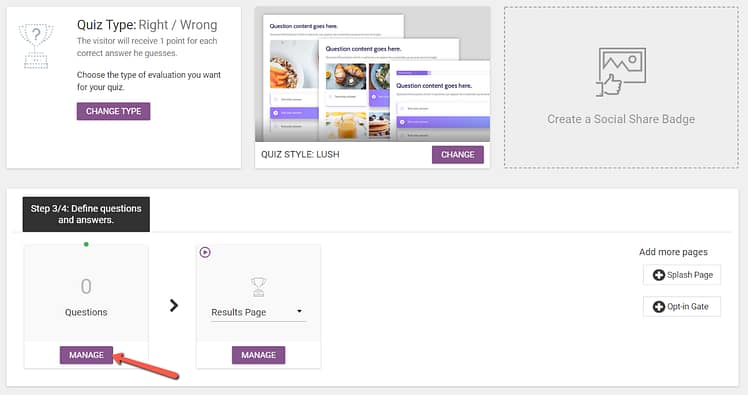
Thrive Quiz Builder Dashboard
In terms of designing the actual quiz, this plugin’s dashboard has broken the process down into steps, so you don’t miss a thing.
Customization Options
This plugin gives you everything you need to make any type of quiz look exactly the way you want. Choose from a huge range of colors, fonts, images, and videos to create a quiz that's totally on-brand.
You get a simple set of templates to start your quiz, and from there you can use the plugin’s visual editor to change its appearance.
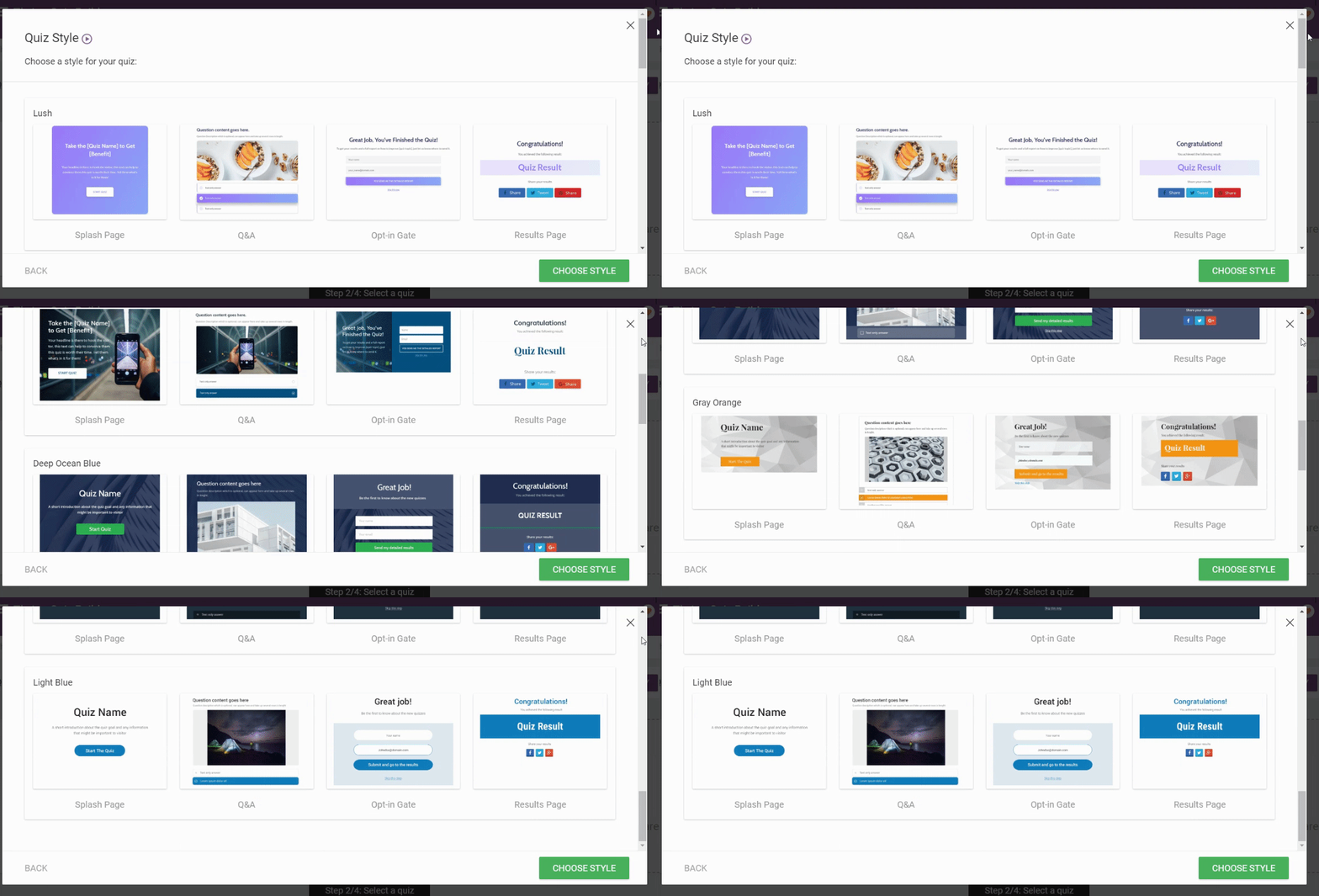
Quiz Templates in Thrive Quiz Builder
You can add pictures and videos to your questions, add a variety of question types (multiple choice, short answer, long answer, etc.), and so much more.
Reporting & Analytics
Thrive Quiz Builder provides you with solid reporting to understand how people are interacting with your surveys. You can track all the important stuff like completion rates, lead generation, and social shares, so you can tweak your surveys to get the best results possible.
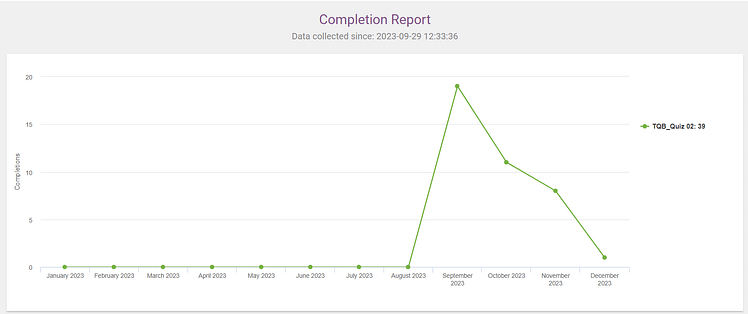
Clear reports you can easily understand
Integrations
Thrive Quiz Builder is compatible with most WordPress themes and you can easily connect it to your email marketing tools.
Thrive Quiz Builder Pricing
Thrive Quiz Builder is available as an individual plugin, for $199 per year ($99 for your first year right now). You can also purchase it as part of our premium WordPress plugin bundle, Thrive Suite, which is $599 per year ($299 for the first year).
2. Formidable Forms
Formidable Forms is another strong contender as a WordPress quiz plugin.
Quick Thoughts on Formidable Forms
Formidable Forms offers a large variety of form templates to help you get started quickly. I’m a fan of their simple interface, which is easy to navigate and the in-depth customization options they provide. This is a great tool for businesses that need different types of survey form templates for their customers.
But, keep in mind that I used their Elite plan to give their forms a test run – so I had access to all their features. Some of the features I spotlight might not be available on lower-priced plans
Ease of Use/Setup
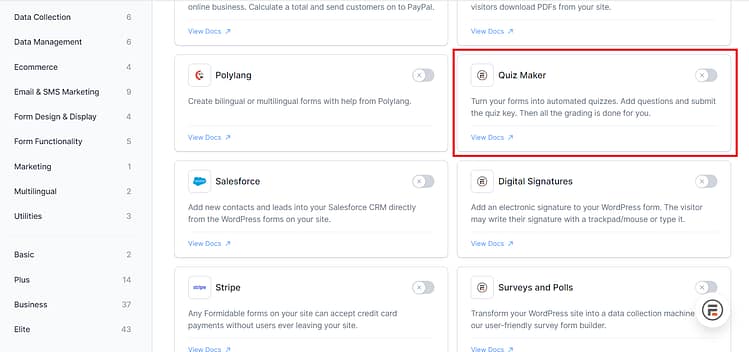
Like most of the top options in this list, Formidable Forms has a straightforward setup process. Install the plugin, go through their quick setup wizard, and you’re ready to create your first quiz or form. Everything is pretty easy to find and I loved that. However, you need Formidable Forms' Business plan (or higher) to access the Quiz Maker plugin.
Customization Options
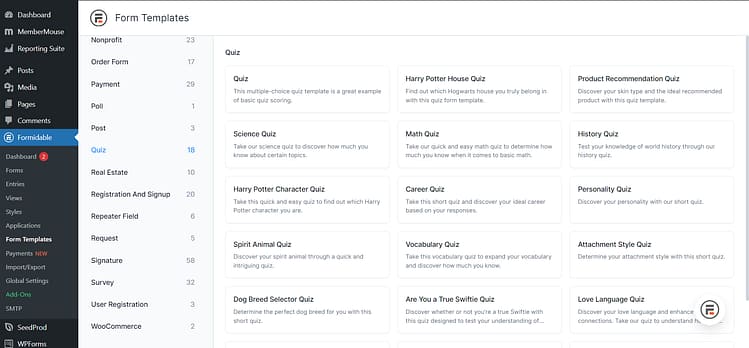
This is where Formidable Forms shines. First, you get access to a library full of templates for different use cases – including surveys. And when you hit the “Quiz” section, you have 20+ types to choose from – history quizzes, math quizzes, product recommendation quizzes, and even "Harry Potter House" quizzes. If you can’t find one that you like, you also have the option to create your quiz from scratch.
Reporting & Analytics
Formidable Forms offers solid reporting features for you to review and analyze form submissions. You also have the option to turn these insights into charts or graphs to understand better.
Integrations
This plugin works well with most WordPress themes and page builders. You’ll need the Plus plan or higher to connect to email marketing tools like Kit, GetResponse, etc. Which I found a little limiting for users who don’t have the budget for a higher priced plan.
Formidable Forms Pricing
Formidable Forms has four paid plans:
Basic: $39.50 for the first year, then $79 per year (one site)
Plus: $99.50 for the first year, then $199 per year (up to 3 sites)
Business: $199.50 for the first year, then $399 per year (up to 7 sites, includes more survey features)
Elite: $299.50 for the first year, then $599 per year (unlimited sites)
3. Quiz and Survey Master
Quiz & Survey Master (QSM) keeps things simple with a drag-and-drop interface. You don't need to be a tech whiz to get started. It's pretty straightforward to set up a basic quiz, even if you're new to WordPress plugins.
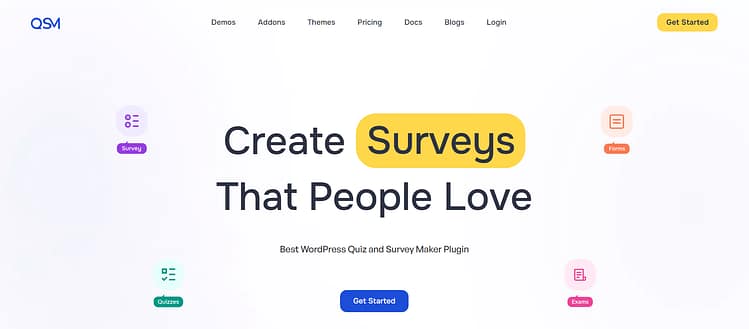
You get a decent range of question types to work with and you've got your standard multiple choice plus open-ended questions to add to your quizzes. There's also conditional logic if you want to create more dynamic surveys – but you’ll need to pay for their Plus plan or higher to access that feature.
QSM’s reporting functionality is decent, too. You can view individual submissions, turn your data into charts or graphs, and export this info too. I love that they made these features available on all their plans, including the Basic plan. It makes it easier for people to build solid surveys without feeling the need to buy a higher priced plan.
Though I will say, their plan pricing is notably higher than some of the other options on the list. So, if surveys (or quizzes) aren’t a big part of your business then you should consider a more affordable option.
QSM Pricing
QSM has a free plan that comes with limited features. It’s available on WordPress.org.
You also have four paid plans to choose from:
Basic: Starts from $149 per year
Plus: Starts from $199 per year
Pro: Starts from $249 per year
All Access: Starts from $299 per year
4. WP Quiz
After spending time with WP Quiz, I can say it's a decent WordPress plugin for those looking to add fun, interactive quizzes to their website -- think Buzzfeed. The interface is clean and intuitive - think drag-and-drop functionality and organized tabs that make quiz creation pretty straightforward. You've got pre-made templates to get you started quickly, which is always appreciated when you're just diving in.
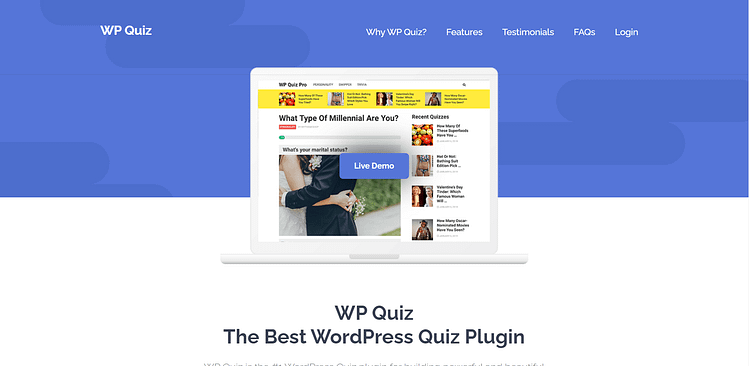
What's interesting about WP Quiz is the variety of quiz formats it offers. Beyond your standard trivia, you can create personality quizzes, swiper-style quizzes (similar to a Tinder interface), Facebook-style quizzes, and flip cards. They've added some nice touches like a timer feature and auto-scrolling between questions, plus about 40 different animation effects if you're into that sort of thing. Just be careful not to go overboard with the animations - less is often more.
The customization options are solid but not overwhelming. You can adjust the basics like colors, fonts, and backgrounds to match your site's look. The responsive design works well across different devices, and if you're into social sharing, you'll appreciate the customizable Facebook sharing features.
One potential drawback is the limited integration options. While it works fine with WordPress themes and plugins in general, don't expect built-in connections to email marketing platforms or CRM systems.
WP Quiz Pricing
WP Quiz is available for $57 per year.
Not on WordPress? The SaaS Quiz Tools Worth a Look
Everything above runs on WordPress. If your site doesn’t, these are the hosted quiz tools that come up most often. They’re quick to start with, but you pay monthly, and the price climbs as your list grows.
Quick Thoughts on Interact Quiz Maker
Interact Quiz Maker impressed me with its sleek, professional-looking quizzes and clever features like AI quiz generation and branching logic. I found the interface refreshingly straightforward -- you can create engaging quizzes without wrestling with complex settings, and the marketing integrations work smoothly for lead generation.
However, it is one of the more expensive options in this list. I'd say it's a fantastic choice if you're serious about quiz marketing and lead generation, but probably overkill if you just need basic quizzes.
Ease of Use/Setup
I appreciate how this tool doesn't make you feel lost when you first log in. The drag-and-drop interface is clean and logical, and I found myself creating basic quizzes without needing to consult help docs every five minutes.
Design and Customization Options
The design side of things is pretty straightforward. I've found the template library adequate for most needs - not overwhelming but enough variety to get you started. You can adjust colors and fonts to match your brand, which works well enough.
Integrations
Let's talk about how Interact works with other tools. In my experience, the WordPress plugin does what it says on the tin, and I've had no major issues connecting with email marketing platforms like Mailchimp and Kit. The Zapier integration opens up lots of possibilities, though keep in mind that some of the more advanced integration features are locked behind higher-tier plans.
Interact Quiz Maker Pricing
Here's where you'll need to do some math based on your needs:
The Lite plan runs $27/month when billed annually, giving you 25 quizzes and 500 email leads a month. I'd say this works if you're just testing the waters, but you might outgrow it pretty quickly.
At $53/month annually, the Growth plan bumps you up to 50 quizzes and 2,000 email leads a month. This is where I think most growing businesses will find their sweet spot.
The Pro plan is a bigger jump at $125/month annually, with 100 quizzes and 8,000 email leads a month. It's an investment, for sure, but if you're really leaning into quiz marketing, the features might justify the cost.
There's also a free plan (100 quiz completions a month and 5 quizzes) and a 7-day free trial of the paid plans, which I'd definitely recommend taking advantage of before committing to a plan.
Outgrow
Outgrow is built for interactive content in general, not just quizzes: calculators, assessments, polls, chatbots and giveaways all live in the same tool. That makes it a good fit for agencies and marketing teams that want more than one kind of lead magnet.
What I’d watch out for is the lead limits. Every plan caps how many leads you can collect each month, so the price climbs fast as your list grows.
Outgrow pricing (billed yearly):
- Freelancer: $14/month, 250 leads a month and 5 content pieces
- Freelancer Pro: $25/month, 1,000 leads a month
- Essentials: $95/month, 7,500 leads a month
- Business: $600/month, 50,000 leads a month
Typeform
Typeform is best known for conversational forms that show one question at a time, and that same format works well for quizzes. AI form creation and conditional logic come with every plan, and it connects to most email and CRM tools.
The catch is that Typeform counts responses, not leads. Every completed quiz counts toward your monthly limit, whether or not the person gives you their email.
Typeform pricing (billed yearly):
- Basic: $28/month, 100 responses a month
- Plus: $56/month, 1,000 responses a month
- Business: $91/month, 10,000 responses a month
What Quiz Software Really Costs as Your List Grows
Here’s where the difference between a WordPress plugin and a SaaS tool really shows up. These are the yearly costs at three list sizes, taken from each tool’s own pricing page in October 2026:
Tool | About 500 leads a month | About 2,000 leads a month | About 8,000 leads a month |
|---|---|---|---|
Thrive Quiz Builder | $199 a year | $199 a year | $199 a year |
Interact | $324 a year (Lite) | $636 a year (Growth) | $1,500 a year (Pro) |
Outgrow | $300 a year (Freelancer Pro) | $1,140 a year (Essentials) | $7,200 a year (Business) |
Typeform* | $672 a year (Plus) | $1,092 a year (Business) | $1,092 a year (Business) |
Thrive Quiz Builder’s price is for one site and renews at the full price ($99 for your first year right now). Formidable Forms and Quiz and Survey Master work the same way: a yearly license with no cap on leads. *Typeform counts every completed response, not just leads, so you’d likely need the next plan up sooner than these numbers suggest.
Your leads also stay in your own WordPress database instead of on someone else’s platform, and that matters more the bigger your list gets.
Frequently Asked Questions About Quiz Funnel Software
TL;DR: A quiz funnel is built to convert; quiz marketing is built to entertain or engage.
- Quiz funnel: Interactive quiz → captures email → segments answers → delivers tailored offer or next step.
- Quiz marketing: Often for engagement or virality (e.g., Buzzfeed-style) with no structured conversion path.
TL;DR: Psychology + personalization + zero-party data.
Curiosity & instant feedback keep people completing.
Segmentation turns answers into targeted follow-ups.
Zero-party data (shared willingly) powers highly relevant emails and offers.
Clarity reduces friction by guiding users to the right product or next step.
TL;DR: Recommendation, diagnosis, and style/persona quizzes dominate.
Product recommendation (e-commerce): “Find your best-fit [product].”
Consultation/diagnostic (services/SaaS): “What’s blocking your [goal]?”
Style/persona (content/community): “Which [type/archetype] are you?”
Lead magnet quizzes (creators/coaches): Segment first, nurture with tailored content.
TL;DR: Goal → audience → topic → questions → outcomes → flow → opt-in → traffic.
Start with the goal, then write 5 to 10 questions that sort people into 3 to 5 outcomes, gate the results with an opt-in, and send each outcome its own follow-up.
For the full walkthrough, see how to make a quiz in WordPress, and for real funnels to learn from, these quiz funnel examples.
TL;DR: Logic, lead capture, integrations, analytics.
Builder: Drag-and-drop, templates, mobile-first.
Intelligence: Conditional/branching logic, (optional) AI assist, personalized results pages.
Marketing: Embedded opt-in, A/B testing, conversion tracking.
Stack fit: Native email/CRM integrations, branding control, WP compatibility (if on WordPress).
TL;DR: Match tool to context and stack.
WordPress: Thrive Quiz Builder (visual flow, deep WP fit), Formidable Forms, Quiz & Survey Master.
Not on WordPress: Interact, Outgrow or Typeform, depending on whether you want ready-made templates, calculators or conversational forms.
E-commerce: Tools that sync products and support add-to-cart from results (Shopify-focused platforms shine).
Coaches/consultants: Assessments/scorecards that segment and qualify, plus calendar/e-mail integrations.
TL;DR: Free plans are fine for testing; serious use needs paid tiers.
Free/Trials: Good for low volume; expect limits on branding, logic, or responses.
SaaS pricing: Monthly tiers tied to responses, features, or active quizzes.
WordPress plugins: Predictable annual licenses; often unlimited quizzes/responses on your site.
Real numbers: at around 2,000 leads a month, Interact costs $636 a year and Outgrow $1,140, while Thrive Quiz Builder stays at $199.
Pro tip: Calculate total cost to scale (responses, branding removal, advanced logic, A/B tests) before choosing.
My Top Pick (And Why I Keep Coming Back to It)
Want to know which quiz funnel tool actually delivers on its promises? Of everything on this list, Thrive Quiz Builder is the one I’d pick for lead generation. Here’s why:
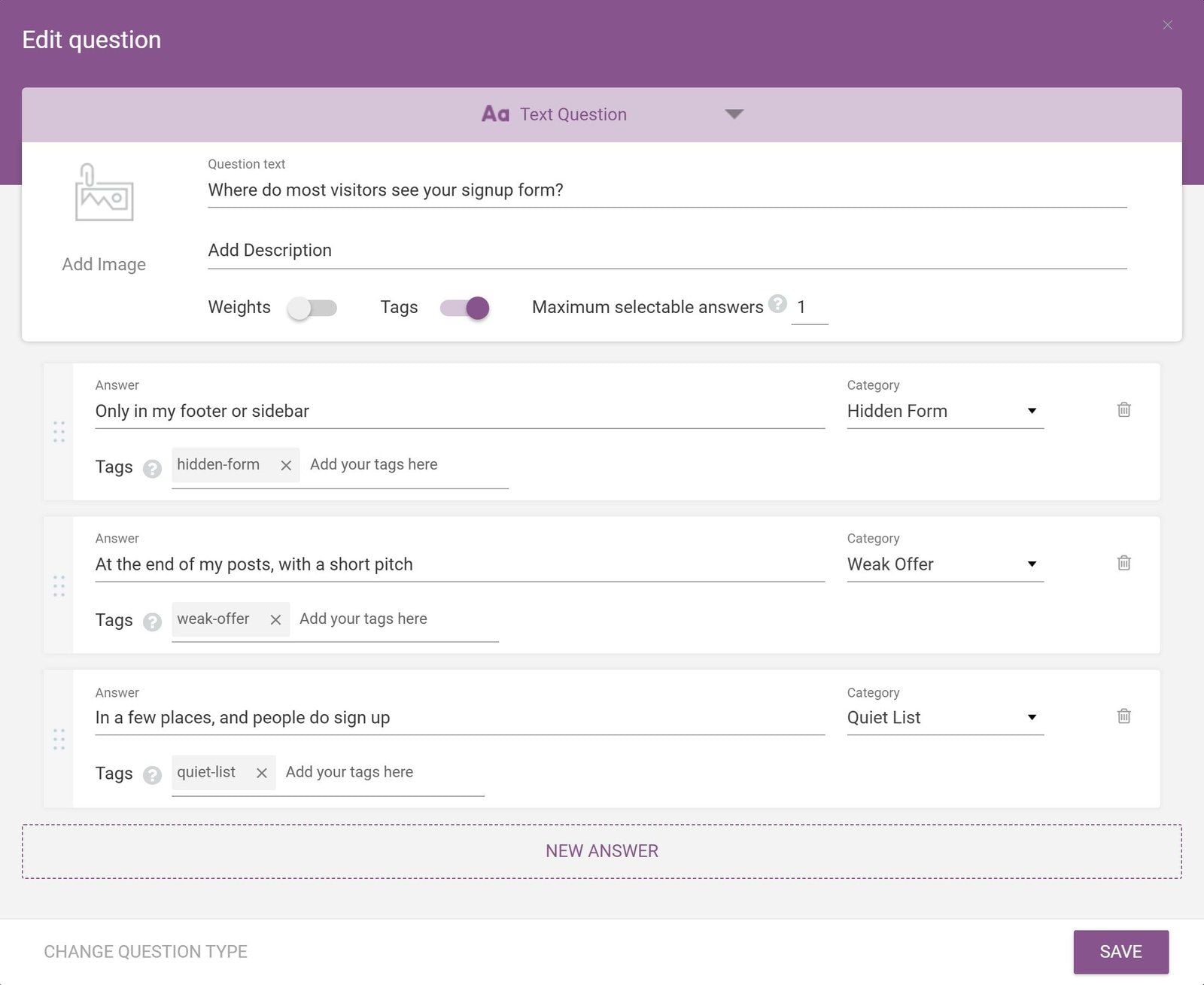
Every answer can carry a tag, so each new subscriber lands in your email tool already segmented.
First off, I love how it manages to be both powerful and easy to use. Look, I've wrestled with plenty of complicated quiz tools, but Thrive Quiz Builder just feels right. I was able to put together professional-looking lead generation quizzes without getting lost in complex settings, but there's plenty of advanced features when you need them.
The lead generation features really won me over. I particularly appreciate how smoothly the opt-in forms fit into the quiz experience -- it feels natural, not forced. And when it comes to connecting with email marketing platforms? Super reliable. No more crossing your fingers hoping leads actually made it to your email list!
Now, about the pricing - it's not the cheapest option out there, but here's the thing: you get what you need without constantly bumping into paywalls or "premium only" features. That's refreshing in today's world of endless upsells.
If you want a quiz funnel tool that you can start using right away but won't outgrow as your marketing gets more sophisticated, Thrive Quiz Builder is your best bet. Give it a try - I think you'll be pleasantly surprised at how capable it is without being overwhelming.
Which Quiz Funnel Software Should You Choose?
We've covered quite a range of quiz builders here, from simple plugins like WP Quiz to feature-rich platforms like Thrive Quiz Builder. There's something for everyone.
Here's the thing: finding the right tool really depends on your specific marketing goals, budget, and how you plan to use quizzes in your funnel. There's no need to stress about finding the "perfect" platform immediately - it's more important to find one that aligns with your marketing strategy.
My suggestion? Take advantage of those free trials and money-back guarantees. Between the free plans, trials and refund windows, you can try most of these risk-free. Build a test quiz, try out the lead capture features, and see how the analytics work for you.
Speaking of which, I keep coming back to Thrive Quiz Builder as my top recommendation. It strikes that perfect balance between marketing power and usability.
Ready to see for yourself? Check out Thrive Quiz Builder here.


