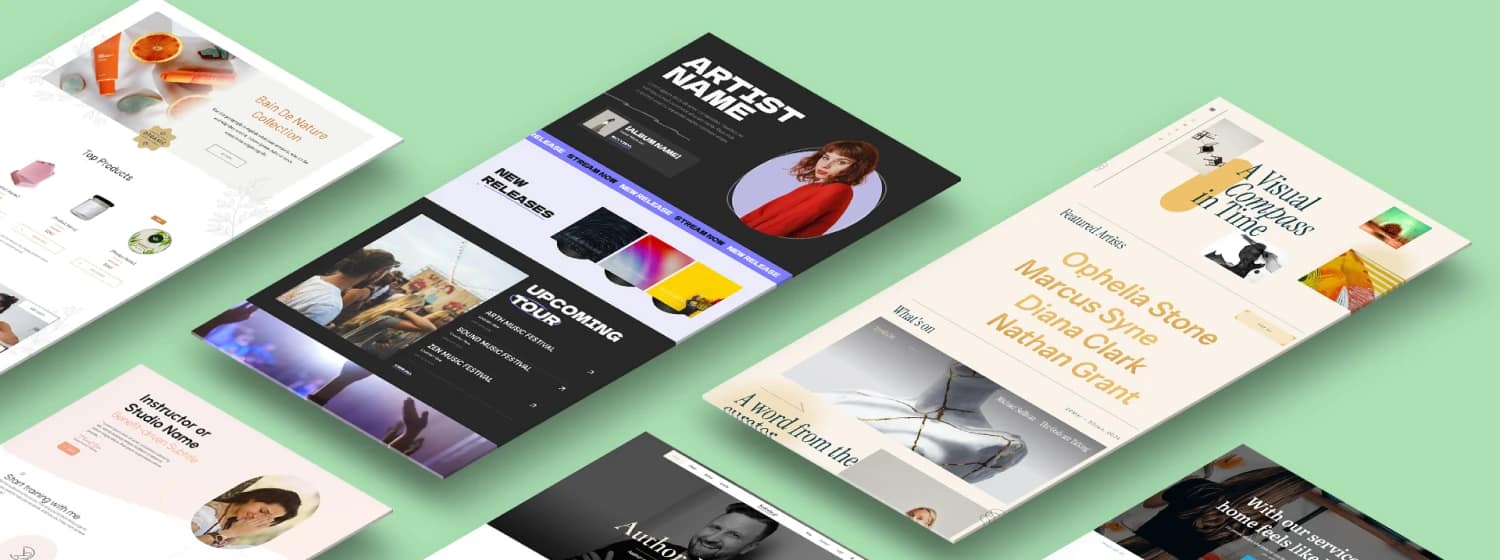

TL;DR: The Strategy Behind the Screenshots
If you’re here to skim, I get it. Your time is valuable, and your landing page needs to be built, not just admired.
This guide moves past pretty screenshots to dissect the structural and psychological patterns that make the best SaaS landing page examples actually generate revenue. I can tell you that the difference between a good page and a great one is often a matter of strategic structure and clear pricing presentation, not just aesthetics.
Here are the three most critical takeaways you’ll find inside:
- Clarity Always Wins: Your hero section must pass the "3-Second Blink Test." If a visitor has to think about what you do, you’ve already lost the conversion.
- Show, Don’t Tell: Trust is built with visual proof. Replace abstract illustrations with high-fidelity UI screenshots, video loops, or optimized micro-demos that show the product in action.
- Structure is Conversion: The best pages follow a predictable, modular Z-Pattern flow that addresses skepticism sequentially, guiding the user from curiosity to commitment, including handling the final hurdle: the price.
If these strategic shifts sound like the difference between doubling your conversion rate and just tweaking a font, you might want to grab a coffee and read the full breakdown. I’ll show you exactly how to rebuild these patterns on your own site.
If you’re running a SaaS business, your landing page isn’t just a static document; it’s the engine of your unit economics. A page converting at 4% versus 2% can literally double your growth rate and extend your runway.
I’ve seen waaaay too many roundups of SaaS landing page examples that feel like digital mood boards. You know, pretty screenshots with zero strategic value. Your landing page is not design inspiration. It’s a carefully engineered conversion machine.
So, in this guide, I’m not just showing you beautiful pages. I’m walking through real-world SaaS landing page examples that teach something fundamental about psychology, data, and conversion patterns. More importantly, I’ll break down why they work and show you how to rebuild the same strategies on your own site using high-leverage, low-friction tools.
We're going beyond aesthetics to focus on the structure, messaging, visual proof, and pricing presentation that turns skeptical visitors into paying subscribers.
If you're ready to dive deeper into the mechanics of high-performance pages, check out This Is Your Ultimate Landing Page Guide to Get Real Results.
Want to get ahead of this?
When I’m building or rebuilding SaaS landing pages like the ones you’ve just seen, I use Thrive Suite for everything — structure, messaging, testing, and iteration — without duct-taping five different tools together.
It’s the fastest way I know to go from “this looks nice” to “this actually converts.”
SaaS Landing Page Best Practices: What Makes Them convert?
Before we dive into specific examples, you need a mental model. The best SaaS landing pages stick to a predictable set of rules because those rules align with how human brains process information and make decisions.
If you can master these five patterns, your page will already outperform 80% of the competition.
Pattern 1: The 3-Second Blink Test
When a visitor lands on your page, you have about three seconds to pass the "Blink Test." This isn't about looking nice; it’s about reducing cognitive load.
The 3-Second Rule: Clarity Over Cleverness
Your visitor must instantly understand three things from the hero section:
- What is this product? (The category: project management, SEO tool, design platform.)
- Who is it for? (The audience: marketing teams, developers, small business owners.)
- What does it do for me? (The transformation: save time, increase revenue, reduce errors.)
Most pages fail here because they lead with jargon or a clever, abstract headline that requires the visitor to think. Clarity always beats cleverness. If I have to scroll down to figure out what you sell, you’ve lost.
💡If you struggle with distilling your message, learning How to Write a Value Proposition that gets 'em in 5 seconds is a must.
And to see more examples of hero sections that nail this clarity test, I analyzed 50+ Hero Section Examples that stop the scroll.
Pattern 2: “Show, Don’t Tell” UI Realism
Abstract illustrations and stock photos are out. UI realism is in.
The best SaaS pages use high-fidelity screenshots, short video loops, or micro-demos to show the product in action immediately. This isn't just about looking modern; it's psychological.
Why UI Realism Builds Trust
Showing the interface:
- Builds Trust: It proves the product actually exists and works.
- Reduces Friction: It lets the visitor visualize themselves using the tool, making the barrier to entry feel lower.
- Demonstrates Quality: A clean, functional UI suggests a well-engineered product.
You don't need a massive video player; a simple GIF or a Lottie animation showing a core feature loop is often enough to convey the value.
💡If you want to use motion without slowing things down, you should definitely read up on The Power of Motion: How to Use Animation in Web Design.
Pattern 3: The Z-Pattern Rhythm
SaaS landing pages rarely deviate from a predictable, conversion-optimized flow—the Z-Pattern. This rhythm guides the eye and builds trust incrementally.
- Hero Section: Instant clarity + primary CTA.
- Trust Bar: Logos of recognizable customers or media mentions (social proof).
- Feature-Benefit Zig-Zag: Modular sections alternating text and visuals, focusing on outcomes.
- Social Proof Wall: Testimonials, case studies, or review scores. (Speaking of social proof, if you're using WordPress, here’s a quick guide on How to Add Google Reviews to a WordPress Website to instantly boost credibility.)
- CTA Squeeze: A final, prominent call to action before the footer.
This structure works because it addresses skepticism sequentially: What is it? → Who else uses it? → How does it help me? → Is it reliable? → Okay, sign me up.
If you’re trying to figure out the exact flow, this guide on the Optimal Landing Page Structure breaks down the science behind it.
Pattern 4: Objection Handling Through Smart FAQs
A high-converting page anticipates friction points. The FAQ section is your dedicated space for objection handling, not just a list of technical specifications.
Place a short FAQ section near the bottom, just above the final CTA. This placement catches the visitor who is 90% convinced but has one lingering doubt (e.g., Is it secure?, How long is the free trial?, Will it integrate with my existing tools?). Answering these questions preemptively removes the final barrier to conversion.
I also wrote a full breakdown on How to Handle Customer Objections that you should check out if you want to master this technique.
Pattern 5: Mobile-First Structure
While many signups happen on desktop, discovery often starts on mobile. You must optimize your page for the thumb-zone and the mobile mindset.
Mobile Optimization for Conversion
Mobile users are often scanning quickly. This means:
- Shorter Copy: Get to the point faster.
- Thumb-Zone CTA: Make sure the primary CTA is easily reachable with a thumb, often by using a sticky header or a prominent button placement.
- Efficient Scrolling: Use accordions or tabs to hide dense information, keeping the primary flow clean.
💡 To make sure your page is fully optimized for small screens, don't miss these 5 Proven Mobile Landing Page Best Practices that get results.
Let’s Analyze 5 High-Converting SaaS Landing Page Examples
Let’s look at specific SaaS landing page examples and break down the actionable strategies you can steal.
What’s Happening: Asana uses extreme whitespace, focused typography, and large, clean UI screenshots. The hero headline speaks to a high-level goal ("Work smarter, not harder") before immediately clarifying the function ("Asana is the work management platform...").

Asana's Conversion Insight: Goals Over Features
Why It Works: The cognitive ease is paramount. The clean design suggests the product itself is simple and easy to use, which is a massive selling point in the crowded project management space. Crucially, the copy focuses on goals (getting results) rather than features (managing tasks). I particularly like how they use the hero section to immediately define the category—work management—which cuts through the noise of competing apps.
What to Steal:
- Goals Over Features: Invert your messaging. Instead of "Our tool has X feature," say "Achieve Y outcome using our tool."
- Whitespace Discipline: Use empty space intentionally to draw the eye to the headline and the single, focused CTA.
- Single CTA Focus: Asana’s hero has one clear path: "Get Started." No distractions.
How to Build Asana's Strategy in Thrive Architect
Strategy | How to Rebuild in Thrive Architect |
|---|---|
Simple Hero | Use a two-column layout. Left for the headline/CTA, right for a clean, looping GIF or Lottie animation of your UI. |
Whitespace | Use the Spacing and Padding controls aggressively to create visual breathing room around key elements. |
Sticky CTA | Set up a sticky header or bottom bar with a single, high-contrast CTA button that follows the user as you scroll. |
If you want your buttons to really pop, I put together 9 Hacks to Boost Your Call-to-Action Click-Through Rates that are worth testing.
What’s Happening: Ahrefs’ landing pages are data-heavy, featuring expert language, dense dashboards, and immediate proof points (e.g., "Trusted by the world’s leading SEOs").

Ahrefs' Conversion Insight: Density Signals Credibility
Why It Works: Ahrefs knows its audience—professional SEOs and marketers who are highly technical and skeptical. For this persona, dense design signals credibility and depth. They are selling a sophisticated tool to sophisticated users, so they don't shy away from complex data visualizations. I thought their approach to matching information density to buyer sophistication was brilliant; they don't try to appeal to everyone, just the people who matter.
What to Steal:
- Match Density to Buyer: If your product is complex (e.g., enterprise software, financial tools), don't dumb down the page. Use proof-first copy and show complex data to establish authority.
- Expert Language: Use the specific jargon your audience uses. It shows you understand their world.
- Proof-First: Lead with data, not promises. Show charts, metrics, and specific outcomes.
What’s Happening: Canva excels at creating thousands of job-specific landing pages (e.g., "Instagram Story Maker," "Presentation Creator"). The hero section often allows the user to "start creating" instantly, offering instant value before requiring a sign-up.

Canva's Conversion Insight: Instant Gratification
Why It Works: This approach uses the "Jobs-to-Be-Done" (JTBD) framework perfectly. Users arrive with a specific task in mind, and Canva immediately lets them experience the emotional win of completing that task. This creates the endowment effect—once they've invested a few minutes creating something, they are far more likely to sign up to save it. I find this strategy highly effective because it delivers instant gratification, reducing the perceived risk of signing up.
What to Steal:
- Preview Outcomes: Let users preview the result or interact with a limited version of the tool before demanding an email address.
- Niche Pages: Identify 5–10 high-intent use cases for your product and build hyper-specific landing pages for each one.
- Zero Friction Hero: Reduce the barrier to entry in the hero section to the absolute minimum.
A great hero starts with a great headline, and I’ve got some killer tips on How to Make Headlines Stand Out if you need help with that.
What’s Happening: Zoom uses segmented landing pages targeting specific industries (Healthcare, Education, Financial Services). The messaging, hero visuals, and social proof change drastically to reflect the needs and compliance requirements of that niche.

Zoom's Conversion Insight: Deep Relevance Accelerates Trust
Why It Works: Trust accelerates conversion, especially in regulated fields. By speaking directly to a niche, Zoom reduces skepticism. A doctor visiting the Healthcare page sees HIPAA compliance badges and testimonials from hospital systems, which is far more convincing than a generic "video conferencing" page.
What I appreciate here is the discipline to sacrifice broad appeal for deep relevance to a high-value segment.
💡 This strategy is basically the core of Niche Marketing Strategies: selling without targeting everyone, which is super smart.
What to Steal:
- Build Audience Versions: Create 3–5 audience-specific versions of your core landing page.
- Compliance-First: If your audience requires security or regulatory assurances, make those badges and trust markers highly visible.
What’s Happening: Slack uses human-first illustrations, a conversational tone, and a focus on team connection rather than technical complexity. Their design breaks the mold of cold, corporate SaaS.

Slack's Conversion Insight: Tone as a Competitive Advantage
Why It Works: Slack is selling a human category (communication). By using personality, warmth, and relatable illustrations, they differentiate themselves from sterile enterprise software. They prioritize connection and ease-of-use over feature lists. I thought this was a risky but successful move; they used tone as a competitive advantage in a crowded market.
What to Steal:
- Break the Mold: If everyone in your niche uses cold, corporate design, use tone and personality as your differentiator. (Honestly, the whole industry needs a shake-up, and I think my thoughts on why SaaS Marketing Is Broken and how to fix it are pretty relevant here.)
- Human Storytelling: Focus on the emotional benefit (less stress, more connection, better collaboration) rather than just the functional benefit.
The Conversion Gap: Where Most Pages Fall Apart
Knowing why great SaaS pages work is one thing. Actually rebuilding those patterns — clean Z-flows, segmented messaging, pricing psychology, fast load times — is where people get stuck.
Usually because their tools aren’t built for conversion thinking.
Not by adding more complexity — but by giving you one conversion-first system where:
- Structure comes first (not decoration)
- Messaging, proof, and CTAs are designed together
- Testing and iteration are baked in, not bolted on later
So instead of fighting your page builder, you can focus on the work that actually moves the needle: clarity, trust, and momentum.
Pricing Page Psychology: The Final Conversion Hurdle
Now that we’ve covered several top Saas landing page examples you can copy, let’s move on to a real key factor: PRICING.
Your pricing page, or the pricing section on your landing page, is often the final landing page before conversion.
You need to present your offer in a way that minimizes decision fatigue and maximizes perceived value.
The best SaaS companies use psychological triggers to guide the visitor to the right plan.
1. Pricing Placement: When to Show the Money
The decision of *where* to place pricing depends entirely on your product model.
Pricing Placement Strategy by Product Model
Model | Pricing Strategy | Example Analysis |
|---|---|---|
Freemium/Free Trial (Low Friction) | Price is secondary. Lead with the "Free" CTA in the hero. | Asana, Canva, Slack: They offer a clear path to start for free. The landing page focuses on the product experience, deferring detailed pricing until the user is invested. |
High-Cost/Enterprise (High Friction) | Price is often hidden or requires a "Contact Sales" CTA. | Zoom: For enterprise segments, they focus on compliance and features, knowing the price will be negotiated later. The landing page is a lead qualification tool. |
Tool/Utility (Mid-Friction) | Price is clearly linked or displayed lower on the page, after value is established. | Ahrefs: They display clear pricing tiers, but only after the page has established their authority and the depth of their data. The price justifies the high value. |
The Rule: If you have a free option, make that the primary conversion goal of the landing page. If you require a commitment, make sure the visitor has seen all the value and proof *before* they see the price.
Your pricing page deserves its own deep dive, so make sure you read How to Customize Your Pricing Page for More Sales—it's more than just listing numbers.
2. Anchoring and Decoy Effects
Anchoring is the psychological principle where the first piece of information offered (the anchor) influences subsequent judgments.
- The Decoy: Introduce a high-cost, high-friction plan that you don't necessarily expect people to buy. This makes the next-highest plan—the one you want them to buy—look significantly more reasonable and valuable by comparison.
- Highlighting the Winner: Use visual cues (a different color, a bold border, a "Most Popular" badge) to guide users to the plan that offers the best balance of features and profit margin for your business.
How to Implement: When building your pricing table, make sure the plan you want users to select is visually distinct and placed between a cheaper, less-featured plan and a more expensive, feature-heavy plan.
If you’re building your site on WordPress, I show you two easy methods for How to Add a WordPress Pricing Table that actually converts.
3. Framing Value, Not Cost
Never let the conversation be about the dollar amount; it must always be about the ROI and the value delivered.
- Focus on the Outcome: Instead of saying "$99/month," say "Less than $3.50 a day to save 10 hours a week."
- Annual Discounting: Present the monthly price, but heavily incentivize the annual commitment (e.g., "Save 20% by paying annually"). This locks in revenue and reduces churn.
- Feature Gating: Make sure the features gated behind higher tiers are truly valuable and solve a specific pain point for that advanced user segment.
A Word of Caution: Don't try to trick people with pricing. Use these psychological triggers to clarify the best option, not to confuse the buyer. Transparency builds trust, and trust is the ultimate conversion driver.
Under-the-Radar Examples No One Talks About
To give you a competitive edge, let’s look at a few less obvious SaaS landing page examples that offer powerful, niche lessons.
The “Anti-Design” Brutalist SaaS Page
For developer tools or niche technical products, you sometimes see a brutalist or anti-design approach (think mono fonts, high-contrast colors, bold borders, and minimal styling).
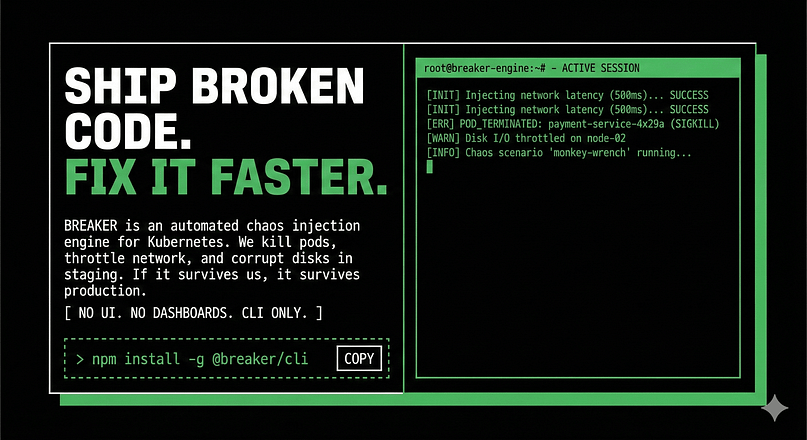
What It Signals: This design signals authenticity, rawness, and a focus on function over polish. For a developer audience, this translates to: "We spent our time building a powerful tool, not a fancy website."
How to Replicate the Energy: You don't need to destroy usability. Use intentional contrast, high-information density, and a straightforward layout. Use bold borders and system fonts to achieve the aesthetic without sacrificing clarity.
A Micro-SaaS Example with Perfect Clarity
Micro-SaaS companies (single function, niche audience) are forced into supreme clarity because they have only one thing to sell. Their landing pages are often masterpieces of focus.
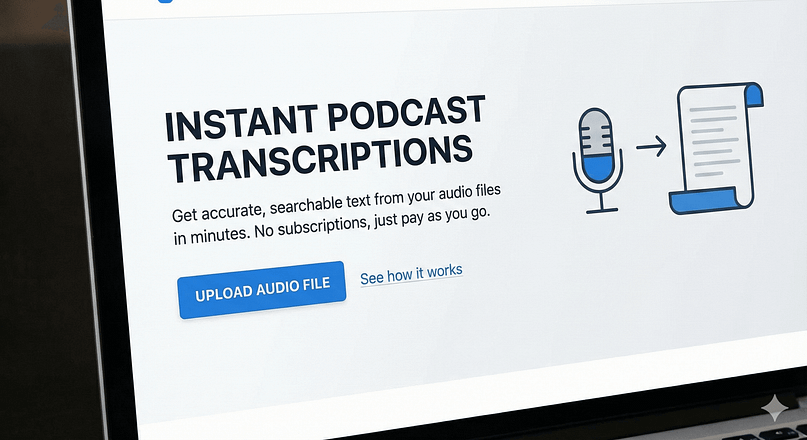
What Big Companies Can Learn: If a micro-SaaS page takes 10 seconds to explain its value, a complex tool should aim for 30 seconds, not 3 minutes. Learn to strip away every unnecessary element and focus the entire page on proving the value of that single, core function. This simplicity can be rebuilt into complex tools by dedicating specific landing pages to specific features.
An AI Tool That Uses Personalized Hero Messaging
The rise of adaptive landing pages means the hero headline changes based on firmographic data (e.g., industry, company size) or referral source.
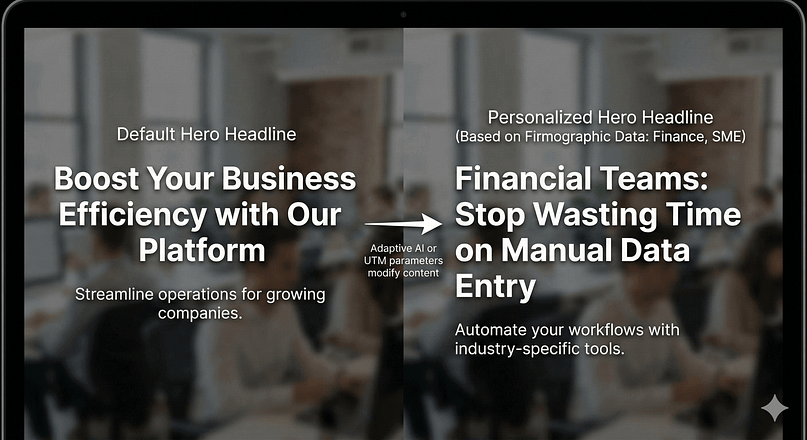
How SMEs Can Recreate the Feeling: You don't need complex AI. You can manually recreate this feeling using conditional content based on UTM parameters. For instance, if a user clicks a link tagged utm_source=linkedin_finance, you can conditionally display a hero headline that says, "Financial Teams: Stop Wasting Time on X." This makes the visitor feel instantly understood.
How to Create and Execute a High-Converting SaaS Signup Page Design: A Step-by-Step Blueprint
Showing examples is one thing; building your own is another. Here is a blueprint for translating these strategies into action.
Step 1: Define the Outcome You’re Promising
Drop the jargon. Your H1 should not describe your product; it should describe the transformation your user experiences.
- Bad: "Integrated, multi-channel marketing automation platform."
- Good: "Get 20% More Leads Without Hiring Another Person."
Step 2: Decide on Your Information Density
Your page length and visual style should match your buyer's sophistication level and the complexity of your product.
Information Density Strategy
Buyer Type | Product Complexity | Page Strategy |
|---|---|---|
Low Sophistication | Simple, Low-Cost | Short, visual, outcome-focused. |
High Sophistication | Complex, High-Cost | Long, data-heavy, use toggles/tabs for depth. |
For complex products, you could try using accordions, toggles, or tabs to create "density sections" that lets the interested user dive deeper without overwhelming the casual scanner.
Step 3: Pick Your Visual Strategy
Avoid generic illustrations unless they are highly branded (like Slack or Mailchimp). Your primary visual should be proof:
- UI realism (high-fidelity screenshots)
- Video loops (showing the product in use)
- GIF demos (highlighting a specific feature)
Step 4: Map Your Z-Pattern
Structure your page modularly. Before you start designing, write down the block structure:
- Hero (H1, CTA, Visual)
- Trust Wall (Logos)
- Benefit 1 (Outcome focus)
- Benefit 2 (Outcome focus)
- Social Proof (Testimonials)
- Objection Handling (Mini-FAQ)
- Final CTA Block
Step 5: Handle Objections Before They Kill the Conversion
Every SaaS product faces five common objections. Make sure your page addresses these, either in the copy or the FAQ:
- Cost: Is it worth the price? (Address with ROI or value proposition.)
- Time: How long does it take to set up? (Address with "Quick Start" copy.)
- Security/Trust: Is my data safe? (Address with badges/compliance.)
- Integration: Will it work with my existing stack? (Address with logo bar.)
- Risk: What if I hate it? (Address with free trial or money-back guarantee.)
Step 6: Speed is a Feature: Optimizing Performance for Conversion
Load time is not a technical detail; it is a conversion factor. If your page takes more than three seconds to load, your conversion rate drops significantly, and your bounce rate spikes. We aren't just talking about general speed—we need to focus on the metrics that directly impact user experience and Google's ranking factors, known as Core Web Vitals.
The most critical metric for a landing page is Largest Contentful Paint (LCP). This measures how quickly the main content (usually your hero headline and visual proof) loads. If your LCP is poor, the visitor can't pass the 3-Second Blink Test, and they leave.
Here is how you can make sure your page loads fast and feels fast:
Prioritize Above-the-Fold Assets
The hero section must load instantly. This means the primary image, the H1, and the main CTA button should be prioritized by the browser. If you use a page builder, make sure it’s not loading unnecessary CSS or JavaScript for elements that are far down the page.
Use Efficient Visuals
Heavy video files and unoptimized UI screenshots are conversion killers.
- Compress Everything: Use modern image formats (like WebP) and compress all visuals, especially those large UI screenshots.
- Optimize Micro-Demos: If you use a GIF or a Lottie animation for your UI demo, you'll want to keep it lightweight. A GIF should be under 500kb if possible.
- Lazy Load Below the Fold: Use native browser lazy loading for any image or video that is not immediately visible when the page loads. This frees up resources to load the critical LCP elements first.
Minimize Code Bloat
A lightweight page builder is essential here. Bloated code means the browser spends too much time parsing instructions before it can render the page. You'll want to use tools that prioritize clean, efficient code and let you build pages without injecting excessive, unnecessary scripts.
Step 7: Optimize for Mobile (Not Just Responsiveness)
Don't just shrink your desktop page. Write real mobile copy—shorter, tighter, and more direct. Make sure your primary CTA is always visible and actionable within the thumb-zone.
Implementation: Building High-Converting SaaS Landing Pages
This is where we move from theory to execution. I use tools like Thrive Architect because they let you rapidly prototype and test these sophisticated conversion patterns without needing a developer.
For those of you building these pages on WordPress, my Thrive Architect Review covers exactly how easy it is to set up these custom layouts without code.
Implementation Summary: How to Build High-Converting SaaS Landing Pages
Execution Summary: Building High-Converting Pages
Execution Step | What You Do | Why It Works |
|---|---|---|
Start with Smart Templates | Use conversion-optimized landing page templates that already follow a Z-Pattern and include CTA, testimonial, and benefit blocks. | Removes structural guesswork so you can focus on clarity, messaging, and outcomes instead of layout decisions. |
Segment with Conditional Display | Swap headlines, visuals, and testimonials based on traffic source, campaign, or audience type. | Makes each visitor feel like the page was built specifically for them — increasing relevance and conversion rate. |
Use Lightweight UI Previews | Add looping GIFs or Lottie animations instead of heavy videos to show the product in action. | Preserves speed and Core Web Vitals while still delivering visual proof and reducing friction. |
Clone for Jobs-to-Be-Done Pages | Duplicate a high-converting master page and tweak the hero, visuals, and first testimonial for each use case. | Lets you scale high-intent pages quickly without redesigning from scratch — perfect for SaaS growth funnels. |
Use Smart Landing Page Templates as Your Base
You'll want to start with conversion-optimized templates that already follow the Z-Pattern and include modular blocks for testimonials, feature lists, and CTAs. This saves the cognitive load of designing structure and lets you focus purely on messaging.
Use Conditional Display to Build Segmented SaaS Pages
This is a high-leverage trick. If you know a visitor is coming from a specific campaign (e.g., a LinkedIn ad targeting small agencies), you can use Thrive's conditional display features to automatically swap out the hero image, headline, and testimonials to match that segment. This makes the page feel deeply personalized.
Add Looping UI Previews Without Adding Weight
Heavy video files kill load time. Instead, use optimized GIF loops or Lottie animations for micro-demos. You can easily embed these into background sections or image elements, creating that essential UI realism without slowing down the page.
Build Hyper-Specific “Jobs-to-Be-Done” Pages Using Cloning
Once you have a high-converting master template, use the cloning feature to rapidly create variations. Change the hero headline, the main visual, and the first testimonial to target a new "job" or audience segment. This funnel logic—category page → job-specific page → conversion—is how you capture high-intent traffic efficiently.
Frequently Asked Questions About SaaS Landing Pages
A SaaS Landing Page Isn’t Just a Page — It’s a Product Feature
Every landing page is a promise. Every design choice affects trust.
The SaaS landing page examples we reviewed today are reminders that your page is the first feature your users ever experience. It requires the same care, iteration, and purpose as the product itself.
Start by setting up the Z-Pattern, obsessing over clarity, and using visual proof. Once you have that foundation, you can use tools like Thrive Architect to segment your audience, optimize your pricing presentation, and test your way to higher conversion rates.
Your next step is simple: Pick one strategy from this guide—maybe it's inverting your headline to focus on the outcome, or maybe it's adding a looping UI demo—and set it up on your highest-traffic landing page this week.
Your Landing Page is Part of Your Product
It’s not a one-off asset. It’s a system you refine — just like onboarding, pricing, and retention.
If you want pages that evolve, segment, and convert without rebuilding from scratch every time, you need tools that are designed for that reality.
That’s why I recommend Thrive Suite.
It gives you the leverage to turn everything you just learned — psychology, structure, proof, pricing — into a repeatable, scalable conversion engine inside WordPress.
No Franken-stack. No design-only tools pretending to care about results. Just a system built for people who want their pages to do their job.


