


TL;DR: We've Just Upgraded Thrive Leads
Skimming? Here are 3 things worth knowing:
- Thrive Leads has been rebuilt from the ground up. New dashboard, new navigation, new design system, and guided flows for everything you do in the plugin.
- Creating a form is now one guided flow. The new 4-step wizard takes you from template to live, targeted form: Design → Display Rules → Lead Group → Review & Finish. You can even create a brand-new Lead Group without leaving the wizard.
- Everything you've built is already in there. Your Lead Groups, forms, and tests moved over automatically. Open the dashboard and continue where you left off.
If you build opt-in forms regularly, the sections below on the form wizard and the new My Forms screen are worth a few minutes of your time.
After months of hard work from our dev team, I'm proud to share the biggest update in Thrive Leads history: the fully revamped Thrive Leads is live right now.
The entire plugin has been rebuilt: the dashboard, the navigation, the way you create forms, the way you manage them, the way you test them. Every screen and every flow now works toward one goal: get your opt-in funnels set up faster and easier, so more of your time goes into collecting leads and growing your list.
And before you ask: everything you've already built came along for the ride. Your Lead Groups, your forms, your tests, all of it is waiting in the new dashboard, exactly as you left it. Update, open Thrive Leads, and pick up right where you were, in a much nicer place to work.
Here's what's changed.
The New Thrive Leads Dashboard
The first thing you'll notice is the dashboard itself. Thrive Leads now runs on a modern design system, and the difference hits you the moment it loads: clean screens, clear hierarchy, and a navigation bar that tells you exactly where everything lives. Five sections cover the whole product:

The redesign goes deeper than layout, though. The whole product now talks to you as you work.
Unsure what a setting does? A short hint appears right next to it. Whenever a flow could leave you wondering what comes next, the dashboard points you to the next step. You always know what just happened and what to do about it, which means your attention stays on the campaign instead of on the tool.
The New Form Creation Wizard
This is the flagship of the redesign, and it changes the part of Thrive Leads you touch most often. Creating a form is now a single guided flow with four steps:
You never leave the flow. Naming, grouping, even setting group conditions all happen right inside the wizard, so a brand-new form goes from idea to live and targeted in one continuous run. Each step gets a full screen too, with every setting laid out in plain view and a final review of all your inputs before anything goes live.

The review step is the part you'll come to rely on. Your template, your display rules, and your group assignment sit together on one screen before anything goes live, so if a display rule points at the wrong pages or the form landed in the wrong group, you catch it right there in the flow and fix it in seconds. What your visitors see is exactly what you planned, on the first publish.
And the wizard covers every form type. Lead Groups, ThriveBoxes, Shortcodes, and Signup Segue each get their own dedicated, focused creation flow, built to get that specific type of form live in less time.

The Template Gallery Gets Its Own Tab
The template library now lives directly on the dashboard, in its own Templates tab. The benefit is pure ease of access: you no longer need to create a form or popup just to see the templates. Open the tab and the full gallery is right in front of you, any time you want to browse.
The gallery is organized into visual style categories, and you can narrow it down with filter tags for:

Your saved templates live here too. Any design you've saved for reuse carries on exactly as before, right alongside the built-in gallery, so the designs you've already perfected stay one click away from your next campaign.
My Forms: All Four Form Types in One Place
My Forms is the new home for everything you've built, and it's the screen we think you'll come back to most. Thrive Leads gives you four different form systems, and they now share one organized space with a tab for each: Lead Groups, Shortcodes, ThriveBoxes, and Signup Segue.
Inside each tab, the list works the way you'd hope:

Status tags sound like a small touch until you're running several campaigns at once. A quick scan of My Forms tells you what's live, what's in progress, and what's waiting on you, across your entire lead generation setup.
That single glance replaces a whole round of clicking into forms to check on them, and it means no campaign sits half-finished because you lost track of where you left it.
Group Conditions and Lead Group Priorities
Where your forms appear is now a clear, visible part of the product, with two dedicated screens.
Precise targeting is half the battle in lead generation, because the right offer in front of the right visitor converts and the same offer in front of everyone else gets ignored. The new Thrive Leads gives that job the space it deserves.
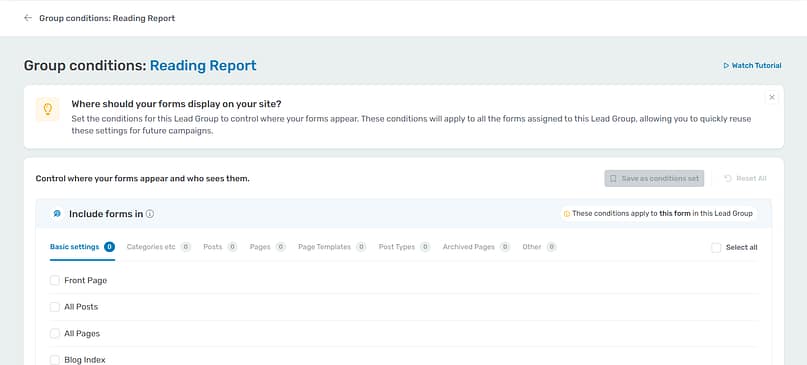

Together, these two screens give you full command over your campaigns: Group Conditions decides where each campaign is allowed to appear, and Priorities decides which one takes the stage when several qualify. Set them once and your funnels run exactly the way you planned them.
Separate Flows for Duplicating Forms and A/B Testing
Copying a form and testing a form are different jobs, and the new Thrive Leads gives each one its own clear action with its own flow:


Here's what those guardrails buy you: an A/B test only pays off when it's set up to produce data you can trust, and the new flow checks that before the test starts running. Every test you run is one you can act on with confidence. And when a valid test takes this little effort to set up, you test more often, which is exactly how opt-in rates climb.
More Improvements Across Thrive Leads
The redesign reaches every corner of the plugin, and you'll keep bumping into pleasant surprises for weeks. A few more highlights worth knowing about:
- A revamped State Manager: when you edit a form in Thrive Architect, the new State Manager gives you an interactive view of all your form states, so you can see and manage every state clearly while you design.
- Full-screen setup everywhere: form-level and group-level details now get proper dedicated screens with room to breathe, and you review everything before finalizing.
- A guided start for new users: anyone opening Thrive Leads for the first time is taken through a flow that walks them to their first form, complete with an exploration checklist on the dashboard.
Every flow in the product got this treatment. Simpler steps, clearer guidance, and an easier path to done, whether you're building your tenth ThriveBox or your first ever opt-in form.
Common Questions About the New Thrive Leads
A rebuild this size raises practical questions, especially if you have campaigns running right now. Here are direct answers to the ones that matter most.
What happens to my existing Lead Groups, forms, and A/B tests?
Nothing you need to act on. Everything migrated automatically. Open the new dashboard and all of it is there, organized under My Forms.
Do I need to rebuild or reconfigure anything?
No. Your forms, groups, display rules, and tests continue working exactly as they did. The interface around them is what changed.
Where do I set up display rules now?
On the Group Conditions screen. You'll find it next to any Lead Group on the My Forms page, and inside the form creation wizard. Include and Exclude rules live there in category tabs, along with visibility settings.
Was anything removed?
No. Every feature has a home in the new navigation. Some things have new names and better screens, but nothing was taken away.
Is this a paid upgrade?
No. If you have an active Thrive Leads or Thrive Suite license, the new Thrive Leads arrives automatically with the plugin update.
Open the New Thrive Leads Today
The new Thrive Leads is live in the latest version of the plugin. With an active license, the update arrives on its own, so there's a good chance it's already sitting in your WordPress dashboard.
Go take the tour. Open Thrive Leads, click through the new navigation, and browse the template gallery. Then create one form with the new wizard, start to finish. That first run will tell you more than any blog post can, and we have a feeling you'll enjoy it.
We're always working to make Thrive Suite a better platform for your business, and updates like these are exactly how we do it: one well-built improvement at a time.
— Angie & The Thrive Themes Team
P.S. Don't have Thrive Suite yet? Join here and the new Thrive Leads is yours the moment you log in, along with every other conversion-focused tool we've built to help you grow your list and your business. Come join the fun.
