

TL;DR: How to Choose a Website Platform
Choosing a website platform isn't about picking the prettiest template. It’s a foundational business decision that dictates your growth trajectory, your long-term costs, and your operational freedom. If you’re asking how to choose a website platform that won't make you regret your life choices in three years, the answer depends entirely on your business model and your tolerance for future maintenance headaches.
Here’s the short version, designed to save you time:
- SaaS platforms (Squarespace, Wix, Shopify) offer speed and simplicity. You trade long-term flexibility, data ownership, and migration freedom for immediate ease. They are perfect if your website is a static brochure that rarely needs updating.
- Open-source platforms (WordPress) demand more setup but deliver maximum growth capacity, superior SEO power, and full control over your digital assets.
- The decision must hinge on function, scalability, and Total Cost of Ownership (TCO), not just the initial monthly fee.
- If your business relies on content, organic traffic, deep customization, or long-term asset ownership—the open-architecture route is the only viable choice.
This Is The Website Platform Problem No One Talks About
I’ve seen this mistake made hundreds of times: a smart business owner sits down, opens three browser tabs—Wix, WordPress, Shopify—and starts comparing features.
That is the absolute worst starting point.
Choosing a website platform isn’t like picking a font or a color palette. You are selecting the foundation your entire business will stand on for the next three to five years. If that foundation is weak, rigid, or built on rented land, you’re guaranteeing yourself an expensive, painful rebuild down the line.
Most guides rush you straight into the feature comparison. They ask, "Do you need a blog?" or "Do you need e-commerce?" That’s too tactical. The real question we need to answer is: What future are you building for your business?
What feels "easy" and "free" today—those simple drag-and-drop builders—often becomes "expensive" or "impossible to migrate" the moment you hit a growth inflection point. Your platform choice is part tech, part psychology, and entirely business strategy. I want you to make a decision based on where you’re going, not just where you are right now.
AI Has Changed The Web Design Game
Let’s get one thing straight: AI has commoditized design. Every platform, from Wix to WordPress, can now generate a beautiful, functional layout in minutes. The "pretty website" problem is solved.
This means your competitive advantage no longer comes from having a slightly nicer template. It comes from the infrastructure underneath that template. If everyone can generate a beautiful website, the winners will be those who can outrank, convert, scale, and own their data. Ignore the AI-generated visuals for a moment. Focus instead on the platform’s capacity to handle the complex, strategic work of marketing and growth.
And this shift is huge, and it really highlights why understanding AI for Small Businesses is becoming so critical for staying competitive.
Before diving into the nitty-gritty, it's always a good idea to step back and think about how to plan a website strategically, right from the start.
Start With Your Business Model, Not the Platform Features
Before you look at a single template, you must categorize what your website actually needs to do for your business. This simple segmentation reduces anxiety and points you toward the right architectural choice immediately.
The Three Types of Websites—and the Platform Each One Actually Needs
I break websites down into three functional buckets: Credibility, Content, and Commerce.
1. The Brand & Credibility Website
This website needs to look professional, build trust, and facilitate simple actions. Think local restaurants, consultants, freelancers, or service providers like plumbers and accountants.
- Goal: "I need people to trust me, see what I do, and book a call or service."
- Needs: Clean design, mobile responsiveness, easy updates, integration with booking software (like Calendly or OpenTable).
- Best Fit: Squarespace or Wix. If design aesthetics and zero maintenance are your top priorities, and you don't plan to aggressively pursue organic traffic, these SaaS builders are fast and effective.
- The Upgrade Path: If, six months from now, you realize you need to start publishing articles to rank locally or capture leads aggressively, you’ll need to transition to WordPress.
2. The Content & Audience-Building Website
This is the engine room for educators, publishers, SaaS companies, and creators. The goal is to grow an audience, rank highly on Google, and build a valuable email list.
- Goal: Acquire traffic, convert traffic into leads, and scale content production infinitely.
- Needs: Advanced SEO controls, scalable content structure (silos), high performance (speed), and full data ownership.
- Best Fit: WordPress.
- Why: Open architecture platforms offer the deep access necessary for serious SEO, schema optimization, speed tuning, and the sophisticated content architecture required to compete for organic traffic. You simply cannot build a powerful, scalable content asset on a closed system.
To truly dominate search results, you'll want to learn more about how to build smarter SEO silos for traffic and conversions within your content.
3. The Commerce Website
This website focuses entirely on transactions. It demands smooth checkout flows, reliable uptime, and conversion optimization.
- Goal: Sell products, manage inventory, and process payments efficiently.
- Best Fit:
- Shopify: For pure retail, dropshipping, or if speed-to-market is the only priority. Shopify is excellent at one thing: getting a product from a page into a cart.
- WooCommerce + WordPress: For businesses that need margin protection (lower transaction fees), advanced product logic (subscriptions, custom B2B pricing), or hybrid models (selling courses and physical goods). WooCommerce gives you the flexibility to build a complex business, not just a simple store.
We're really digging into the core differences here, and if you want a deeper dive into this fundamental choice, check out our full breakdown on SaaS vs. WordPress.
How to Evaluate Platforms: Goals, Resources, and Risk Tolerance (The 3-Part Framework)
The platform decision is a function of three variables. If you answer these honestly, the right choice becomes obvious, and you won't have to second-guess which website platform to choose.
Your Goals: Where Do You Want to Be in 3 Years?
The biggest mistake I see is choosing a platform for today's needs, not tomorrow's growth.
- Do you care about organic traffic and SEO? (If yes, you need control.)
- Do you plan to publish weekly content, build online courses, or run complex funnels? (If yes, you need flexibility.)
- Do you want full control over your code and data later, even if you don’t need it right now? (This is future-proofing.)
Your Resources: What’s Your Capacity?
Be honest about your technical comfort and budget for ongoing maintenance.
- Do you have the time to learn a new tool, even if it’s powerful?
- Do you want a true "set and forget" solution, accepting the limitations that come with it?
- Is paying a developer occasionally for maintenance or complex tasks acceptable? (If your answer is a hard no, stick to SaaS. Just know what you're giving up.)
Your Risk Tolerance: How Much Do You Value Freedom?
The biggest psychological barrier is fear of maintenance. But you need to weigh that against the very real risks inherent in closed systems:
- Vendor lock-in: If the platform raises prices or changes its terms, you have no recourse.
- Migration Pain: Trying to move a complex site off a SaaS platform is often a full rebuild.
- App Dependency: Relying on proprietary app stores means you pay subscription fees for basic functionality.
- Scalability Caps: Closed systems eventually hit a wall when you need custom integrations or high-volume performance tuning.
SaaS vs. Open Source: The Architectural Choice That Determines Everything
The foundational difference between platforms isn't their feature list—it's their architecture. You are choosing between renting and owning.
SaaS = Renting a House (Wix, Squarespace, Shopify)
SaaS (Software as a Service) platforms handle everything: hosting, security, updates, and maintenance. You are paying for convenience and peace of mind. But remember: you can’t move out without rebuilding, and if the landlord raises the rent, you have to pay it.
Pros
Cons
The SaaS Approach to AI
SaaS platforms often integrate AI directly into their builders (e.g., "AI Site Generator"). This is great for speed, but the AI is locked into their proprietary system. You get a quick, beautiful site, but the underlying structure remains rigid. The AI helps you build faster, but it doesn't help you grow smarter because the infrastructure is still inflexible.
Open Source = Owning the Land (WordPress)
Open-source platforms like WordPress give you the software for free, but you are responsible for hosting and maintenance. With open source, you own the land, the house, and the blueprints. It requires more work upfront, but you build an asset that can grow and change with your business without permission.
Pros
Cons
The Open Source Approach to AI
The AI revolution is happening in the plugin ecosystem for open source. Instead of being limited to the platform’s built-in AI, you can choose from dozens of specialized AI tools for SEO, content generation, image optimization, and conversion rate optimization. This flexibility means you can adopt the best new AI technology immediately, without waiting for a platform update. You get to choose the AI tools that best serve your business strategy.
Speaking of leveraging powerful tools for growth, you might also be interested in exploring how to use AI in wordpress to further enhance your site's capabilities and content strategy.
Detailed Platform Breakdown: Who Wins on Key Features?
Once you understand the architectural difference between renting and owning, it helps to look at the specific capabilities of the major players. This is where most people start, but I want you to view this section through the lens of flexibility versus ease.
When you look at the tables below, ask yourself: Am I willing to sacrifice control over this feature for the sake of simplicity?
Feature Comparison: WordPress vs. SaaS Platforms
Feature | WordPress (Open Source) | Shopify (SaaS E-commerce) | Squarespace (SaaS Creative) | Wix (SaaS All-Purpose) |
|---|---|---|---|---|
Primary Focus | Content, SEO, Customization | E-commerce Transactions | Design, Portfolio, Simple Sites | Ease of Use, Small Business |
SEO Flexibility | Maximum. Full control over code, schema, speed, and redirects. | Good for product pages, limited for content/blogging architecture. | Basic. Relies on native tools; limited technical access. | Basic. Historically poor, but improving; still rigid. |
E-commerce Scale | Excellent (via WooCommerce). Handles complex inventory, subscriptions, hybrid sales. | Excellent. Best for pure retail and dropshipping. | Basic. Suitable for small catalogs (under 50 products). | Basic/Moderate. Suitable for simple transactions. |
Migration Difficulty | Easy. Full portability to any host. | Very Hard. Design/logic locked to platform; data exportable. | Hard. Content exportable, design is lost. | Very Hard. Content export is problematic; design is lost. |
Learning Curve | Moderate to Steep. Requires understanding of hosting/plugins. | Low to Moderate. Intuitive interface for retail. | Low. Extremely user-friendly. | Low. Drag-and-drop simplicity. |
Custom Code Access | Full PHP/CSS/JS access. | Limited to Liquid templates (E-commerce only). | Minimal. Only via Code Blocks (advanced plans). | Minimal. Only via Velo (advanced plans). |
Integration Ecosystem | Massive (59,000+ free plugins). | Large App Store (paid subscriptions common). | Small, curated internal integrations. | Large App Market, but quality can vary. |
The Nuances of the SaaS Contenders
- Wix: They market heavily on ease of use, and it's true; you can build a decent-looking site quickly. However, the underlying code structure has historically been messy, which is bad for SEO. If your business depends on organic traffic, Wix is a risky bet. It’s best for local businesses that rely on word-of-mouth or paid ads, not content strategy.
- Squarespace: The champion of aesthetics. If you are a photographer, artist, or designer, Squarespace delivers stunning, clean designs with minimal effort. Their templates are beautiful right out of the box. The trade-off? If you need to do anything slightly outside their template structure—like advanced lead capture or complex content hierarchies—you hit a wall immediately.
- Shopify: This platform is a masterclass in focus. They know they exist to facilitate transactions, and they do it better than almost anyone else in the pure retail space. If you sell physical goods and want to launch fast, Shopify is the answer. But the moment you want to blend content marketing, courses, or custom SaaS features into your store, the platform starts fighting you.
Total Cost of Ownership (TCO): The Hidden 3-Year Costs of Website Platforms (Fees, Apps, & Migration)
When comparing platforms, everyone focuses on the basic monthly fee. That’s like comparing cars based only on the sticker price without factoring in gas, insurance, or maintenance.
Why Cheap Isn’t Cheap—and Why Price Tables Are Misleading
The real cost of a platform is the Total Cost of Ownership (TCO) over three years.
Hidden Costs of Website Platforms
- The Shopify "Success Tax": If you use a third-party payment processor instead of Shopify Payments, they charge a transaction fee (typically 0.5% to 2%). If you do $500,000 in sales, that could be $10,000 a year, which quickly dwarfs the platform’s monthly fee.
- App Subscriptions: SaaS platforms often charge monthly fees for functionality that is free or a one-time purchase in the open-source world (e.g., advanced SEO tools, complex forms, booking systems). These $10/month apps stack up quickly.
- Migration Costs: If you outgrow your platform, the cost of paying a developer to manually scrape and rebuild your site can easily run into five figures. Trust me, paying a developer to copy-paste 300 blog posts from a rigid platform is soul-crushing work, and you pay for every minute of it.
TCO Comparison: SaaS vs. WordPress (3-Year Estimate for Growth Site)
Feature | Squarespace (SaaS) | WordPress (Open Source) |
|---|---|---|
Platform Fee | $23 - $49/month | $0 (Software is free) |
Hosting | Included | $15 - $30/month (Managed Hosting) |
Security/Updates | Included | Requires time or developer retainer |
E-commerce Transaction Fees | 0% (if using their processor) | 0% (WooCommerce) |
Advanced Functionality | $10 - $50/month per proprietary app | Free or $50 - $150 (one-time plugin purchase) |
Data Ownership | Limited | Total |
TCO over 3 years (Growth Site) | High & inflexible | Moderate & scalable |
If you are a growing business, the flexibility and lower marginal costs of the open-source route almost always deliver a lower TCO over the long run.
The One Question Most Guides Ignore: How Easy Is It to Leave Later?
This is the most crucial question you can ask yourself: If this platform goes sideways, or if I need to move in five years, how much will it cost me?
SaaS Migration Reality
The reality of moving off a closed system is brutal.
The Harsh Reality of SaaS Migration
- Wix/Squarespace: You can export your basic text content via XML, but that’s it. All your design, templates, layouts, and most images are lost. You are starting from scratch on the new platform, manually copying and pasting content.
- Shopify: You can export product data and customer lists, but the entire front-end design, logic, and proprietary Liquid templates are useless outside of Shopify.
- Apps Don’t Transfer: If you rely on a dozen apps for functionality, you must find, purchase, and reconfigure all new equivalents on the new platform.
The pain of migration creates emotional urgency. It forces you to stay even when the platform is no longer serving your business needs.
Open Source Migration Reality
If you use WordPress, migration is simple:
- Click a button to export your database and files.
- Move those files to any new host in the world.
- Your content structure, URLs, SEO settings, and data fidelity remain intact.
Choosing open source is the ultimate safe long-term bet because it guarantees you maintain control over your digital assets, regardless of market changes or platform pricing.
SEO, Performance, and Technical Power
Many people think SEO is just "Can I edit my meta tags?" That’s the bare minimum. True SEO power is about infrastructure.
Why SEO Isn't Just “Can I Edit My Meta Tags?”
Google cares deeply about the technical foundation of your site, and closed systems often limit your ability to optimize these factors.
- Schema Markup: This is the code that tells Google exactly what your content is (a recipe, a product, an FAQ). WordPress allows for granular, code-level control over schema, leading to richer results and higher click-through rates.
- Core Web Vitals (CWV): Google uses CWV—metrics like loading speed and interactivity—as a ranking factor. On a closed system, you are stuck with whatever performance the vendor gives you. On WordPress, you can fine-tune your hosting, caching, and asset loading to achieve blazing fast speeds.
- Asset Control: WordPress lets you decide exactly which scripts and CSS files load on which pages, eliminating bloat. This level of control is impossible in a rigid SaaS environment.
A faster site means better rankings, and better rankings mean more sales. You need a platform that lets you optimize for speed, not just hope for it.
This is why understanding and optimizing for metrics like Core Web Vitals is so critical, and you can dive deeper into all things core web vitals to ensure your site is performing at its best.
The Real-World Recommendations
If you’ve followed the logic, your choice should be clear by now. Here are my honest, high-trust recommendations for how to choose a website platform based on your specific needs:
Platform Recommendations Based on Your Goals
If your goal is... | Choose This Platform |
|---|---|
Something beautiful and fast, with zero maintenance. | Squarespace or Wix (For brochure sites only) |
To rank, publish, and grow an audience through content. | WordPress (The only viable option for serious content marketing) |
To sell simple products quickly and efficiently. | Shopify (If you accept the transaction fees) |
To sell complex products, protect margins, or run hybrid models. | WooCommerce + WordPress |
To ensure full control, portability, and flexibility for the next decade. | Open Source (WordPress) |
Thrive’s Conversion-First Angle: How to Choose a Platform If You Want Growth
At Thrive, we view websites as conversion machines. Your website shouldn’t just look good; it should actively capture leads, personalize experiences, and run experiments.
The Marketing Reality No One Mentions
If you want your website to be a growth engine, it needs to handle sophisticated marketing tasks:
- Run A/B tests on landing pages.
- Deliver digital products and protect premium content.
- Build complex, multi-step funnels.
- Personalize content based on visitor history or referring source.
- Integrate deeply with your CRM and email marketing tools.
Why Thrive Suite Works Best on WordPress
WordPress gives you the ownership; Thrive gives you the conversion muscle.
Because WordPress is open source, we can build tools like Thrive Architect and Thrive Theme Builder that give you granular control over every element, allowing you to run marketing experiments that are simply impossible on closed systems.
For example, you can use our Conditional Display feature to tailor a hero section specifically to warm traffic coming from your email list versus cold traffic coming from a Google search. You can create content silos for SEO using Apprentice and Architect, ensuring Google understands your topical authority. This is strategic marketing, and it requires the full power of an open platform.
Final Decision Flowchart
Use this simple path to confirm your choice:
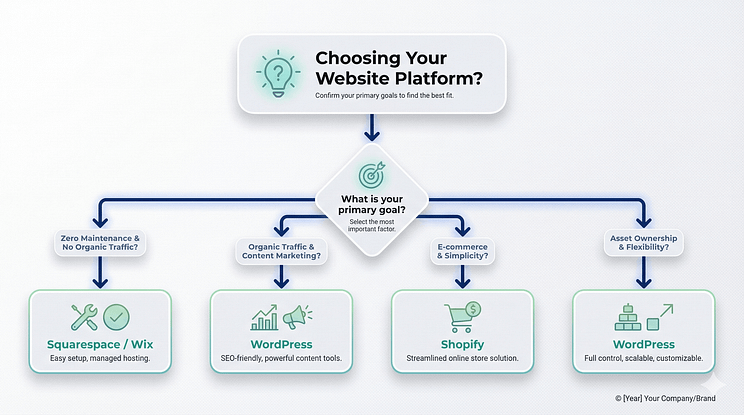
- If your primary goal is zero maintenance and you will never rely on organic traffic: Go with Squarespace/Wix.
- If your primary goal is organic traffic, audience building, and content marketing: Choose WordPress.
- If your primary goal is e-commerce and you value simplicity over margin: Choose Shopify.
- If your primary goal is long-term asset ownership and maximum flexibility: Choose WordPress.
Conclusion: Your Website Platform Is a Business Strategy—Not a Template Choice
The platform you choose today becomes the foundation of your future freedom, or your future frustration.
Don’t choose based on the trends you see on Instagram. Choose based on where you are going. If you are building a business that requires traffic, audience, and the ability to pivot, you need a system that can handle it.
Closed platforms can make you fast, but they will always lock you in. Open platforms require a little more responsibility, but they guarantee you own your success.
Make the choice that lets you grow, change, rebrand, expand, and own every single pixel of your digital asset. That is the smart, strategic decision every business owner should make.


