


TL;DR: Everything You Need to Know About Website Heatmaps
You're here because you suspect your website could be doing more, but you're tired of just guessing why visitors aren't converting. I get it. This article isn't about vague theories; it's about giving you a direct, visual way to understand exactly what your users are doing. Website heatmaps are the X-ray vision you need to see past the numbers and into the actual behavior on your site.
Here's what you'll walk away with:
- The "Why" Behind the "What": You'll learn how heatmaps show you why users get stuck or convert, not just that they did. This means you can stop making assumptions and start making informed decisions.
- Your Toolkit for Discovery: I'll break down the different types of heatmaps—click maps, scroll maps, and session recordings—and show you which one to use for what specific problem. You'll understand how to spot everything from user frustration to hidden conversion opportunities.
- A Clear Path to Action: This isn't just theory. I'll guide you through setting up your first heatmap, interpreting the data you collect, and turning those visual insights into concrete improvements that actually boost your conversions.
If you're ready to move beyond basic analytics and truly understand your users, stick around. This guide will give you the clarity you've been looking for.
I've poured effort into my website, but sometimes it feels like a black box.
Visitors come, some convert, others leave, and I'm left wondering why.
And while A/B testing and GA4 give me some information... tried A/B testing or looked at Google I'm only told what happened, not why. I feel a disconnect, a nagging suspicion that there's more to understand about my users' behavior. I might even feel frustrated, knowing there are conversion opportunities slipping through my fingers.
Imagine seeing your website through your visitors' eyes, understanding exactly where they click, how far they scroll, and what they ignore. Imagine pinpointing the exact elements causing confusion or delight. This isn't science fiction; this is the power of website heatmaps.
They transform abstract data into vivid, actionable visual insights, giving you the clarity you need to stop guessing and start improving. I will show you how to use these incredible website optimization tools to turn your website into a conversion machine.
Speaking of optimization, don't miss our ultimate website optimization checklist to make sure you're covering all your bases.
What Are Website Heatmaps, and Why Do You Need Them?
You've heard the term "heatmap," but what does it really mean for your website?
Think of a website heatmap as a visual representation of your visitors' engagement, using a color-coded scale to show you where attention is hottest (red) and coldest (blue).
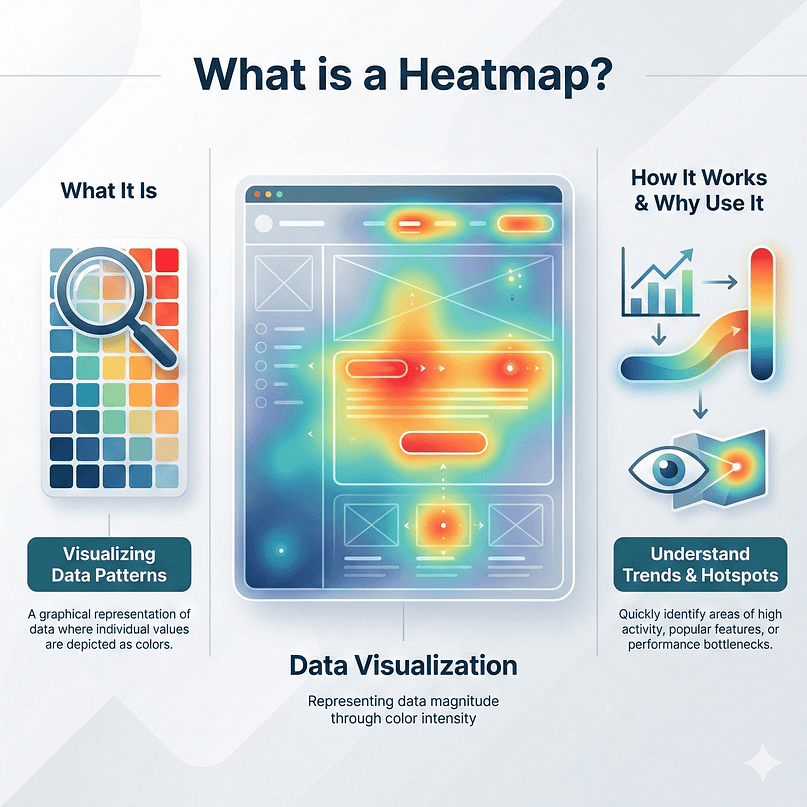
It's like a weather map for your website, but instead of temperature, it shows user interaction. I think you need them because they bridge the gap between analytics data and real human behavior, revealing insights that text-based reports simply can't. They are a fundamental component of good user experience analytics.
After all, making your site easy and enjoyable to use is key, and we've got some great tips on how to create a user-friendly website.
Decode the Colors: What Hot and Cold Spots Really Tell You
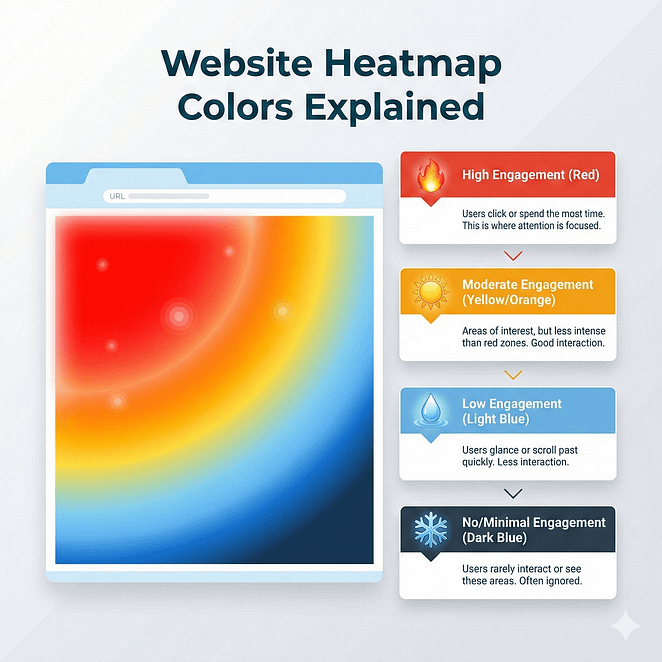
When you look at a heatmap, you'll see a spectrum of colors. Red areas indicate high engagement: lots of clicks, long viewing times, or frequent scrolling. Blue areas show low engagement.
We'll explore what these colors mean in different contexts, helping you understand if a hot spot is a good thing (like a popular call-to-action) or a bad thing (like users clicking a non-clickable image).
How Heatmaps Reveal the "Why" Behind User Behavior
Traditional analytics tell you how many people visited a page or what percentage clicked a button.
Website heatmaps go deeper, showing you where they clicked, how far they scrolled, and what they ignored. This visual context is important for understanding the motivations and frustrations behind your users' actions, allowing you to move beyond assumptions and make data-driven decisions.
They are a core component of effective conversion rate optimization (CRO) strategies because they provide the visual evidence needed to understand the customer journey mapping on your site.
If you're looking for ways to boost your numbers, we've got a ton of tips to increase conversion rates.
I learned this the hard way:
seeing what people do on your site is powerful — but it’s only the beginning.
Heatmaps showed me where things were going wrong.
A/B Testing helped me confirm what actually worked better.
And quizzes and surveys gave me a window into why people hesitated in the first place.
What made the biggest difference was having a site that could hold all of that — insight, experimentation, and direction — in one place.
That’s why I use Thrive Suite.
Your Heatmap Toolkit: Understand the Different Types of Website Heatmaps
Not all website heatmaps are the same. Each type offers a unique lens into user behavior, and knowing which one to use for what purpose is key. You'll want to understand these core tools to get the most out of your analysis of user behavior and conversion opportunities.
Click Maps: Where Are Your Visitors Clicking (and Not Clicking)?
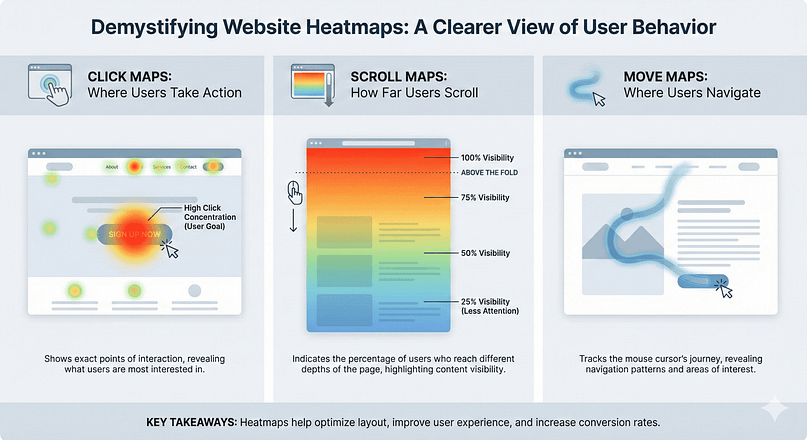
A click map shows you exactly where visitors click on a page. Hot areas mean lots of clicks, while cold areas mean few. You'll learn how to identify if users are clicking on important elements, or if they're trying to click on non-clickable elements, indicating confusion.
- Spotting "Rage Clicks" and "Dead Clicks": These are important indicators of user frustration. A "rage click" is when a user repeatedly clicks the same spot, often because it's not responding as expected. A "dead click" is a click on an element that looks interactive but isn't. Both are conversion killers you can easily spot with click maps, giving you clear signals for website optimization.
- Uncovering "Ghost Buttons" and Unclear CTAs: Sometimes, your call-to-action (CTA) isn't as obvious as you think. Click maps reveal if users are missing your primary CTA or getting distracted by less important elements.
Scroll Maps: Are Your Visitors Seeing Your Most Important Content?
A scroll map uses color to show how far down your page visitors scroll. Red means most people see that section, while blue means very few do. This is invaluable for understanding content visibility and placement, a key part of good user experience (UX).
- Identifying the "Fold" and Its True Impact: The "fold" is the part of your page visible without scrolling. Scroll maps show you where your actual fold is for most users and if your important content is being seen or scrolled past.
- Improving Content Placement for Maximum Exposure: If your key messages or CTAs are in a "cold" scroll area, you know you need to move them higher up the page. This helps you make sure your most valuable information isn't hidden, directly supporting your CRO strategies.
Move Maps (Hover Maps): What Catches Their Eye Even Without a Click?
Move maps track where users move their mouse cursor. While not always directly correlated with eye-tracking, they often indicate areas of interest. You'll discover how these can hint at what users are considering, even if they don't click.
- Gauging Interest in Images and Text Blocks: If users are hovering over specific images or paragraphs, it suggests they're paying attention, even if they don't interact further. This can inform your content strategy and digital marketing analytics efforts.
Confetti Maps: Segment Clicks by User Attributes
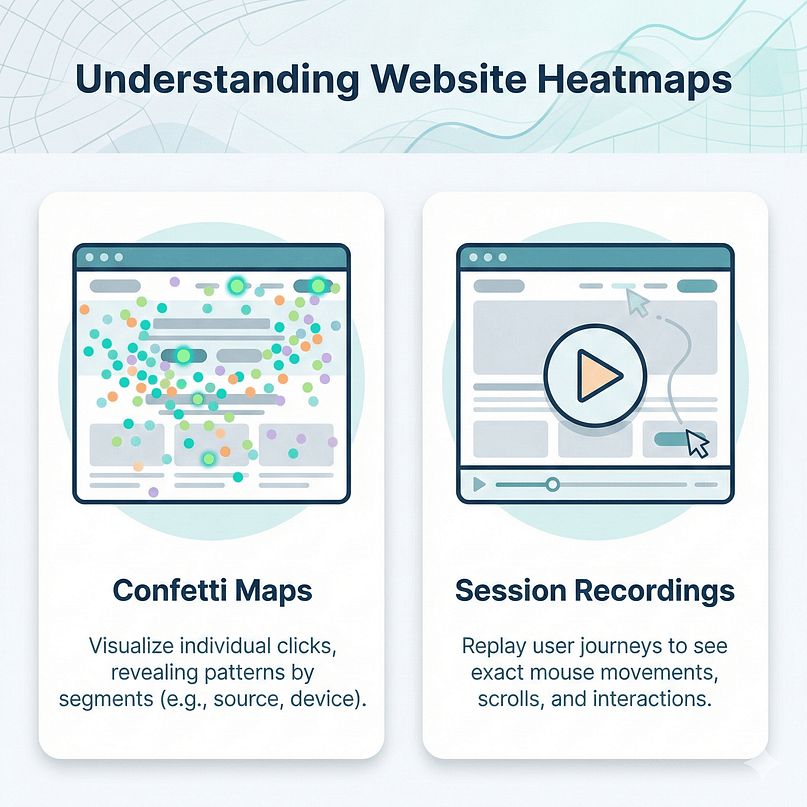
Confetti maps are a more advanced type of click map that lets you segment clicks by different user attributes (e.g., traffic source, device, new vs. returning visitor). This allows you to see if different user groups interact with your page in unique ways.
- Tailoring Experiences for Specific Audiences: If mobile users click different elements than desktop users, or if visitors from a specific campaign behave differently, confetti maps help you identify these patterns and tailor your improvement efforts, enhancing your user experience analytics.
Session Recordings: Watching the Full User Journey Unfold
Session recordings are like DVR for your website. They capture individual user sessions, allowing you to watch their mouse movements, clicks, scrolls, and form interactions in real-time. This is where the "why" truly comes alive, giving you a deep look into user behavior and helping you visualize the customer journey mapping.
- Pinpointing User Frustration and Confusion: Watch for erratic mouse movements, repeated clicks, or rapid scrolling back and forth. These are clear signs of a user struggling.
- Identifying Usability Issues and Technical Glitches: Sometimes, a button simply doesn't work, or a form field is buggy. Session recordings expose these issues instantly, providing important data for website optimization.
- Understanding the "Aha!" Moments: Just as important as frustration, look for smooth, confident user journeys that lead to conversion. What did those users do differently?
Heatmaps in Action: Benefits for Every Role
Website heatmaps are not just for one department, by the way.
They offer unique and powerful info that can help various roles within your organization. I've seen how different teams can use the same heatmap data to solve their specific challenges, making these tools incredibly versatile for driving growth.
For Marketing Teams: Improving Campaigns and Landing Pages
As a marketer, I'm always looking for ways to make my campaigns work harder. Heatmaps are a secret weapon here. They show me exactly how visitors interact with my landing pages, telling me if my ad copy aligns with what users are looking for, or if my call-to-action is getting lost in the shuffle.
- Refining Ad-to-Landing Page Cohesion: If I'm running a campaign promising "free templates," and my click map shows users are ignoring the template download section on the landing page, I know there's a disconnect. I can adjust the landing page layout or the ad messaging to better meet expectations.
- Improving CTA Visibility and Effectiveness: A scroll map might reveal that my primary CTA is consistently below the fold for most users, or a click map could show a low click-through rate on a key button. This tells me to experiment with placement, size, or even the wording of that button to boost conversions.
- Understanding Campaign-Specific Behavior: Using confetti maps, I can segment users by traffic source (e.g., Google Ads vs. organic search). If users from a specific ad campaign are rage-clicking on a particular element, I know exactly where to focus my optimization efforts for that campaign.
For UX Designers: Enhancing User Flows and Usability
For my UX design colleagues, heatmaps are like having a superpower. They can validate design choices or immediately flag areas of confusion, allowing them to build more intuitive and delightful user experiences.
- Identifying Navigation Pain Points: If session recordings show users repeatedly clicking back and forth between navigation items, or move maps indicate a lot of hesitation around a menu, it's a clear signal that the navigation structure needs a rethink.
- Improving Form Completion Rates: Watching users struggle with a form field in a session recording, perhaps they're repeatedly deleting and retyping, or skipping a required field, gives me direct evidence to simplify the form, add clearer instructions, or break it into smaller steps.
- Validating New Feature Adoption: After launching a new feature, a click map can quickly show if users are discovering and interacting with it as intended. If a new button is cold, I know I need to improve its discoverability or re-evaluate its placement.
For Product Managers: Validating Features and Prioritizing Roadmaps
Product managers are always balancing user needs with business goals. Heatmaps provide objective data to inform their decisions, helping them build products that users genuinely want and find easy to use.
- Assessing Feature Engagement: A click map on a product page can tell me if a newly added feature (like a "compare products" button or a "customer reviews" section) is actually being used. Low engagement might mean it's not valuable, or it's simply not visible enough.
- Prioritizing Development Efforts: If session recordings consistently show users struggling with a particular part of the checkout process, or a scroll map highlights that an important product detail is never seen, I have clear, data-backed reasons to prioritize fixing those issues on the development roadmap.
- Understanding User Value Perception: If users are consistently hovering over (move map) or clicking on (click map) specific product specifications or images, it tells me what aspects of the product they find most interesting, which can inform future product enhancements or marketing messaging.
For Developers: Identifying Technical Glitches and Performance Issues
Even developers, who often focus on code, can find immense value in heatmaps and session recordings. They offer a visual way to catch front-end bugs or performance bottlenecks that might otherwise go unnoticed.
- Pinpointing Broken Elements: A dead click on a button that should work, or a rage click on a form field, is a direct indicator of a technical issue. Session recordings can show the exact moment a JavaScript error occurs or a dynamic element fails to load.
- Diagnosing Responsiveness Issues: If a click map for mobile users looks significantly different and less engaged than the desktop version, it might point to a responsive design issue that's making the site difficult to use on smaller screens.
- Validating A/B Test Implementations: After a developer sets up an A/B test, heatmaps can be used to confirm that the different variations are displaying correctly and that users are interacting with them as expected, making sure the test data is reliable.
How to Choose Your Heatmap Tool: A Feature Comparison
You're ready to get started, and the good news is that setting up website heatmaps and session recordings is surprisingly straightforward. You don't need to be a coding wizard.
But before you dive in, you'll need to pick the right tool for your needs. There are excellent free options and solid paid platforms, each with its own strengths.
I'll walk you through some of the most popular choices, helping you weigh features, pricing, and ease of use, all of which are important considerations for your digital marketing analytics stack.
If you're just starting out or working with a tight budget, Microsoft Clarity is an absolute gem. It gives you unlimited heatmaps, session recordings, and even some basic insights for free. I often recommend it as the perfect entry point for anyone looking to experiment with website heatmaps and session recordings without any financial commitment. It's surprisingly solid for a free tool among website optimization tools.
- Key Features: Unlimited heatmaps (click, scroll), unlimited session recordings, instant insights, Google Analytics integration, no traffic limits.
- Pricing: Completely free.
- Ideal for: Small businesses, startups, individual marketers, anyone new to heatmaps, or those with very high traffic who need a free solution for user experience analytics.
Hotjar is probably the most well-known name in the heatmap space, and for good reason. It offers a comprehensive suite of tools beyond just heatmaps and recordings, including surveys, feedback widgets, and an intuitive interface. It's a fantastic option if you're looking for a more integrated approach to understanding user experience and gathering direct feedback, making it a strong contender for holistic user experience analytics.
- Key Features: Heatmaps (click, scroll, move), session recordings, surveys, feedback polls, form analysis, funnel analysis.
- Pricing: Offers a generous free tier for up to 35 daily sessions, with paid plans starting around $39/month for more sessions and advanced features.
- Ideal for: Businesses looking for a complete UX research platform, those needing to combine quantitative data with qualitative feedback, and teams with dedicated UX roles focused on customer journey mapping.
Crazy Egg has been around for a long time and is known for its distinctive "Confetti" heatmaps, which allow you to segment clicks by referral source, search term, and more. It also offers a suite of other visual reports like scroll maps and overlay reports. It's a solid choice if you want detailed visual insights without the full breadth of a feedback platform like Hotjar, particularly for focused CRO strategies.
- Key Features: Heatmaps (click, scroll, confetti, overlay), session recordings, A/B testing, editor for making changes directly.
- Pricing: No free tier, but offers a 30-day free trial. Paid plans start at $29/month for 30,000 tracked pageviews.
- Ideal for: Marketers focused on conversion rate optimization (CRO), e-commerce sites, and businesses that need A/B testing capabilities integrated with their visual analytics.
VWO (Visual Website Optimizer) is more than just a heatmap tool; it's a full-fledged experimentation and conversion optimization platform. While it includes heatmaps and session recordings, its core strength lies in its advanced A/B testing, multivariate testing, and personalization capabilities. You'd use VWO if you're serious about running complex experiments and have a larger budget, making it a top-tier choice among website optimization tools.
- Key Features: Heatmaps, session recordings, A/B testing, multivariate testing, server-side testing, personalization, and a solid analytics suite.
- Pricing: Custom pricing, typically for larger businesses with significant traffic and advanced CRO needs.
- Ideal for: Enterprise-level businesses, large e-commerce sites, and teams with mature CRO strategies that require advanced testing and personalization.
Here's a quick comparison to help you decide:
Feature/Tool | Microsoft Clarity | Hotjar | Crazy Egg | VWO (Visual Website Optimizer) |
|---|---|---|---|---|
Heatmaps | Click, Scroll | Click, Scroll, Move | Click, Scroll, Confetti, Overlay | Click, Scroll, Move |
Session Recordings | Unlimited | Yes | Yes | Yes |
Surveys/Feedback | No | Yes | No | Yes (as part of broader platform) |
A/B Testing | No | No | Yes | Yes (core feature) |
Pricing Model | Free | Free tier, then paid | Paid (trial available) | Custom enterprise pricing |
Ease of Use | Very High | High | Medium | Medium-High |
Ideal Use Case | Beginners, high-traffic free needs | UX research, feedback, all-in-one | CRO, visual analytics, A/B testing | Advanced experimentation, enterprise CRO |
I'll be real, though. At some point, I realized the problem wasn’t a lack of tools.
I knew what people were doing.
I could test what changed outcomes.
I even had ways to ask people directly what they were thinking.
The friction came from trying to make all of that work on a website that wasn’t designed to guide decisions in the first place.
Thrive Suite clicked for me because it supports how I actually think about websites.
Not as pages, but as paths.
Not as isolated experiments, but as connected signals.
It helped me stop collecting insight for its own sake — and start using it to build clearer, more intentional journeys.
Setting Up Your First Website Heatmap: A Practical, Step-by-Step Guide
You're ready to get started, and the good news is that setting up website heatmaps and session recordings is surprisingly straightforward. You don't need to be a coding wizard. I'll walk you through the process, making it easy to add these powerful website optimization tools to your site.
The Installation Process: Getting the Tracking Code on Your Site
Most heatmap tools require you to add a small snippet of JavaScript code to your website. You'll learn the easiest ways to do this, whether you use a content management system (CMS) or have direct access to your site's code.
- Using Google Tag Manager for Easy Deployment: If you're already using GTM, adding heatmap tracking is a breeze. I'll show you how.
- Direct Installation for WordPress, Shopify, and Custom Sites: Specific instructions for common platforms to make sure you get it right the first time.
Configuring Your First Heatmap and Recording Sessions
Once the code is installed, you'll need to tell the tool which pages to track. You'll learn how to set up your first click map, scroll map, and session recording, making sure you capture the data you need for effective user experience analytics.
- Targeting Key Pages: Where to Start Your Analysis: Don't try to track every page at once. I'll guide you on identifying the most important pages for your initial website heatmap analysis (e.g., landing pages, product pages, checkout flows).
- Setting Up Recording Filters and Sampling (If Applicable): Understand how to manage data collection, especially for high-traffic sites, to make sure you're capturing relevant sessions without overwhelming your system.
Interpreting Your Website Heatmaps: Turning Visuals into Actionable Insights
Now that you've collected data, the real work (and fun!) begins: interpreting your website heatmaps. This is where you transform colorful patterns into concrete actions that drive conversion opportunities. You'll learn how to ask the right questions and spot the important clues, all part of a smart approach to digital marketing analytics.
The "Aha!" Moments: What to Look For in Your Click Maps
Your click maps are a treasure trove of insights. You'll discover how to identify common patterns and what they mean for your user experience.
- Clicks on Non-Clickable Elements: The Frustration Indicator: If users are clicking images or text that aren't links, it means your design is misleading. How can you make interactive elements clearer or remove the illusion of interactivity? This is a direct signal for website optimization.
- Ignoring Key CTAs: Is Your Call to Action Hidden or Unappealing?: If your main "Buy Now" or "Sign Up" button is cold, it's a huge problem. You'll explore design, copy, and placement changes to make it pop, directly impacting your CRO strategies.
- Unexpected Clicks: Uncovering Hidden User Intent: Sometimes, users click on elements you never intended to be interactive. What does this tell you about their expectations or what they're looking for?
Getting Scroll Map Secrets: Are Users Missing Your Value Proposition?
Scroll maps reveal whether your most important content is actually being seen. You'll learn how to make sure your key messages land above the important visibility threshold.
- The "False Bottom" Phenomenon: When Users Think the Page Ends: This happens when a large image or white space makes users think they've reached the end of the page, causing them to miss valuable content below.
- Improving Content Flow and Visual Hierarchy: Use scroll map data to rearrange your page elements, making sure a logical flow that keeps users engaged and scrolling, which is vital for effective customer journey mapping.
Looking Closely with Session Recordings: Empathizing with Individual Users
Session recordings are your most empathetic tool. You'll learn to watch them with a critical eye, putting yourself in the user's shoes.
- Identifying Friction Points in Forms and Checkouts: Watch how users interact with forms. Do they hesitate? Do they re-type information? These are clear signals for improvement, informing your CRO strategies.
- Spotting Navigation Confusion and Broken User Journeys: If users are repeatedly going back and forth, clicking on the wrong navigation elements, or getting stuck, your navigation needs an overhaul. This is key for understanding customer journey mapping.
- The Power of the "Golden Path": What Do Successful Users Do? Don't just look for problems. Analyze sessions of users who *do* convert. What was their user journey like? Can you replicate that experience for others?
Expanding Your Horizons: Advanced Strategies for Heatmap Analysis and Improvement
You've mastered the basics of website heatmaps. Now, let's push the boundaries and explore advanced strategies that use these insights for truly transformative results. This is where you move from understanding *what* happened to strategically influencing *what will happen*, integrating these insights into your broader digital marketing analytics.
Combining Heatmaps with Other Analytics Tools for a Holistic View
Heatmaps are powerful, but they're even stronger when integrated with your existing analytics stack. You'll learn how to weave them into your broader digital marketing analytics strategy.
- Google Analytics + Heatmaps: The Dynamic Duo: Use GA to identify *which* pages have high bounce rates or low conversion rates, then use website heatmaps to understand *why*. This combination is essential for comprehensive user experience analytics.
- A/B Testing with Heatmap Insights: Validating Your Hypotheses: Don't just guess what changes to make. Use heatmap data to form hypotheses, then A/B test your proposed solutions to confirm their impact on conversions, a cornerstone of effective CRO strategies.
- Integrating with CRM Data: Understanding User Segments: Connect heatmap data with your CRM to see how different customer segments (e.g., new leads vs. existing customers) interact with your site, enriching your customer journey mapping.
Using Heatmaps for UX Audits and Website Redesigns
When you're planning a major website overhaul or a routine UX audit, website heatmaps are indispensable. They provide objective data to guide your design decisions, making them important website optimization tools.
- Pre-Redesign Analysis: Benchmarking Current User Behavior: Before you change anything, capture extensive heatmap data to understand current user patterns. This provides a baseline for measuring the success of your redesign.
- Post-Redesign Validation: Did Your Changes Improve UX?: After a redesign, immediately set up heatmaps to see if your new layout, navigation, and content hierarchy are performing as intended, providing clear user experience analytics.
Proactive Improvement: Anticipating User Needs Before They Click
Don't just react to problems; use heatmap insights to anticipate them. You'll learn how to use patterns to predict user behavior and improve proactively, a key aspect of advanced digital marketing analytics.
- Identifying Emerging Trends in User Engagement: Are users starting to ignore a once-popular section? Are new elements drawing unexpected attention? Heatmaps can flag these shifts early, guiding your website optimization.
- Designing for Intuitive User Journeys: Guiding the Eye and the Click: Use heatmap data to inform your information architecture and visual design, creating a website that naturally guides users towards their goals, improving customer journey mapping.
The "Crazy Scientist" Approach: Challenging Assumptions with Heatmaps
You've been told "above the fold" is everything. You've heard that shorter pages are always better. Website heatmaps give you the data to challenge these assumptions and discover what *actually* works for *your* audience, proving their value as powerful website optimization tools.
- The Long Scroll Advantage: When More Content Means More Engagement: Sometimes, a well-structured long page with compelling content can outperform a short one, especially if your scroll maps show high engagement throughout. This is a direct insight for CRO strategies.
- Testing "Negative Space" for Focus: Less Can Be More: Instead of filling every pixel, use heatmaps to test if strategic white space around key elements actually draws more attention and clicks.
- The Power of "Distraction Mapping": What Are Users *Not* Looking At?: It's not just about what's hot; it's about what's cold. If an important element is consistently ignored, it's a distraction or poorly positioned. How can you remove or re-evaluate it?
Ethical Considerations and Data Privacy with Heatmaps
As much as I love the insights heatmaps provide, I also know we're dealing with real people and their data. So, while we're uncovering "hidden gold," we also carry a responsibility to handle that information ethically and legally. This isn't just about avoiding fines; it's about building trust with your users, which, frankly, is good for business.
GDPR and CCPA Compliance: Playing by the Rules
If your audience includes users from the EU or California, you're already familiar with GDPR and CCPA. Heatmap tools, by their nature, collect data. You'll want to make sure your chosen tool and your data collection practices align with these regulations. This often means having clear privacy policies, obtaining consent, and offering users ways to opt-out or request their data. I always advise checking with a legal professional to make sure your specific setup is compliant.
Anonymization Best Practices: Protecting User Identities
Most heatmap tools offer features to anonymize data. This is a smart move. You don't need to know *who* clicked a button, just *that* it was clicked. Look for features that automatically mask IP addresses, hide sensitive text input (like credit card numbers or personal details in forms), and prevent the recording of specific elements on your page. This lets you get the behavioral insights without compromising individual privacy.
Obtaining User Consent: Transparency is Key
Before you start tracking, you'll need to make sure you've obtained proper consent, especially in regions with strict privacy laws. This usually means a clear, concise cookie banner or privacy notice that explains what data you're collecting and why. Don't bury it in legal jargon; tell your users in plain language. I find that when you're upfront about it, people are generally more understanding.
Transparency with Your Users: Building Trust
Beyond legal requirements, I think there's a moral obligation to be transparent. Your privacy policy should clearly state that you use tools like heatmaps and session recordings to improve the user experience. Explain the benefit to them: that you're using this data to make the site better, easier to use, and more helpful. This kind of honesty fosters trust, and a trusted user is often a loyal customer. Remember, you're observing user behavior, not spying on individuals. Keep that distinction clear.
FAQ Section
You've got questions, and I've got answers. Here are some of the most common inquiries I hear about website heatmaps, their benefits, and how to get started. Think of this as a quick reference to solidify your understanding and clear up any lingering confusion.
Your Next Steps: From Heatmap Insights to Conversion Success
You now have a deep understanding of website heatmaps, how to set them up, interpret their data, and use them for advanced improvement. The key is to start small, experiment, and consistently apply these insights. Ready to stop guessing and start improving?
Begin your heatmap journey today by choosing a tool like Microsoft Clarity to explore your user behavior, or look at advanced platforms like Hotjar. The insights you uncover are the first step to getting your website's true conversion potential. Start analyzing, start improving, and watch your website transform.
If you’re anything like me, you don’t just want more data.
You want to understand your visitors.
You want to test ideas without second-guessing yourself.
And you want a website that quietly does its job — guiding people, not confusing them.
That’s the lens I build through now.
Thrive Suite supports the what through testing, the why through deeper visitor insight, and the how through a site that’s built to lead people somewhere — on purpose.


