


TL;DR: My Shortlist of the Best Sales Funnel Builders
This is not a ranked list, and I'll say that more than once. These five are all good tools at different price points; the question is which one is good for YOU:
- ClickFunnels if you want a largely done-for-you funnel, fast, and you have the budget for it
- Systeme.io if you're starting out and want a genuinely useful free plan
- FunnelKit if you run WooCommerce and want funnels without leaving WordPress
- GoHighLevel if you're an agency or sales team that needs the whole machine
- Thrive Suite if you're a WordPress business owner who wants to own the funnel, not rent it (ours, saved for last on purpose)
I got hands-on with every one of these for this review. The details, the surprises, and the honest caveats are below.
If you're looking for a list of 20 funnel builders, this isn't that article, and honestly, going through 20 options wouldn't help you anyway.
I've gone through scores of tools over the years. I've done the reading and the trying: I built client funnels on the original ClickFunnels back in my freelance days, I run my own websites on Thrive Suite today, and for this update I got hands-on with every tool on this shortlist, going through setup, templates, and the editors myself. Where I mention a tool I haven't personally run, I'll tell you exactly that.
So this is my list of the funnel builders you should actually consider. They're all good. They come at different price points. And the decision boils down to your actual preference and what your business needs, which is exactly how this article is organized.
Full disclosure, once here and again when it matters: I work for Thrive Themes. Our tool is on this list, and I saved it for last so it has to earn its place after you've seen everything else.
What Exactly is a Sales Funnel Builder, Anyway?
A sales funnel builder is software that maps out the path someone takes from "who are you?" to "here's my credit card." You're building the full journey (awareness, interest, decision, purchase) and automating the steps in between so you're not manually herding people through hoops.
Most of these tools give you the same core pieces. You get landing pages to capture attention, opt-in forms to grab email addresses, checkout pages to process payments, and the ability to throw in upsells or downsells when it makes sense. The better ones also include email automation, so you can follow up without living in your inbox.
What I like about a good funnel builder is that it keeps everything in one place. You're not cobbling together a landing page tool, a separate email service, a payment processor, and a page builder, then hoping they all talk to each other. You build the funnel, connect the steps, and let it run.
The point is to remove friction, for you and for the people moving through your funnel. If setting up a simple lead magnet campaign requires three different logins and a Zapier Ph.D., something's broken. (And if you're still deciding what kind of funnel you need in the first place, I've broken down the main types of sales funnels separately.)
When You Actually Need a Sales Funnel Builder (vs. Just a Website)
You probably don't need a sales funnel builder just because everyone's talking about them (take this section as your last check before you start considering tool options).
If you have a straightforward business where people land on your website, browse a bit, and buy something, a standard website with a good checkout flow will do the job. Same goes if you're running a local service business where most of your leads come from word-of-mouth or Google Maps. A clean website with a contact form gets you 90% of the way there.
But there are specific situations where a dedicated funnel builder starts to make real sense:
A practical test: look at your current customer journey. One or two steps from stranger to customer (they Google you, they buy)? Stick with your website. A chain of events (they download something, get a few emails, maybe book a call, then buy)? You're managing a funnel, and doing that with a patchwork of tools gets messy and expensive fast.
Still feel like you need one? Good, keep reading.
How to Choose the Best Sales Funnel Builder for Your Business
When I'm evaluating funnel builders, I pay attention to the details that actually matter once you're six months in and trying to scale:
You'll find there's no universal "best" funnel builder. The right tool depends on how much control you want, what funnels you're running, and whether you value flexibility over convenience. Both camps are valid. You just need to know which one you're in.
The Shortlist at a Glance
Quick word on the order before you scan: this is not a ranking. Every tool here wins a real use case, and the reviews below run in the order I worked through them, with ours saved for last so it has to earn the spot.
Best Sales Funnel Builder Roundup
Tool | Best for | Starts from | My honest take |
|---|---|---|---|
ClickFunnels | Done-for-you funnels for established businesses | $97/mo | Powerful and truly done-for-you, but you WILL be upsold, and it is not cheap |
Systeme.io | Beginners and budgets | Free plan; paid from $17/mo | Simpler than its rivals, and the free plan is genuinely generous |
FunnelKit | WooCommerce funnels inside WordPress | Free version; paid from $99.50 first year | The most complete WooCommerce funnel setup, just bring your own page builder |
GoHighLevel | Agencies and sales teams | $97/mo | Heavy machinery: brilliant for agencies, overkill for most solo owners |
Thrive Suite | WordPress owners who want to OWN the funnel | $299 first year | The stack I run my own sites on: you assemble it, and you own it |
Every price is a "starts from" figure, checked at the time of writing. Promos and renewals move, so treat these as the door price, not a quote.
The Best Sales Funnel Builders: My Hands-On Reviews
Now for the reviews themselves. A reminder before you dive in: this is not a ranked list. The reviews run in the order I worked through the tools, with ours saved for last so it has to earn its place after you've seen everything else.
Every tool here got the same treatment: I signed up (or reinstalled), went through the setup, poked around the templates and the editor, and formed my opinion the same way you would, by actually using the thing. Each review covers what stood out, what surprised me, what it really costs, and who I'd honestly point to it. Read them all if you're serious about this decision, or jump straight to the one that sounded like you in the table above.
You can’t really talk about building funnels without, you know, mentioning ClickFunnels. They’ve very much established themselves in the space.
ClickFunnels was actually one of the first funnel-building tools I came across. I was working a freelance job for an up-and-coming competitor, and ClickFunnels was the model. They were trying to make something similar.
I wasn’t in that job long enough to really understand what was going on, but years later, I ended up using ClickFunnels myself while doing freelance work for some up-and-coming business coaches.
They were part of a mastermind group where they had been encouraged to use ClickFunnels to set up their funnels. And that’s how I started using the software.
Honestly, ClickFunnels is popular for a reason.
A Very Done-for-You Funnel Builder
ClickFunnels doesn’t just give you funnel-building software. The whole product is based around giving you almost everything you need to get started.
You choose what you want your funnel to achieve, and ClickFunnels gives you a selection of relevant funnel types and templates. Its current funnel library covers goals such as generating leads, selling products, running webinars, launching products, collecting applications, and creating video sales letter funnels.
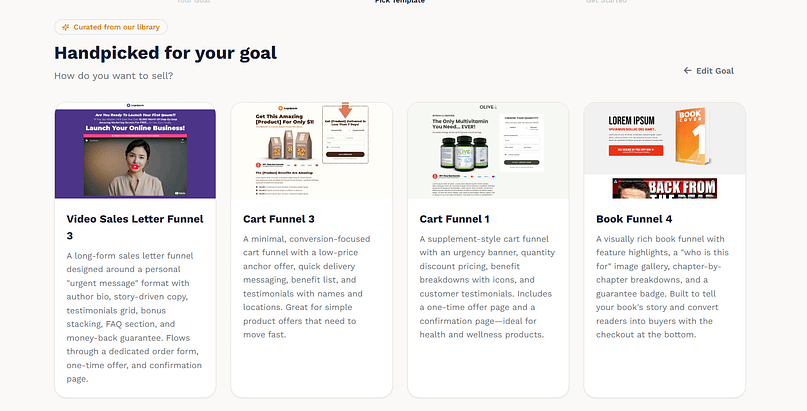
The templates I worked with also came with much of the structure and starter copy already in place. So, technically, you have as little work to do as possible.
That’s helpful because if you’re a new business owner, you might not know what the perfect formula for a video sales letter is. You could spend a lot of time trying to figure it out.
ClickFunnels describes its templates as proven and designed around specific conversion goals. Obviously, that doesn’t mean every template is automatically going to work for every business, but having that structure already there is still genuinely helpful.
You also don’t get an overwhelming amount of design freedom during the initial setup, and I understand why.
ClickFunnels is very goal-focused. It’s basically saying:
“Hey, you, as the coach or business owner, have a goal. We will give you the templates you need to make that goal happen. We’re not going to give you a bunch of random extras. That’s not what this is.”
I wasn’t 100% sure whether I could browse through every other available template during the guided setup because I went straight through the process. But the templates it suggested included options for things like a video sales letter, a short checkout funnel, and a long-form sales page.
You Will Be Upsold
The first thing I noticed when I originally started working with ClickFunnels, and again when I went back to it for this review, is that there are a lot of upsells.
You will be upsold by ClickFunnels.
You can start with a free trial or go straight into choosing a paid plan. But as you move through the setup process, you may also be offered additional training, coaching, and templates. ClickFunnels has a large coaching and consulting audience, so it makes sense that they go all in on that side of the business.
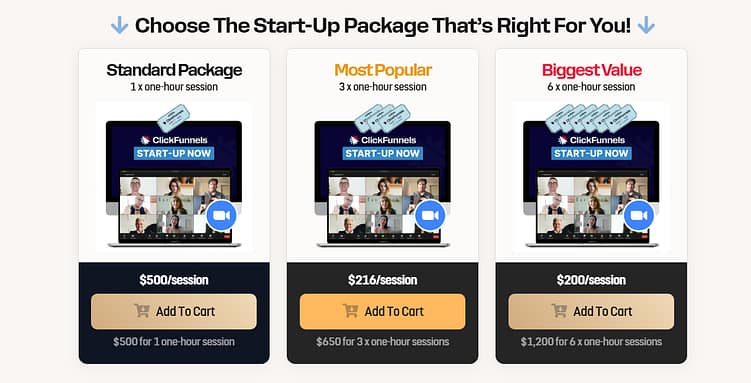
At the time of my review, I was offered coaching packages starting at around $500/session. There’s also a marketplace where users can access or purchase additional funnel resources and templates beyond what comes with the main software.
So, if you’re sensitive to that kind of thing (or you’re just not a fan of feeling like you’re constantly being sold to), this may not be the tool for you.
Building and Editing a Funnel
In terms of ease of use and setup, though, ClickFunnels is a really straightforward platform.
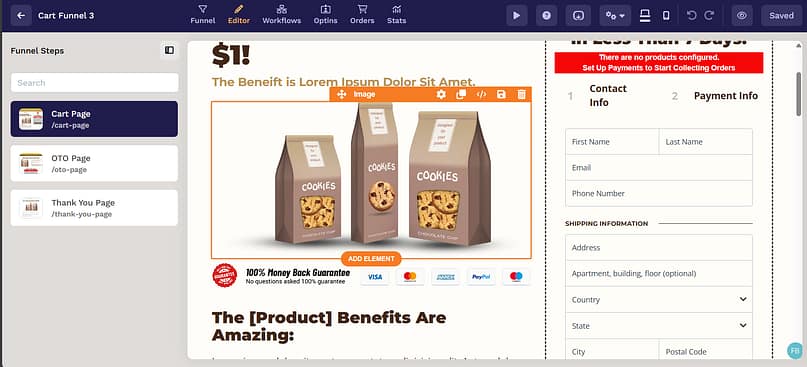
When you enter the dashboard, it immediately pushes you toward building your first funnel. You choose your goal, select a funnel type, and then work through the pages included in it.
You get an overview of what the funnel looks like, which makes it easy to understand what is going where. From there, you can open and edit each individual page.
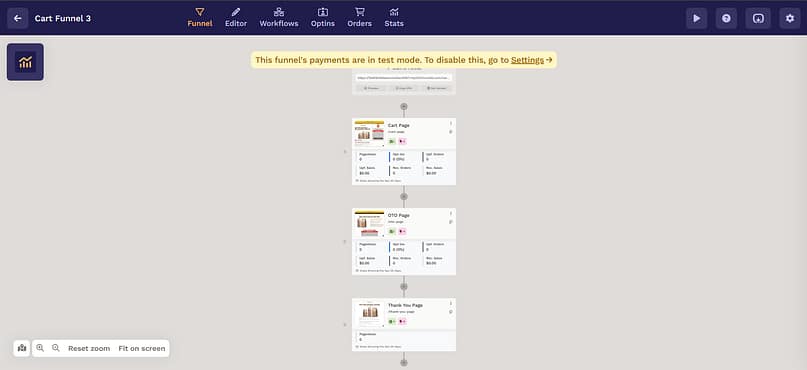
The page editor is also pretty straightforward. It uses a drag-and-drop system, and you can change the text, colors, fonts, images, buttons, and other elements without needing technical or design skills.
ClickFunnels also lets you connect funnel steps to automated workflows. These workflows can handle things like welcoming new leads, sending email sequences, tagging contacts, recovering abandoned carts, and triggering actions based on what someone does inside the funnel.
Some ClickFunnels funnel frameworks even come with pre-built workflows already included, which fits into the whole pre-made, done-for-you approach the platform has.
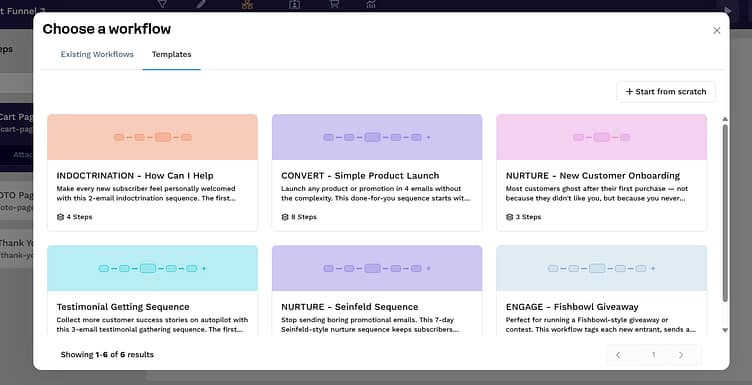
One thing to know on the automation front, though: those workflows handle what happens inside ClickFunnels. The moment you want to connect outside tools (your CRM, a webinar platform, whatever your stack already runs on), you'll mostly be going through Zapier, which ClickFunnels leans on as its official integration layer for apps it doesn't connect to directly. Zapier has a free tier, but it's a small one, and at real funnel volume that's another monthly subscription on top of an already premium price.
It’s very effective for someone who wants almost nothing to do with the design process.
Like, you do not want to spend longer than an hour (maybe two, max) setting up your funnel. You want to get something online and start using it immediately.
That is where ClickFunnels makes sense.
The Price Is the Main Caveat
The caveat is that I would say ClickFunnels works best for someone who already has an established audience or customer base.
Because this tool is not cheap.
This tool is not cheap at all. And they don’t shy away from that.
Here's what the plans look like at the time of my review:
- Launch: $97 per month (paid monthly)
- Mid tier: $197 per month
- Top tier: $297 per month
- A larger annual-only plan is also available
The belief behind that pricing is that if you already have an established business, or you follow their funnel strategies, you should be able to make that money back through the sales your funnels generate.
Which is great to think about.
But if you are completely new to an industry and still figuring out what you’re selling, who you’re selling it to, and whether people even want it, I would not say this is the tool to start with.
That’s a lot of pressure to put on your bottom line.
I think ClickFunnels works best for business owners who already have an audience, already have some kind of “in,” and just need the tools to move that audience toward the checkout.
And even then, I’ll still say it’s a little steeply priced.
The price is understandable because a lot of the work is done for you. ClickFunnels has put years of work and experience into the software, templates, training, and funnel systems.
So, I’m not going to knock them for charging what they charge.
But if you’re starting up or building on a budget, I would not say ClickFunnels is for you.
My Verdict on ClickFunnels
ClickFunnels is a great tool. It’s powerful, straightforward, and very good at taking someone from “I need a funnel” to an actual working funnel without requiring them to become a designer or automation expert first.
I can see why it’s popular. (And if you're weighing it against our tool specifically, I've written a full head-to-head: Thrive Suite vs ClickFunnels.)
But because of that price point (and the number of additional offers you encounter along the way), I would not recommend it as my first choice for a completely new or budget-conscious business owner.
Full disclosure, I don’t really have a backstory with Systeme.io.
While conducting my research for, you know, the best sales funnel builders to cover, examine, and talk about, this one kept popping up. I didn’t know it that well, but after reading some other people’s reviews and experiences, I was like, let me check it out for myself.
And I would probably put this down as a great free option for people who are still trying to figure out what kind of sales funnel they want to build.
You Really Do Just Jump In
Creating an account is pretty straightforward. The site says, “Get started for free,” you create an account (I used Google), and bam, I was in the dashboard being told I had generated one lead.
I’m pretty sure that was my own contact information.
There wasn’t a lot of onboarding advice. I actually checked a couple of times whether I had previously created a Systeme.io account with that email address, but I hadn’t.
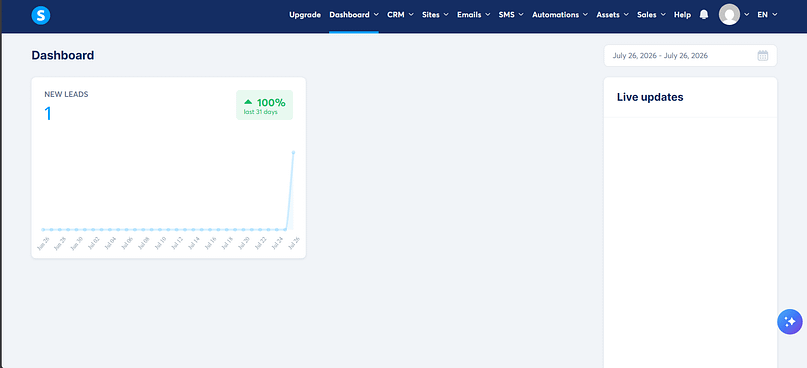
So, you really do just jump in.
And, whoa, there is a lot of stuff in there.
You have the funnel builder, email marketing, a CRM, automation rules, workflows, a website builder, blogs, online courses, communities, affiliate management, booking calendars, sales pipelines, SMS marketing, and more.
When you think about it, that isn’t necessarily unusual for an all-in-one platform. Other platforms have many of these features too.
I think it’s more about the way everything is presented in the navigation. When you first enter, it comes off as a little bit overwhelming.
It also took me a couple of seconds to figure out where I was supposed to go to create a new funnel. But once I found it and got started, it wasn’t that bad.
Building Your First Funnel
The interface becomes pretty simplistic once you get to the actual funnel-building process.
Especially if you’re coming from a tool like ClickFunnels, Thrive Suite, or GoHighLevel, this one feels a little simpler.
You start by choosing what you want the funnel to do, whether that’s building an audience, selling something, creating a custom funnel, or running an evergreen webinar. Systeme.io then creates the relevant funnel steps based on the goal you selected.
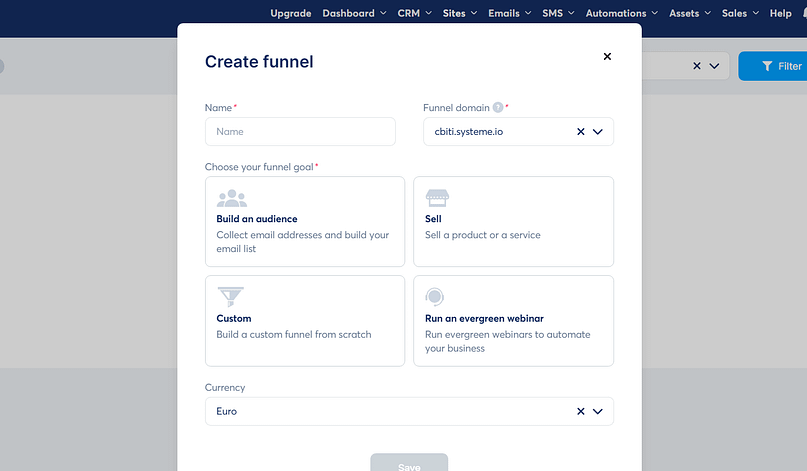
For the funnel I created, it started me off with an order form, a thank-you page, and a page to display if the funnel offer expired. I’m guessing that was based on the goal I selected.
There were a decent number of templates to choose from. Not an enormous selection, but enough to get started. And it was easy to hop into the editor and begin customizing one.
The editor itself is pretty simple and straightforward. You can drag elements onto the page and edit the text, buttons, images, sections, and other parts of the design.
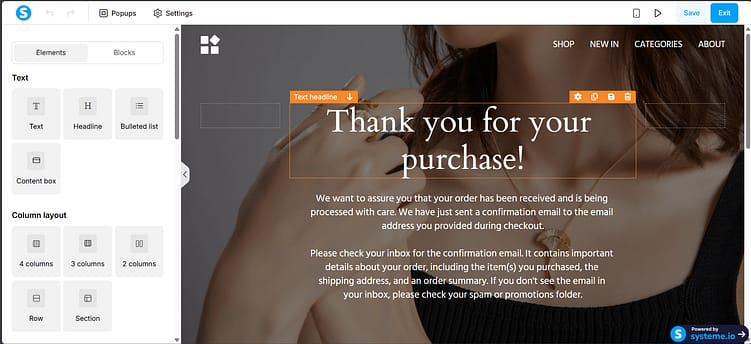
One cool feature I noticed was how easy it was to add a pop-up to the page.
You click the pop-up option, add one, and boom, you have a pop-up ready to customize.
And the fact that I could do that while using the free plan was quite impressive.
It’s More Than a Funnel Builder
Although I’m reviewing Systeme.io as a sales funnel builder, it is definitely trying to be an entire online business platform.
The CRM keeps your contacts, tags, activity, automations, and sales pipeline connected to the other tools in your account. For example, someone can enter through a funnel, be added to your contact database, receive a tag, and then enter an automated email sequence without you having to connect several different tools.
You can also use the platform to build a full multi-page website and blog, not just standalone funnel pages. Its website builder uses the same general drag-and-drop approach, and the site can live alongside your funnels, contacts, emails, and courses.
Personally, seeing all of them in the navigation made the platform feel like a bit much when I first logged in. But, you know, don’t let my yuck interfere with your yum.
You may be looking for exactly that kind of all-in-one setup.
The Free Plan Is Surprisingly Generous
Bear in mind that I tested Systeme.io using its free plan.
From my initial look at the pricing, I thought the free plan basically gave you one of each major feature and that each paid plan simply increased those limits.
That isn’t completely accurate, but it’s pretty close to how the pricing works.
The free plan currently supports up to 2,000 contacts, three sales funnels, one blog, one course, one affiliate program, and one custom domain. Email sends and file storage are unlimited, the plan doesn’t expire, and you don’t have to enter a credit card to sign up.
You also get one automation rule and one workflow, so you can experiment with automation, but you’re not going to build a massive web of complex sequences on the free plan.
A/B testing is available too. To run a test, you create two page variants inside the same funnel, choose the page that represents the conversion goal, and then start the test.
So, if you’re looking for a free solution that lets you build a funnel, add pop-ups, collect contacts, send emails, create a basic automation, and experiment with A/B testing, there’s quite a lot here.
Pricing That Meets You Where You’re At
- Free: up to 2,000 contacts, three funnels, one automation rule and workflow, unlimited emails, no credit card required
- Startup: $17 per month, up to 5,000 contacts
- Webinar: $47 per month, up to 10,000 contacts, adds automated webinars
- Unlimited: $97 per month, unlimited contacts, all features, sub-accounts, and a migration service
Now, $97 per month is still pretty steep.
But if you’re going for that plan, most of the meaningful limits have been removed. At that point, you probably have a full-scale operation you’re trying to grow.
So, the pricing does kind of meet you where you’re at.
You can begin on the free plan, move to one of the relatively affordable middle plans as your contact list and funnels grow, and then pay $97 per month when you genuinely need something closer to an unlimited setup.
When it’s time to scale, you could also decide to hop over to another platform instead. That depends on you.
At least you have room to test the entire concept first.
My Verdict on Systeme.io
Would I say Systeme.io is the most advanced tool on this list?
No.
But can it get the job done?
Yes.
It gives you a simple funnel builder, email marketing, basic CRM functionality, automation, A/B testing, website-building tools, and several extras without forcing you onto a paid subscription from day one.
I think that makes it particularly useful for someone who is still trying to figure out what kind of funnel they need, or whether they even need a full-scale funnel platform yet.
You’re not really interested in full-on customization. You just want the necessities, plus a few extras, and you want to try everything without the pressure of, “I need to pay X amount of money.”
In that case, Systeme.io might be much more up your alley.
You cannot talk about funnels and WordPress without mentioning FunnelKit.
It’s a pretty powerful solution for WordPress websites that use WooCommerce and need a funnel builder at the same time.
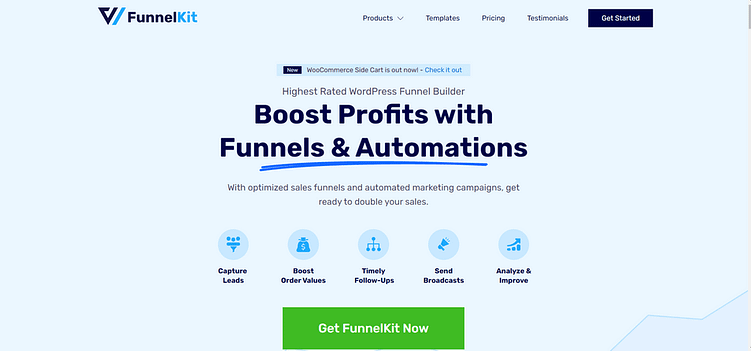
I’ve been familiar with FunnelKit for a couple of years. I’ve used it here and there, although never particularly in depth. Going through it more thoroughly for this review allowed me to gain a better perspective on the tool.
And I can see why it’s one of the more frequently mentioned options, especially for WordPress and WooCommerce websites.
(The other name you’ll keep hearing in this lane is CartFlows, the longtime incumbent. I went deeper on FunnelKit for this review because it’s the fuller toolkit and it’s where the momentum is, but I give CartFlows its due later in this article.)
Build Your Funnels Without Leaving WordPress
The thing is, if you already have a WordPress website, you may not want to introduce a completely separate platform like ClickFunnels or GoHighLevel just to build your sales funnels.
That means another dashboard, another system to learn, and potentially another set of tools that need to be connected to your website.
You’d probably rather create the funnel directly from the WordPress dashboard you’re already using.
FunnelKit is one of the better tools that makes that possible.
Technically, FunnelKit is a collection of separate WordPress plugins rather than one enormous plugin. The main Funnel Builder handles the actual funnels and checkout pages. FunnelKit Automations covers email marketing, SMS, customer profiles, and automated workflows. FunnelKit Cart provides the slide-out shopping cart and its related upsell features. You can use or purchase these tools separately, or get them together as part of a larger package.
For the purposes of this review, though, I’m mainly looking at the Funnel Builder.
Getting Started With FunnelKit
Getting started is pretty straightforward.
Once the plugin is installed, FunnelKit gives you a setup wizard that walks you through creating your first funnel. You can choose the type of funnel you want to build, import a template, and then start editing the individual steps.
The free version is available directly through WordPress.org, so you can install it from your WordPress dashboard and try the basic funnel-building process without purchasing a licence first.
You also get a good number of templates for the different parts of the funnel, including opt-in pages, sales pages, checkout pages, and thank-you pages.
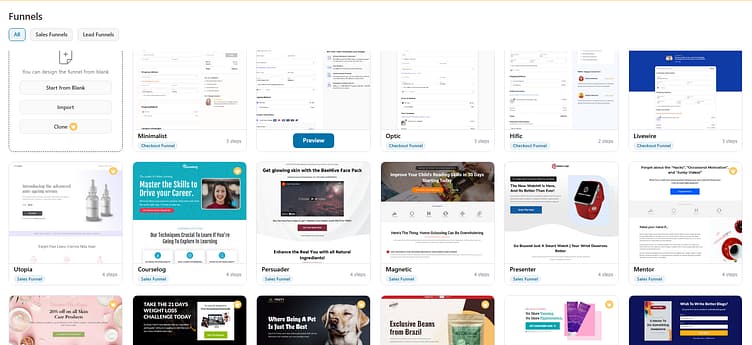
The free version allows you to build a working funnel with basic optimized checkout templates, a one-step checkout layout, opt-in and sales pages, thank-you pages, page-builder integrations, and some basic funnel analytics.
So, it isn’t one of those free plugins where you install it and immediately discover that you can’t really do anything without paying.
You can build and publish a basic funnel.
The more advanced revenue features, however, are gated behind the paid plans.
The Checkout Features Are a Major Part of the Tool
FunnelKit is particularly strong when it comes to the WooCommerce checkout process.
Instead of sending every customer through the default WooCommerce checkout page, you can create a separate, more focused checkout experience.
You can build one-step or multi-step checkouts, remove unnecessary distractions, change the fields customers are asked to complete, and arrange the checkout information in a way that makes more sense for what you’re selling.
The checkout field editor allows you to add, remove, rename, and rearrange billing and shipping fields. On the higher plans, you can also use conditional fields so that different questions appear based on things like the products in someone’s cart, their country, customer role, or product category.
You can also create product-specific checkouts.
So, rather than dropping someone onto a general store checkout page, you can build a dedicated checkout for a particular product and include its image, description, video, or other relevant sales information on the same page.
There’s also a global checkout option that lets you replace the regular WooCommerce checkout across your whole store.
That makes FunnelKit useful even if you’re not building a dramatic, multi-page launch funnel. You may simply want a better checkout process for your existing WooCommerce store.
Order Bumps, Upsells, and Downsells
FunnelKit also gives you the features you would expect from a proper sales funnel solution, including order bumps and one-click upsells.
An order bump lets you present a smaller, related offer directly on the checkout page. The customer can add it to the order without leaving the checkout.
The paid plans allow you to create multiple order bumps and control when each one appears. You can base those rules on what is already in the cart, the cart total, the customer’s location, their user role, previous purchases, and other conditions.
Then, after the initial purchase, you can send the customer to a one-click upsell or downsell page.
Because their payment details have already been submitted, they can accept the additional offer without going through the entire checkout process again.
You can create several upsell offers, place them in a particular sequence, offer multiple products, skip irrelevant offers based on set conditions, and present a downsell when someone rejects the first upsell.
But these features require a higher-tier paid plan.
Which, I mean, is a little limiting if you’re trying to do everything through the free version.
But one might also argue that if you’re at the point where you’re deliberately adding order bumps, upsells, and downsells to increase the value of each purchase, you should be able to cover a premium plan for the tool you’re using.
I can see both sides.
You’ll Ideally Need a Page Builder
The one thing that surprised me was that, to properly edit the funnel pages and templates, you’re ideally going to need a page builder.
I was taken into Elementor because that was already installed on my test website from a previous review.
So, when I clicked to edit the landing page template and saw Elementor opening, I was like:
“Whoa. Oh?”
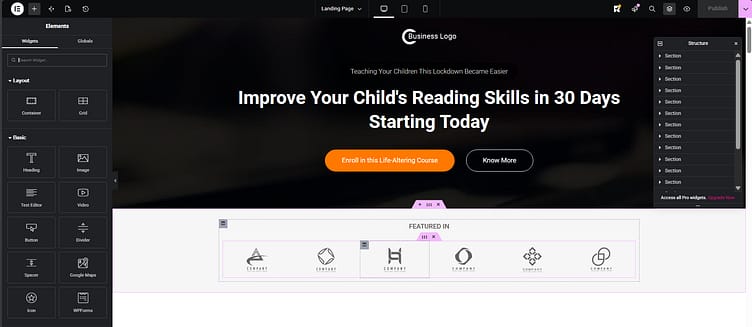
Then I went into the FunnelKit settings, which took a couple of clicks, and realized what was happening.
FunnelKit integrates directly with Elementor, Divi, Oxygen, Bricks, and the WordPress block editor. For other page builders, it provides shortcodes that allow you to place its checkout and funnel elements into the page.
I understand why FunnelKit works this way.
It’s operating on the assumption that if you already have a WordPress website, you probably have some form of page-building solution installed. So, you don’t necessarily need FunnelKit to introduce another completely separate editor.
And you can use the WordPress block editor if you don’t have a traditional page builder.
I understand it.
But I did wonder what happens if your preferred builder isn’t one of the deeply integrated options. Or what happens if it can technically display the FunnelKit elements through a shortcode but can’t give you the same level of control over the template.
I feel like having a small built-in editor wouldn’t have hurt, considering most of the other funnel solutions have one.
But again, it really depends.
For some people, this might be do or die.
For other people, it’s not that deep. If you already use Elementor on your website and FunnelKit opens the landing page in Elementor, you’re simply editing it in the same builder you use for everything else.
I was just surprised by it.
A/B Testing and Funnel Analytics
FunnelKit also gives you proper A/B testing once you move onto the Plus plan or higher.
You can test different versions of your sales and landing pages, opt-in pages, checkout layouts, order bumps, upsells, and downsells.
For example, you could test a one-step checkout against a multi-step checkout, change the product or price used in an order bump, or compare two different upsell offers.
You choose how the traffic is distributed between the variants, track the results, and then decide which version should become the winner.
The paid funnel analytics also help you see how people are moving through the funnel, where they are dropping out, and how the individual pages and offers are performing. FunnelKit can also track traffic sources through UTM parameters, which is helpful when you’re sending people into the funnel from several campaigns or platforms.
So, it really does give you the features required to set up and fine-tune a funnel from start to finish.
FunnelKit Pricing
Pricing-wise, FunnelKit is a little on the higher side, particularly once you get beyond basic checkout customization.
Here's the breakdown, with the renewal prices included because those are the numbers you'll actually live with:
- Basic: $99.50 for your first year (one website), renews at $129. Mainly checkout and thank-you page improvements.
- Plus: $179.50 first year (two websites), renews at $299. This is where the real funnel builder lives: unlimited funnels, order bumps, one-click upsells, A/B testing, analytics, and FunnelKit Cart Pro.
- Professional: $249.50 first year (three websites), renews at $399. Adds FunnelKit Automations: the CRM, email and SMS marketing, broadcasts, and visual workflows.
- Elite: $399.50 first year, renews at $599. The full feature set on up to 30 websites.
So, yeah, it can become an expensive WordPress setup.
But I’d say it’s worth considering if you’re genuinely going all in on sales funnels and need something that works closely with your existing WooCommerce store.
You’re not just paying for a landing-page builder. You’re paying for the checkout customization, order bumps, upsells, testing, analytics, and, depending on the plan, the automation system behind it.
My Verdict on FunnelKit
Outside of the page-builder surprise, FunnelKit is a pretty complete funnel solution.
It gives you the tools to build the pages, customize the WooCommerce checkout, add order bumps, create post-purchase upsells and downsells, run A/B tests, and track how the funnel performs.
And if you want the larger package, you can bring your shopping cart, customer management, email marketing, SMS, and automations into the same WordPress ecosystem too.
It is a little limiting that some of the features people most strongly associate with a sales funnel (particularly order bumps, one-click upsells, and A/B testing) aren’t included in the free version.
But the free plugin still lets you build and publish a basic funnel, so you have a chance to test the general workflow before paying.
Would I recommend it to someone who doesn’t use WordPress or WooCommerce?
No. That’s obviously not who this is for.
But if you already run your business through WooCommerce and want to build funnels without introducing a separate hosted platform, FunnelKit is one of the more complete options available.

I would say GoHighLevel is on the much higher end of the sales funnel builder spectrum.
It’s heavy machinery.
And if you’re just starting a business, working solo, or don’t demand that much from your software, I don’t think this would be the tool for you.
It’s powerful. You can see that from the moment you get to the website.
This Is Not Just a Funnel Builder
GoHighLevel is packed with almost every marketing and sales tool you could need for a business.
There’s a CRM, sales pipelines, funnels, websites, forms, surveys, quizzes, appointment calendars, email and SMS marketing, automated workflows, payment tools, courses, communities, reputation management, call tracking, customer conversations, and a growing collection of AI features.
It’s a lot.
That was the first thing I thought when I started looking through it. I said:
“Wow, this is a lot. This is a really complete solution. This is a serious tool.”
And I felt a little overwhelmed.
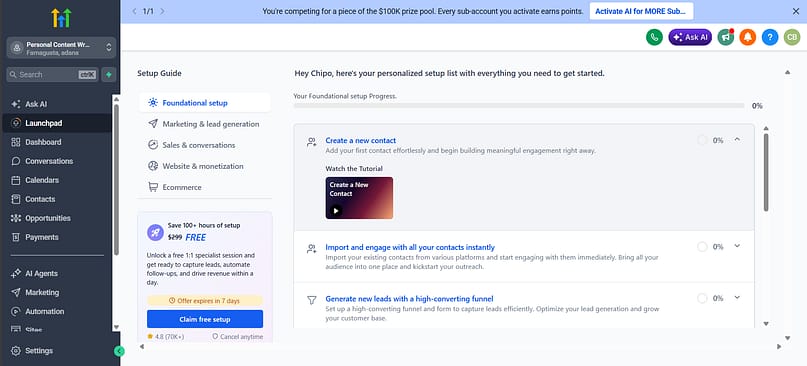
HighLevel describes the platform as a replacement for tools such as ClickFunnels, ActiveCampaign, Calendly, Mailchimp, Kajabi, and a separate CRM. I can understand that comparison because it isn’t really trying to give you one particularly good funnel builder. It’s trying to become the main operating system behind your marketing and sales process.
You can collect a lead through a form or quiz, add them to your CRM, move them into a pipeline, send automated emails and text messages, book an appointment, collect payment, and continue following up with them without necessarily moving between six different platforms.
So, yeah. Heavy machinery.
Getting to the Funnel Builder Is Surprisingly Easy
Despite the magnitude of the platform, it was easy to find the section where I could build a funnel.
And getting through that process was straightforward.
You can start from scratch or choose a template, add your funnel pages, insert forms, customize the content, and connect the funnel to a domain.
I also appreciated that GoHighLevel included small educational videos throughout the setup process.
ClickFunnels did something similar, which I thought was pretty cool.
I feel like those videos are necessary for a tool like this because the initial overwhelm could very easily stop you from wanting to get into it. A short video saying, “This is what this section does, and this is what you need to do next,” makes the whole thing feel more manageable.
You’re not dropped into this enormous dashboard and expected to automatically understand how everything fits together.
The Templates Are Focused on Actual Business Use Cases
GoHighLevel has a lot of funnel and website templates.
And while I sometimes knock tools for offering so much variety that choosing one becomes another task, the templates here are very job-focused.
If you run an HVAC company, you can find something relevant to that type of business. If you’re a life coach, consultant, real estate business, dental practice, fitness company, or another service-based business, there are templates designed around those kinds of offers.
So, there’s enough variety for different niches without it feeling like an endless collection of random designs.
The templates are also high quality.
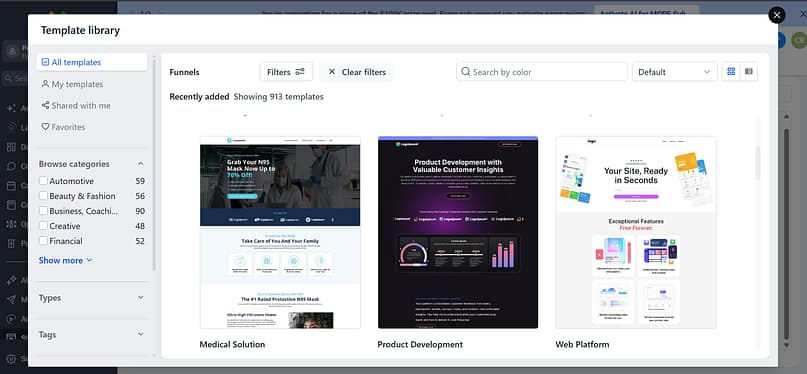
Like, you can genuinely go into one, swap out a few things, add your branding and offer, and use much of the existing structure as it is.
Obviously, you still need to make sure the copy accurately reflects your business. A template cannot magically sell an offer nobody wants.
But you’re not starting with an empty white page and trying to work out what should go where.
This niche-focused approach also carries over into HighLevel’s agency tools. Agencies can save complete configurations as reusable “Snapshots,” including funnels, workflows, forms, calendars, pipelines, and dashboards, and then apply those setups to other client accounts. HighLevel specifically positions these for repeatable setups in industries such as dental, legal, fitness, real estate, spas, and home services.
That starts to explain who this platform was really built for.
The Editor Is Straightforward
The actual page editor is straightforward and relatively easy to navigate.
You can add and rearrange sections, rows, columns, text, images, buttons, forms, surveys, calendars, checkout elements, and other content without needing to code.
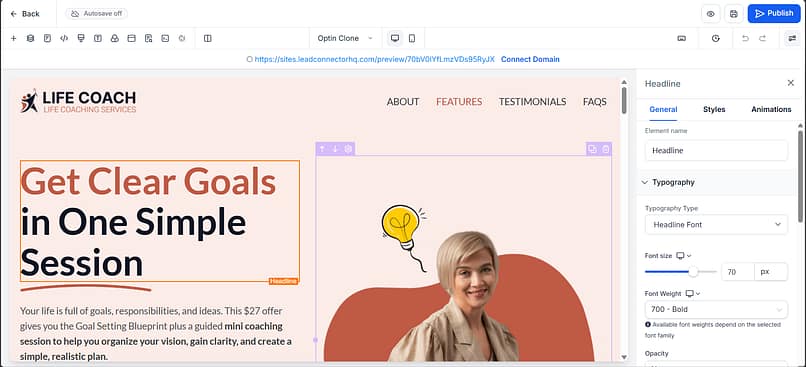
Forms and surveys can also be created separately and then reused across different websites and funnels.
The quiz functionality goes beyond adding a few questions to a page too.
You can create scoring quizzes, assessments, lead-generation quizzes, and personality-style quizzes. The answers can be mapped to CRM fields, used to segment contacts, or used to trigger different automated follow-up sequences based on the person’s result.
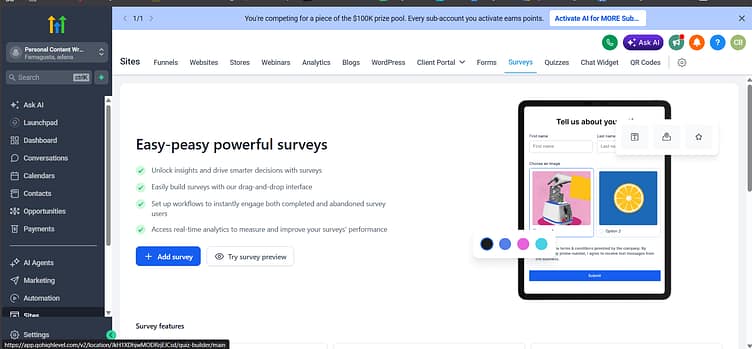
Again, this is what I mean when I say that GoHighLevel isn’t simply giving you a way to design pages.
The page is connected to everything behind it.
The Funnel Connects to a Full CRM
When someone fills in a form, completes a quiz, books an appointment, sends a message, or buys something through your funnel, that activity can feed into the CRM.
You can add contacts to a visual sales pipeline, assign them to team members, apply tags, update custom fields, and trigger different actions based on what they do.
The platform also gives you a centralized Conversations area where teams can manage messages and follow up with contacts. Form submissions can even appear directly inside the relevant conversation thread, so someone handling the lead can review the information and respond without jumping between different parts of the platform.
Then there are the workflows.
You can create automations that send email, SMS, voicemail, or other follow-up messages; update contact information; move opportunities through a pipeline; notify team members; book appointments; request reviews; or branch into different paths depending on what the contact does.
HighLevel’s agency CRM specifically combines automated email, SMS, and voicemail campaigns with its funnels, CRM, pipelines, reputation tools, call tracking, and client portal.
That’s where the value starts to become clearer.
You’re not just building a lead-generation page and then figuring out what to do with the lead afterwards. You can build the whole system around what happens before and after someone converts.
Conversations, Calendars, and Follow-Up
GoHighLevel also puts a lot of emphasis on conversations with prospective customers.
You can manage incoming leads, respond through supported communication channels, automate missed-call follow-ups, and connect conversations to the contact’s wider CRM history.
There are built-in appointment calendars too, which can sync the booking process with the CRM and trigger automations around confirmations, reminders, cancellations, and follow-up.
That makes sense for the kinds of businesses GoHighLevel seems especially focused on.
A local contractor, agency, consultant, dental practice, real estate company, or coach may need to collect a lead, qualify them, book an an appointment, remind them to attend, and follow up afterwards.
GoHighLevel can manage that whole sequence.
For a business with a high volume of enquiries, or several employees handling different parts of that process, that’s genuinely valuable.
For one person selling a straightforward digital product?
It could be a lot.
What If You Already Have a WordPress Website?
I initially felt that if you already had an established WordPress website, GoHighLevel might not be the best choice.
And I still think that may be true if your only goal is to add a few funnel pages.
You could end up paying for GoHighLevel’s website builder, hosting tools, forms, surveys, and other page features while continuing to manage most of your website elsewhere.
However, you don’t necessarily have to rebuild your entire website inside GoHighLevel to use the CRM and automation side.
HighLevel offers an external tracking script that can capture page activity and supported form submissions from WordPress, Shopify, Wix, custom websites, and other platforms. It can automatically create or update CRM contacts and record attribution data from those external forms.
So, having an existing WordPress website doesn’t automatically rule it out.
The more important question is whether you need the rest of the system.
If you want to keep WordPress as your main website but use GoHighLevel for lead tracking, appointments, pipelines, conversations, and automated follow-up, that could still make sense.
But if all you need is a funnel builder attached to your existing site, this is probably overkill.
It Makes Much More Sense for Agencies
The deeper I looked into GoHighLevel, the more its agency focus made sense.
Agencies can create separate sub-accounts for clients, copy complete setups between accounts using Snapshots, give clients access to branded dashboards, track results, and manage funnels, automations, calendars, pipelines, and conversations from one platform.
On the higher plan, agencies can also use SaaS Mode to resell the platform under their own offer, automate the creation of client sub-accounts, and add markups to certain rebilled services.
That’s not a small extra feature.
That is an entire business model.
An agency could create a repeatable setup for a specific industry, load that system into each new client account, and then charge clients for the software and services.
That is where the “heavy machinery” becomes appropriate.
You’re not buying all of this to create one landing page.
You’re using it to run several client accounts, manage a team, standardize processes, and reduce the number of separate platforms your agency relies on.
GoHighLevel Pricing
GoHighLevel currently has three main plans, all with a 14-day free trial.
- Starter: $97 per month, up to three sub-accounts, core platform features, unlimited contacts and users
- Unlimited: $297 per month, unlimited sub-accounts, basic API access, rebill phone and email costs without markup
- Agency Pro: $497 per month, SaaS Mode, automated sub-account creation, advanced API access, and markup on rebilled services
The Starter plan is officially positioned towards smaller businesses and solo marketers.
And yes, technically, a solo business owner could use it.
But I would still ask whether a solo user genuinely needs all this.
At $97 per month, it sits in the same starting-price territory as ClickFunnels. But the value proposition is different.
ClickFunnels is largely saying, “We’ll help you get a funnel online quickly.”
GoHighLevel is saying, “We’ll help you run your leads, marketing, sales conversations, appointments, automations, websites, reputation, and client accounts from one place.”
If you need that, $97 may feel reasonable.
If you only need the funnel part, you’re buying a warehouse because you needed a cupboard.
My Verdict on GoHighLevel
GoHighLevel is a strong and valuable platform.
The funnel builder is straightforward, the templates are high quality, and the educational guidance makes it easier to find your way through a very large product.
But its real strength isn’t the funnel builder on its own.
It’s what happens when the funnel connects to the CRM, workflows, calendars, conversations, sales pipelines, reporting, payments, and follow-up tools around it.
In the right hands, you could run a significant amount of your business from one platform without stacking together several separate tools.
But in the wrong hands, you will not maximize its full potential.
If you’re a one-person team, new to business, or don’t require a lot of different features to manage your leads and customers, this would probably be overkill.
You’d be paying a lot of money for tools you don’t use, and potentially adding usage charges on top of that.
I’d say GoHighLevel is better suited to established agencies, sales teams, and medium-sized or larger small businesses with a wide customer base, several communication channels, or a fairly complex setup.
Is it powerful and valuable?
Yes.
But in the right hands.
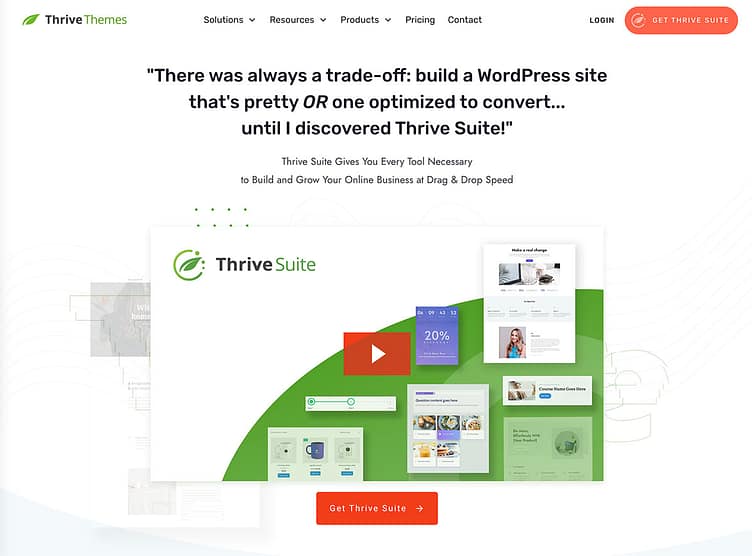
And finally, ours. You probably noticed Thrive Suite is last on this list.
That's on purpose. I work for Thrive Themes, so our tool doesn't get to ride at the top of a list I wrote. It goes last, after you've seen everything else, so you can judge whether it earns its place.
But here's what I can offer that none of the reviews above can: I didn't set up a trial account for this one. I've been running my own websites on these tools for years. This is the stack I actually live in.
It's a Toolbox on Your WordPress Site, Not a Platform
First, the honest category difference. ClickFunnels, Systeme.io, and GoHighLevel are hosted platforms. You build your funnels on their land. Thrive Suite is a set of WordPress plugins that work together, which means you build your funnels on YOUR land, right next to your content, your blog, and your SEO.
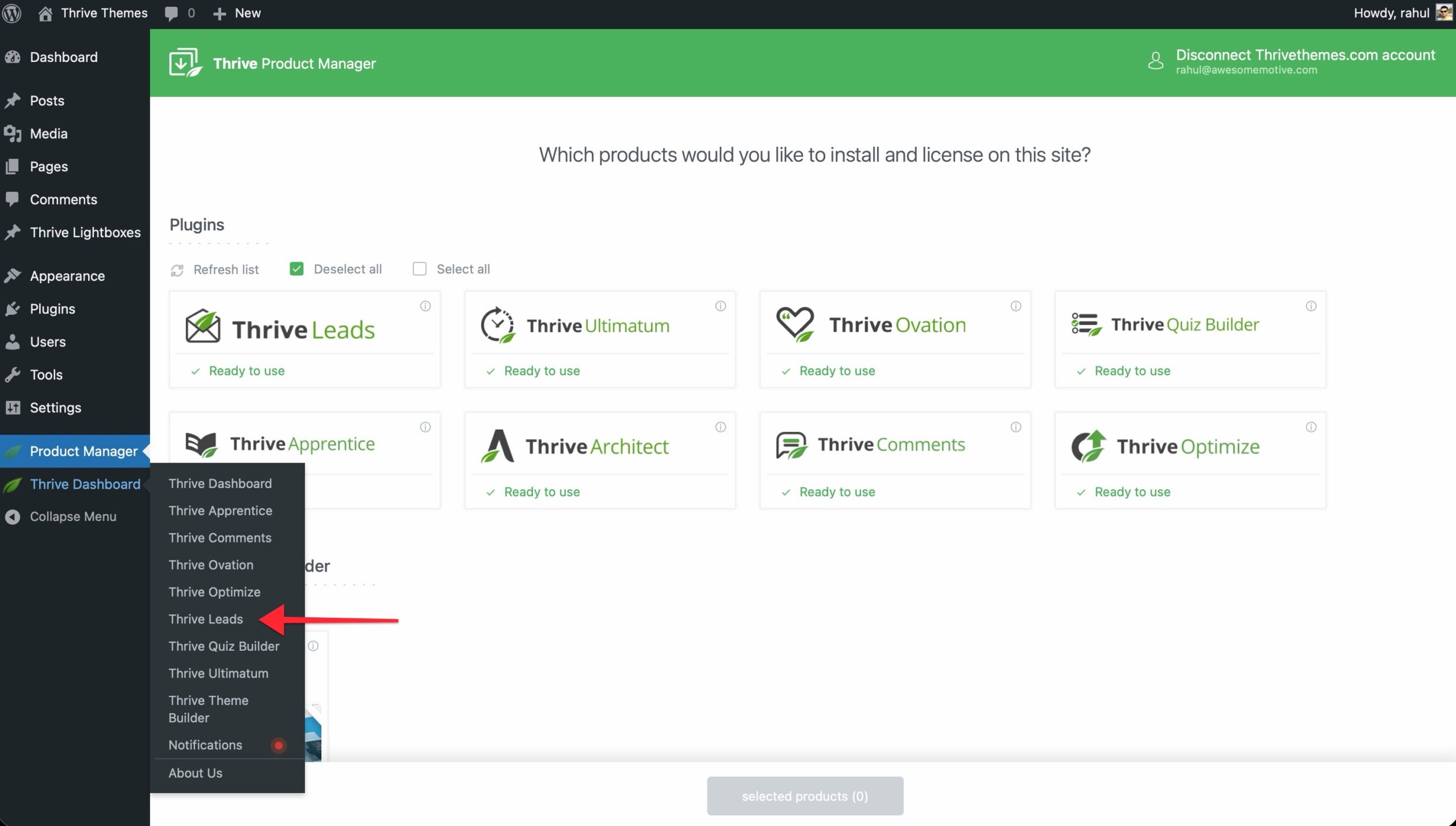
The Suite covers the whole conversion job:
So no, it's not "a funnel builder" in the single-tool sense. It's the pieces a funnel is made of, living inside WordPress.
Building a Funnel With It
Here's what that looks like on my own site.
My lead generation runs through Thrive Leads. I'm working on two newsletters right now, for two different audiences, and I can't have the same form serving both.
So Leads' targeting rules decide which offer shows up where. The landing and confirmation pages are Thrive Architect, built from its template sets, where the pages in a funnel come designed to match each other. Setting up a form, configuring where it displays, and going live takes me 10 to 15 minutes at this point.
Now, the honest comparison: there's no "pick a goal and we'll generate your funnel" wizard here like ClickFunnels or Systeme.io gave me. You assemble the pieces yourself. The template sets get you most of the way, but I won't pretend it's the same experience. The hosted tools hand you a funnel. Thrive hands you very good parts and gets out of your way.
Some people love that control. I'm one of them. If you're not, that difference matters, and you should weigh it honestly.
And I have to give the templates their flowers here, because they're a big part of why the assembly doesn't scare me.
There are templates for everything in the Suite: landing pages, opt-in forms, quizzes, sales pages, course pages, entire funnel sets where the pages come designed to match. They're high quality, and more importantly, they're built with conversion thinking already inside them.
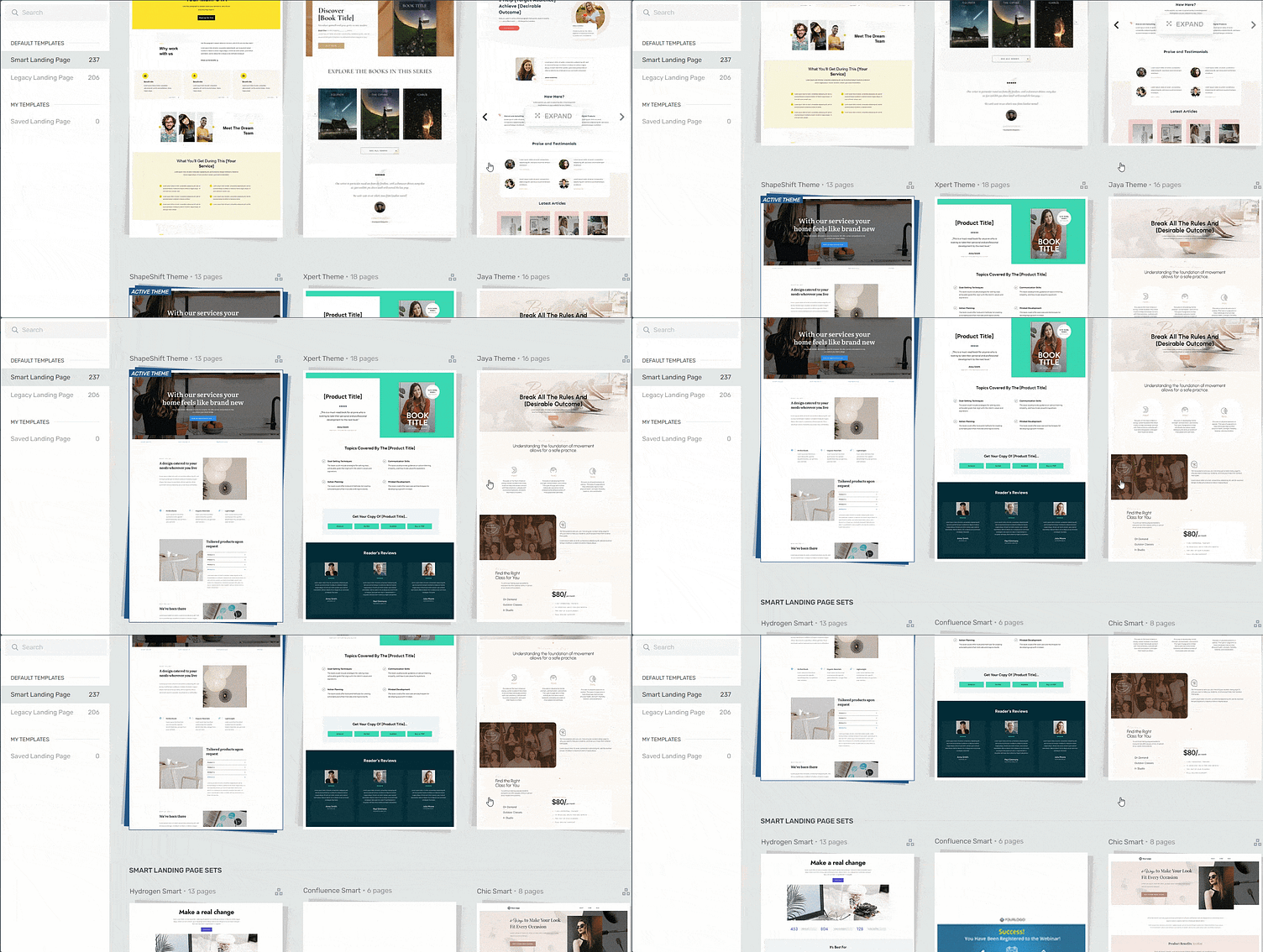
The opt-in template already has the copy structure that earns signups. The sales page already flows the way a sales page should. We put that thinking into each one, and I say that as someone who works here and as someone who leans on it for my own site.
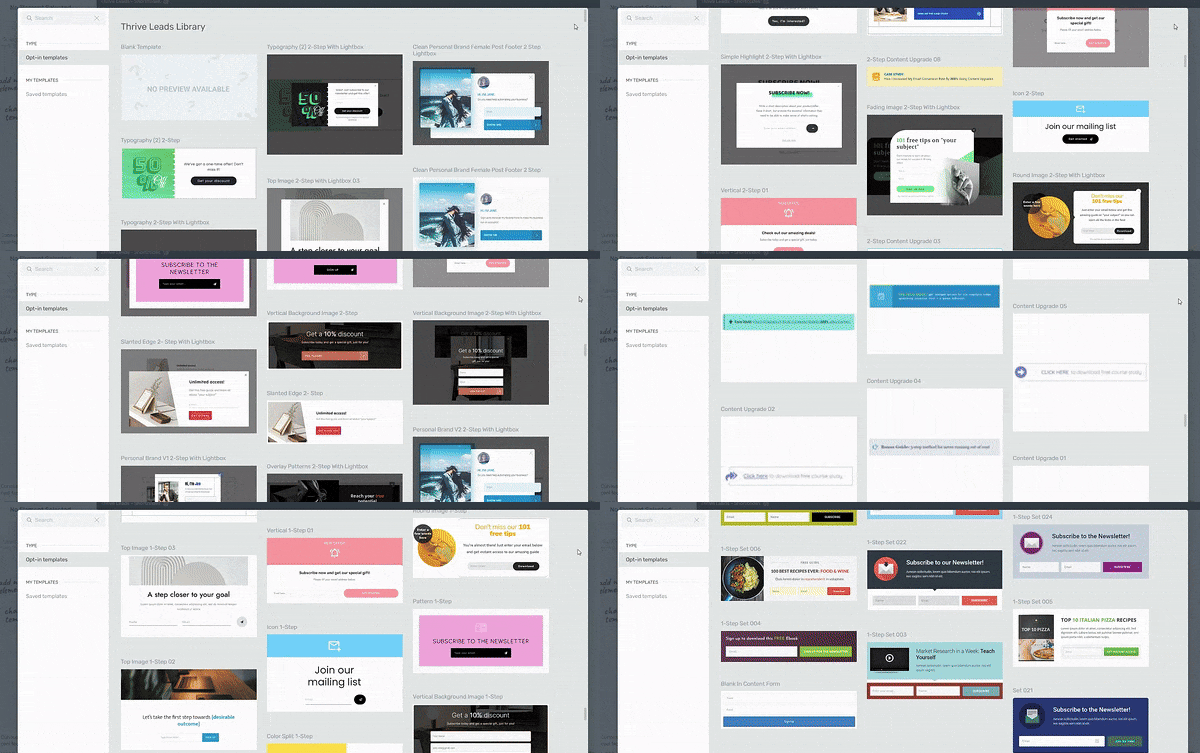
That matters more than people realize. A template that just looks good saves you an hour. A template that's already set up to convert saves you from the much more expensive mistake: building a beautiful page that doesn't do anything.
The Honest Caveats
I've pointed out the catch with every tool above, and I'm not changing the rules now that we've reached mine.
You need a WordPress website and hosting first. If you don't have that, the hosted platforms above skip this step for you, and that convenience is real.
There's no built-in email sending. Thrive Leads captures the lead, but delivering the emails is your email platform's job. I use Kit for mine, and the Suite connects to basically every major service. The all-in-ones above bundle email into the subscription. With Thrive, email is a separate tool, though the free tiers on platforms like Kit mean it doesn't have to be a separate bill.
And it's a suite, not a single screen. The tools share a dashboard and genuinely work together (that cohesiveness is why I moved my own site here in the first place), but a full funnel will have you touching more than one of them.
You'll also need to connect to a checkout tool (unless you're selling through Thrive Apprentice, then you can use the tool's built-in Stripe, Square, or PayPal integrations).
Where It Genuinely Shines
Ownership, first and always. Your funnel pages are WordPress pages on your hosting. There's no export wall, no "cancel and your funnels disappear." That's the trade-off I keep coming back to across this whole list, and Thrive sits on the right side of it.
Then there's what's included rather than gated. A/B testing comes with the Suite through Thrive Optimize, while some tools on this list put testing behind their higher plans. Quiz funnels get a full dedicated builder, not a form field with ambitions (I've written a whole guide on how to create a quiz funnel with it).
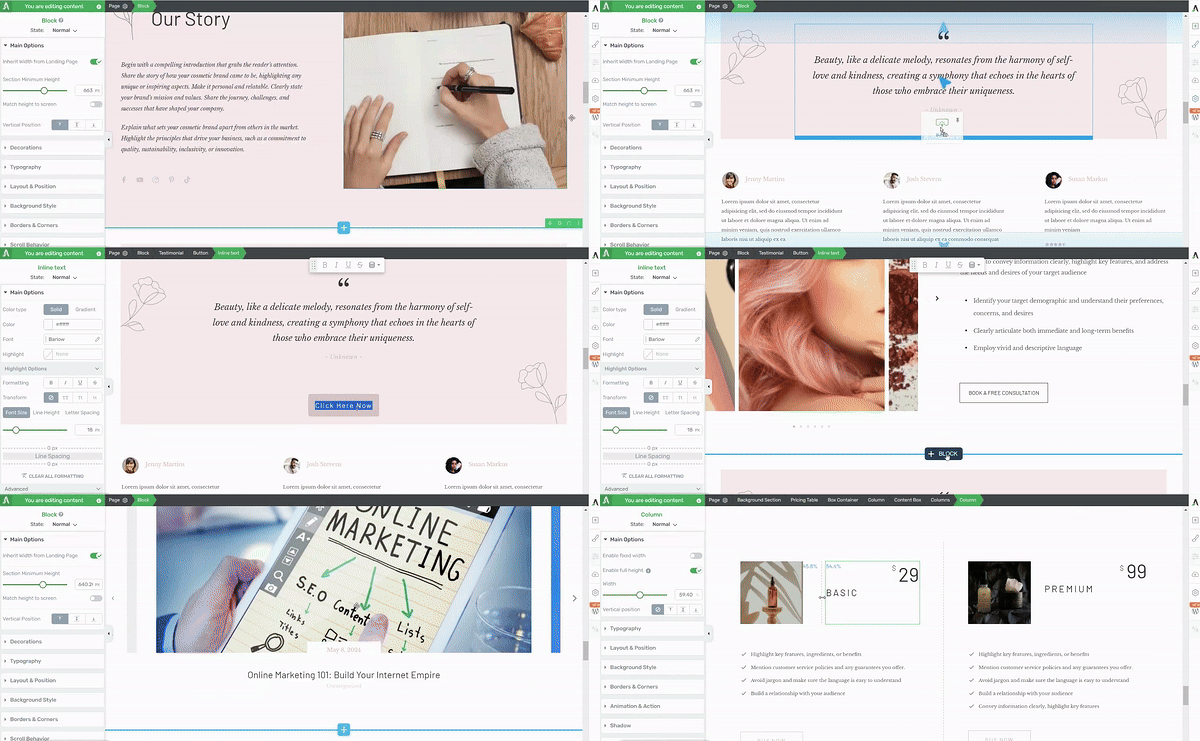
And scarcity campaigns through Ultimatum are the kind of feature you'd usually be piecing together with separate countdown plugins.
And everything compounds in one place. The blog post that ranks, the landing page it links to, the opt-in form on both, and the A/B test improving them: same site, same system.
Thrive Suite Pricing
One plan, so this list is short:
- First year: $299, all the tools, on up to five websites
- Renewal: $599 a year after that
- You'll add: WordPress hosting (from a few dollars a month) and your email platform (free tiers exist)
I'm giving you the renewal number upfront because I've complained about renewal surprises in every hosting and plugin review I've ever written, and I'm not making an exception for us.
Against the monthly platforms, the math is still blunt: even the $599 renewal is about six months of ClickFunnels or GoHighLevel at their entry prices, and year one is about three. You'll add hosting (from a few dollars a month) and your email platform (free tiers exist). Stacked together, you're comfortably under the hosted all-in-ones, and you own what you built.
My Verdict on Thrive Suite
If you want a funnel live by tonight, never want to think about hosting, and like everything under one roof, pick one of the hosted platforms above. I mean that, and I've told you which one fits which situation.
But if you're a WordPress business owner, if your content and your funnels need to live and grow together, and if you'd rather own the machine than rent it, this is the lane Thrive Suite was built for, and it's the one I live in.
It's what I use, daily, on the sites that represent me. That's the whole review, really.
Other Good Sales Funnel Builders to Consider
I said this list would be short on purpose. But these four come up constantly, too, but they didn't meet my requirements. They could, however, pique your interest. I'll tell you exactly where each one stands with me:
- CartFlows: the longtime incumbent in the WooCommerce funnel lane, and still a solid, simpler-to-start option. I went with FunnelKit for the deep review (the fuller checkout and automation toolkit, and where the momentum is), but if you try FunnelKit and find it more than you need, CartFlows is the sensible one to consider.
- Kartra: I first looked into Kartra years ago when people in a networking group I was part of kept recommending it, and I went deep enough to form a real opinion, but I've never run funnels on it myself. It's an all-in-one in the ClickFunnels mold with strong automation and client-delivery features, starting from around $119/mo. If the all-in-one lane appeals to you, compare it against ClickFunnels and GoHighLevel on price and CRM needs.
- GetResponse: an email marketing platform that added funnels, not a funnel builder that added email. If email is your center of gravity and funnels are a bonus, it's worth a look. I haven't run it hands-on.
- Leadpages: genuinely good at what it actually is: simple, high-converting landing pages and lead capture. But a landing page builder is not a funnel builder (I break down the difference in the FAQ below), which is why it's here and not above. Not hands-on.
Sales Funnel Builder Pricing: What You Really Pay Over Time
Most sales funnel builders advertise their monthly pricing like it's the whole story. It's not. The real cost shows up when you factor in contact limits, usage charges, renewal jumps, and the features you actually need to run a funnel that converts. So here's the honest over-time math on my five, using the prices I saw during my reviews:
- ClickFunnels: predictable, but premium. The $97/mo Launch plan is $1,164 a year, every year, and the higher plans run $197 and $297/mo. Over three years you're at roughly $3,500 to $10,700 depending on tier. No contact-based penalties, which is genuinely good. But remember the Zapier note from my review: connecting outside tools usually means another subscription on top.
- Systeme.io: the gentlest curve here. Free until you outgrow 2,000 contacts and three funnels. The $17/mo Startup plan is $204 a year; even three years on the mid plans keeps you under what one year of most competitors costs. The $97/mo Unlimited tier only makes sense once you're running a full operation, and by then it should be paying for itself.
- FunnelKit: watch the renewal. First-year pricing runs $99.50 to $399.50 depending on tier, but renewals are the real number: $129 to $599 a year. The Plus plan (where the order bumps, upsells, and A/B testing live) is $179.50 in year one, then $299/yr, so a realistic three-year total is around $780. You're also self-hosting, so add hosting costs if you don't have them already.
- GoHighLevel: the subscription is not the whole bill. $97/mo is $1,164 a year, but phone numbers, calls, SMS, email volume, and several AI features carry usage-based or per-sub-account charges on top ($50 to $97/mo per sub-account for the AI Employee plans alone). Budget from your feature list, not the headline price.
- Thrive Suite: front-loaded honesty. $299 in year one, $599/yr at renewal, so three years is $1,497, plus WordPress hosting ($10 to $30/mo). No contact limits, no transaction fees, no per-seat charges. Around $1,857 all-in over three years, which is still less than two years of most of the monthly platforms. [confirm figures at publish]
What hidden costs actually look like
- Contact limits are the classic trap: platforms that price by list size effectively charge you for growing. Model what your bill looks like at double your current list before committing.
- Usage charges are GoHighLevel's version: calls, texts, and AI features that bill by consumption. Fine if you use them, expensive if you forget them.
- Integration costs are ClickFunnels' version: Zapier plans to connect the tools it doesn't natively talk to.
- Renewal jumps are the WordPress-plugin version: FunnelKit and Thrive Suite both roughly double after year one. I've given you both numbers above, because finding out at renewal time is the worst way to learn this.
How to Choose Based on Real Budget
- Testing the waters, no list yet: Systeme.io free. You can validate an offer for exactly $0.
- WooCommerce store, funnels next: FunnelKit free version first, Plus when the order bumps start paying for themselves.
- Established audience, want it done for you: ClickFunnels, if the monthly bill is comfortably covered by what the funnels bring in.
- Agency or team running client funnels: GoHighLevel, priced from your actual feature list.
- WordPress business playing the long game: Thrive Suite. The three-year math is the argument.
What the Numbers Say: Real Conversion Rate Benchmarks by Funnel Type
The short version, if you want the numbers at a glance: dialed-in lead magnet funnels convert around 25-45%, webinar funnels live or die on a 40-50% show-up rate, tripwires run 1-3% on the front end with the profit in the bumps and upsells, and e-commerce averages 2-3%.
Most advice tells you "good funnels convert at 20-30%!" which is about as useful as saying "good weather is 70 degrees." It depends entirely on what you're asking people to do.
Here's what conversion rates actually look like across different funnel types, based on published benchmark data from Unbounce, Livestorm, ON24, Data Driven Marketing, Shopify, and other sources tracking hundreds of thousands of funnels:
- Lead Magnet Funnels can hit 25-45% when the offer is dialed in. Top-performing landing pages in Unbounce's benchmark data push past 27%, and warm traffic from an engaged audience (podcast, YouTube, blog) typically opts in at 30-60%. Cold traffic from ads runs lower, around 25-40%. Generic "10 Tips" PDFs trail far behind offers that solve one specific, painful problem. The offer is doing most of the work here; a fast-loading page and a form that doesn't break on mobile help, but they won't save a weak offer.
- Webinar Funnels are trickier. Registration rates can hit 40-60% if your topic nails a burning question, but show-up rates tell the real story. Live webinars average 40-50% attendance. Automated ones typically land in the 20-35% range. Reminder sequences matter more than people realize: SMS reminders alone bump attendance 12-20%, and three email reminders can lift it by around 28%. Without automated reminders, you're leaving money on the table.
- Product Launch Funnels operate in stages, and this is where people get discouraged. Your opt-in page might convert at 30%, but only a fraction of those people will watch your first video, and 1-2% of your email list is the standard for a $200-$2,000 offer during cart-open. That number feels low until you do the math on a list of 10,000: it's 100-200 sales. The rest of your list isn't wasted; email nurture sequences routinely pull more buyers over the following months.
- Tripwire Funnels (low-price offers designed to turn browsers into buyers) typically convert at 1-3% on the front end when traffic comes from a lead magnet, with anything above 2.5% considered strong and 5% representing a ceiling. The upsell is where the economics work. Order bumps average around 40% (with a 20-60% range depending on the offer), and upsells typically convert at 15-30%. Across e-commerce, upsells contribute 10-30% of total revenue for stores that run them well.
- Application Funnels for high-ticket offers are a different beast. You want 10-20% of visitors to complete the application, then you're hoping to book 40-60% of those on calls, then close 20-40% of qualified calls (documented case studies range from 18% close rate at baseline up to 50%+ when the funnel is fully optimized). The application step itself is the filter: it replaces "book a call" buttons that attract tire-kickers with a qualification gate that protects your calendar.
- E-commerce Funnels vary wildly by price point. The global average sits around 2-3%, with Shopify stores typically landing at 2.5-3%. Products under $50 can push above that; over $200, you're thrilled with 1-2% unless you've built serious trust first. Device matters too: desktop converts at around 3.9% while mobile lags at 1.8%, despite mobile making up roughly 73% of traffic. That gap is why your mobile checkout deserves more attention than most people give it.
The tool should match the funnel type. ClickFunnels is built for launches and webinars because the templates are dialed in for those exact flows. FunnelKit shines for order bumps and checkout flows because that's exactly what it was built around. For lead magnets feeding into long-term email sequences, Systeme.io covers the basics without the bloat.
Here's what nobody tells you: your first funnel will probably underperform these benchmarks. That's normal. Knowing the numbers you're aiming for means you can tweak (headline, confirmation email, reminder sequence, CTA) instead of panicking and rebuilding everything. Most of the gap between "this doesn't work" and "this is printing money" closes through iteration on the same tool, not switching tools.
Frequently Asked Questions About Sales Funnel Builders
Picking a sales funnel builder gets noisy fast. Every tool claims to be the best, pricing pages hide the real costs, and half the comparison posts were written by affiliates of the tool they recommend. These are the questions that come up most often, answered without the sales pitch.
What is a sales funnel builder?
A sales funnel builder is software that lets you design the full path a visitor takes from first landing on your site to buying something, without stitching together five separate tools. A complete builder usually handles landing pages, opt-in forms, checkout, upsells, and follow-up in one place. Some are hosted platforms (ClickFunnels, Systeme.io, GoHighLevel); others are WordPress-native suites like Thrive Suite or FunnelKit that add funnel functionality to a site you already own.
Is there a free sales funnel builder?
Yes, genuinely. Systeme.io's free plan is the real thing: up to 2,000 contacts, three funnels, unlimited emails, no credit card, and it doesn't expire. On WordPress, FunnelKit's free version lets you build and publish a basic funnel too. Most other platforms offer free trials rather than free plans, which is fine for testing but not for running.
What's the best sales funnel builder for beginners?
The best beginner tool is the one with the shortest distance between "I have an idea" and "I have a live funnel," with no financial pressure while you learn. From my testing, that's Systeme.io: the free plan lets you build a real funnel, experiment with automation, and even A/B test without paying anything. If you're already on WordPress and plan to stay, Thrive Suite lets you learn on a site you own so there's no migration later.
How much do sales funnel builders cost?
Anywhere from free to $497+/month. Real free plans exist (Systeme.io, FunnelKit's base plugin). Entry-level paid plans run $17 to $99. The established hosted platforms sit around $97 to $297/month. WordPress-based options price annually instead: Thrive Suite is $299 for the first year, FunnelKit from $99.50. The number to actually check is your cost over three years at your expected list size, which is why I broke that down above.
Do I need a sales funnel builder if I already have a website?
If your site is just a brochure right now, a funnel builder is how you turn traffic into leads and customers instead of watching it bounce. A regular website answers "who are you?" A funnel answers "what do I do next?" And you can absolutely add funnel functionality to a site you already own; that's the cheaper path, and it's exactly what the WordPress-native tools on this list (Thrive Suite, FunnelKit) are built for.
What's the difference between a sales funnel builder and a landing page builder?
A landing page builder makes one page. A sales funnel builder connects multiple pages into a sequence with logic between them: thank-you pages, order bumps, upsells, follow-up triggered by behavior. Landing page tools like Leadpages are great at what they do. If you only need one page, they're fine. If you need the full path, you need a funnel builder.
Can I build a sales funnel on WordPress?
Yes, and it's one of the most cost-effective ways to do it long-term, because you own the site and the data. The WordPress approach uses plugins rather than a hosted platform: FunnelKit if your world is WooCommerce, or the Thrive stack (Architect for pages, Leads for opt-ins, Optimize for testing) if conversions and content are the game. The trade-off is that hosting and maintenance are your job, which the hosted platforms handle for you.
Which sales funnel builder has the best templates?
Depends on what you're building. ClickFunnels' templates are dialed in for launches, webinars, and long-form sales pages, with structure and starter copy already in place. GoHighLevel's are impressively niche-specific (HVAC, dental, real estate, coaching). Systeme.io's are lighter but perfectly workable. My honest advice from testing all of them: open the template library during a trial before you commit. Screenshots in comparison posts never match what's inside.
What should I look for when choosing a sales funnel builder?
Visual editing, solid templates, real integrations with the email and payment tools you already use, and pricing that still makes sense in year three, not just month one. The details that separate tools: A/B testing without a plan upgrade, checkout customization, and an ownership path if you ever want to leave. That last one catches people off guard: on some hosted platforms, canceling means your funnels disappear. WordPress-based tools sidestep that because the site is yours from the start.
Making Your Decision: Which One Is Good for You?
I'll say it one last time: this was never a ranking. All five of these tools are good. They solve the same problem from different directions, at different price points, for different kinds of businesses.
If you want a funnel live this week and the budget is there, ClickFunnels will carry you. If you're starting from zero, Systeme.io will let you learn for free. If your business runs on WooCommerce, FunnelKit builds the machine inside the store you already have. If you're an agency running this for clients, GoHighLevel is the operating system for that job.
And if you're a WordPress business owner who wants to own the whole thing, funnels, content, data, and all, that's the lane Thrive Suite was built for, and it's the one I live in.
Pick the one that matches how you work, not the one with the loudest marketing. Then stop researching and go build the thing.
💡 Ready to build your funnel on WordPress? I've got a guide that walks you through the exact steps, from landing pages and opt-ins to connecting your email platform and publishing your first offer: How to Build a Sales Funnel on WordPress.


Thanks for this great article that shares so many options and directions! I am a huge Thrive Suite fan — and I love how confident you are in your product that you are able to openly share info about competitors. Of course, in my opinion, there is no competition to Thrive Suite! (I have a bunch of lead pages stuck on Leadpages and wish I could convert them easily to Thrived so I could get out of Leadpages.
Thanks for all the great products and service you provide!
Thank you!
Thanks for this article.
I’ve used a few of these Sales Funnel Builders but honestly, Thrive Suite is the easiest and the most effective.
You guys have the best tips and info. Love your suite of products. I use ThriveThemes is a must for all my 5 businesses websites and wouldn’t consider anyone else. Keep up the great content I’ve learned so much from you guys!!
Very Interesting Article! CartFlows sounds really promising for building an website!
used Thrive Suite for my last job. pretty easy to use
Very informative, thanks
I have been using thrive themes for years now and I still love it. One of my favourite combos is Thrive Themes / Thrive Automater / Thrive Apprentice / SureCart. Works so well together and looks amazing.
Glad to hear this, Daniel! Thanks for being a part of the Thrive Themes fam!
I’ve used Thrive Apprentice for years and have been thrilled with it. But then I tried Thrive Themes and I’m kicking myself for not getting the this full suite of tools years ago. Easy to understand and use. Fully integrated. Everything you’d want for all types of webpages. Fast websites. Great price. Of course, you could spend hundreds a month with those other products and spend all your time trying to figure them out, or you could take advantage of this Black Friday Sale and do it right and do it the easy way.
Thank you for these kind words, Maurice. We’re glad to have you as a part of the Thrive Themes family!
thanks for the information it’s really helpful, that’s what we really need
thnks for the info
Will be getting the Funnelkit
I use LeadPages now. Its great
This was really helpful for me
Thank you for this article, it helps me a lot to building the website
We were discussing this the other day. You included some really useful points that we as newbies hadn’t considered. Thanks.
Thanks for the info, something new.
Thank you for this article, it helps me a lot to learn . You can never know too much ahah
Great roundup! Thrive Suite caught my eye for its versatility and affordability. Excited to explore the options and build effective sales funnels. Thanks for the insights!
You’re welcome! Thank you for reading!
I’m not an entrepreneur, but I appreciate all the tips you offer. I highly recommend these to anyone wanting to grow their business.
Wow this was very informative and I really enjoyed learning about Thrive Themes, I’m definitely looking into getting started!!
Great. Thank you for the article!
Apart from Seedprod I would consider the listing order of the funnel builders as if it goes from best to worst in terms of money for value, with the Thrive suite being number one and some other good plugins on the funnel builder market following. Thanks for the list!
Thanx for showing me all those tools
I like that I can use Thrive Suit even though I don’t know how to code. It’s also the most cost-effective solution considering everything you get.
Fantastic article, thank you. Though once you’ve set up your sales funnel with Thrive Suite and start seeing results, you’ll be hooked like I was.
Great guide! I’ve been exploring sales funnel builders lately for my small business, and this article came at the perfect time. The breakdown of key factors to consider is super helpful. I’m particularly intrigued by Thrive Suite – the all-in-one bundle seems like a steal, especially for someone like me with limited coding experience. Has anyone here tried it?
Thanks for all the information I learned a lot.
Your content is very elaborative and informative. Thanks a lot for sharing such great knowledge.