

TL;DR: Best WordPress Themes for Travel Blogs
I know you're busy, so here's the quick rundown. The best WordPress themes for travel blogs are built on page builder ecosystems with a real travel starting point, because travel blogs live on customization: galleries, maps, itineraries, affiliate placements. Overall, these are the five I'd recommend, all tools I've actually used (this is not a ranked order):
- Astra: the flexible one, with a wide travel template library, as long as you're okay choosing your own page builder to pair with it.
- Hello Elementor: the budget-friendly canvas. Free theme, free builder to start.
- Divi: the design-control pick for photography-heavy blogs, if you have the patience for its editor.
- SeedProd: the easiest setup on the list. What you see in the template is what you get.
- Thrive Theme Builder + the Travel theme: the one I'd start on if your blog is meant to make money. I save the full case for last.
I also take an honest look at the two ThemeForest travel themes communities keep recommending, clearly labeled as ones I haven't used.
And one warning from experience: be careful buying marketplace themes off a pretty demo.
If you're starting a travel blog, you probably already have the good part: the trips, the photos, the stories you keep telling anyway. The part you're missing is a website that does them justice, and that's the part that tends to eat people's weekends.
I've built enough websites to know where those weekends go. Back in my freelance days I set up sites for clients, I've built my own from scratch, and working at Thrive Themes I get to see what actually works for bloggers who've turned a site into an income. The pattern I keep seeing: the theme you start on decides how hard everything after it will be.
Travel blogs feel this more than most. Your photos need to look incredible, your posts lean on galleries, maps, and itineraries, and if you want the blog to help pay for the trips, you'll be adding affiliate links and opt-in forms from early on. Start on a rigid base and every one of those becomes a chore.
So these are the five tools I'd genuinely build a travel site on today, all ones I've used, plus an honest look at the two ThemeForest travel themes everyone recommends. By the end you'll know which one fits the blog you're picturing, and what to check before you spend anything.
How I Chose the Best WordPress Themes for Travel Blogs
Before we get to the reviews, I want to be upfront about how this list came together, because "best" means nothing if you don't know the criteria behind it. Travel blogs have their own demands, and I judged every tool here against them:
One more thing shaped this list, and it's personal enough that it deserves its own space.
Why I Don't Buy Marketplace Travel Themes Anymore
Back in 2021, I was working on my first website for myself. I wanted something nice, something feminine, and ThemeForest had amazing themes. The demos blew me away.
So I bought one.
And when it was time to upload it to my website, nothing was as it seemed. I had to download a couple of other plugins just to get things working. Then there was everything I still had to populate and set up: background images, sliders, sections that didn't look anything like the preview.
It was an overwhelming mess. And even after I removed the theme, it took a while to get my website back to normal.
Now, I'm not saying that's everyone's experience. Plenty of people use marketplace themes and do just fine. But you should understand that themes from third-party platforms often require more work and more time than the demo suggests. And if you're not experienced with website design, that gap between the preview and what shows up on your site is going to be frustrating.
That experience changed how I build websites. For a travel blog especially, I now start from a page builder ecosystem instead of a standalone theme, because customizing is the normal way of working in those tools, not something you fight the theme to do.
Quick Comparison: The 5 Best WordPress Travel Blog Themes
If you like to scan the menu before ordering, this table is for you. It puts all five tools side by side on the things that matter for a travel blog, and every one of them is covered in depth right after.
Quick Comparison: The 5 Best WordPress Travel Blog Themes
Tool | Travel starting point | Price | Best for |
|---|---|---|---|
Astra | Travel starter templates | Free / Pro from $99 first yr, renews $149 | Flexibility, choosing your own stack |
Hello Elementor | Elementor travel template kits | Theme free / Elementor Pro from $60/yr | Simple visual building on a budget |
Divi | Travel blog layout pack | From $89/yr | Visual control for photography-heavy blogs |
SeedProd | Travel template kit | Free version / paid from $39.50 first yr | Getting a clean travel site up quickly |
Thrive Theme Builder | The Travel companion theme | From $199/yr with Thrive Architect | Turning a travel blog into a travel business |
Which Tool Fits Your Kind of Travel Blog?
Travel blogging isn't one niche. A luxury resort reviewer, a van-lifer mapping campsites, and a digital nomad selling itinerary e-guides all need different things from their website. So before you pick a tool, think about which of these sounds like you.
In-Depth Reviews: The Best WordPress Themes for Travel Blogs
Now for the part you came for. For each tool below, I'll tell you what it was like in my hands, what it offers a travel blog specifically, and who I'd point toward it. I've kept the same order as the comparison table, and yes, mine is last on purpose.
1. Astra: Flexible, but Know What You're Signing Up For
Astra and I go back. I'm fairly sure it was the first WordPress theme I ever installed, all those years ago, and it's the theme that introduced me to page builders in the first place. So I'll always have a soft spot for it.
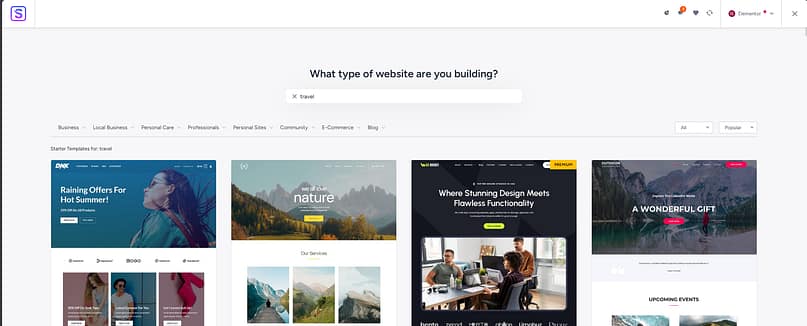
Using Astra Pro more recently, the core appeal hasn't changed: an enormous starter template library, including several travel templates you can import and have standing in minutes. My setup wizard proudly announced my site was built in 33 seconds. Then I opened the site, and of course it was still the template. The real work, making me mine, hadn't started yet.
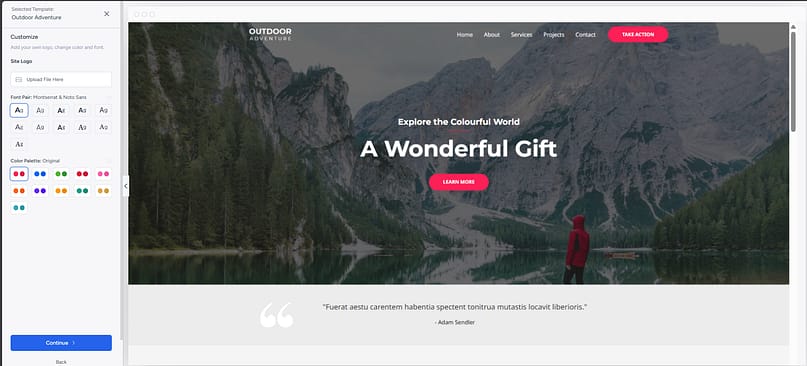
That's where Astra asks something of you. To customize, you pick an editor: the block editor with Spectra (Astra's own block builder), or a separate page builder like Elementor.
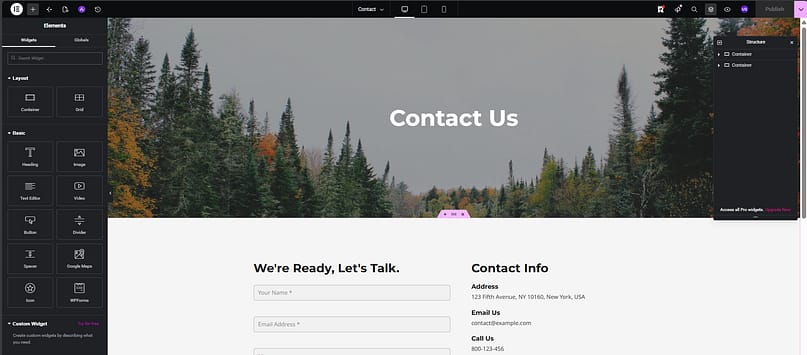
Either way, that's one more tool to install and learn, and depending on what you need, possibly one more paid plan on top of Astra Pro. Nothing wrong with building a stack; you just deserve to know you're signing up to assemble one.
- Travel starter templates: several travel and adventure designs with one-click import.
- Lightweight base: a fast foundation that handles map embeds and gear round-ups without drama.
- Your choice of editor: Spectra, Elementor, or the block editor, whichever you already know.
- Free version available: the base theme costs nothing, so you can test the fit before paying.
2. Hello Elementor: A Canvas That Keeps Costs Down
Elementor holds a special place for me: it was my introduction to WordPress page builders, back in my freelance days when a client wanted a cheaper alternative to ClickFunnels and I rebuilt their funnel in WordPress. Slowly, because I was a beginner. But that project taught me what a page builder could do.
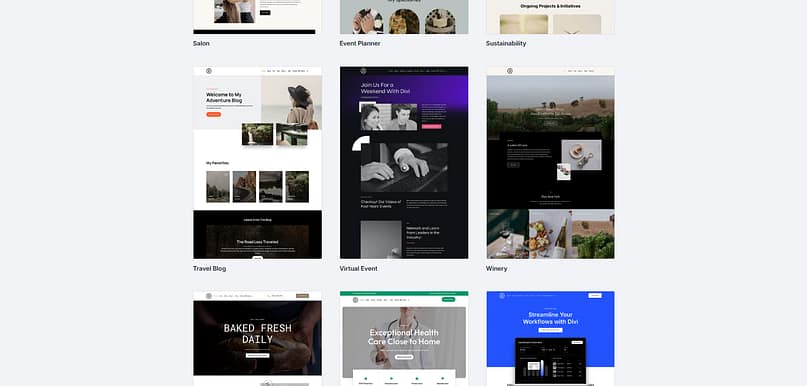
Hello Elementor is Elementor's own theme, and it's deliberately minimal. Think of it as a canvas: almost nothing comes from the theme itself, because everything is meant to happen in the Elementor builder. That design choice quietly solves a cost trap, too. Pair Elementor with someone else's premium theme and you can end up paying for two products; pair it with Hello and the theme side costs nothing.

My honest caveat comes from living with it. My first personal website ran on Elementor, and the reason I eventually moved on was that, at a certain level of customization, it started feeling like the site was held together by duct tape. Everything worked, but some things only worked through workarounds. A straightforward travel blog may never hit that ceiling. A perfectionist redesigning their archive pages at midnight will.
- Travel template kits: Elementor's library includes travel kits with the pages you actually need, destination pages, itinerary layouts, and galleries.
- Free path to launch: free theme plus the free builder tier is enough to get a simple travel blog live.
- Visual editing throughout: drag-and-drop everything, no code, gentle learning curve.
- Pro when you're ready: forms, theme building, and the professional features arrive with Elementor Pro.
3. Divi: A Lot of Power, and a Lot to Learn
I'll be honest with you here, because I have been in my other reviews on this site: Divi has never been my favorite. I've long felt it does too much for the average personal user. When someone told me Divi 5 had changed things, I went back in with fresh eyes, and credit where it's due, the experience was smoother than my earlier rounds with it. Less frustration, cleaner setup.
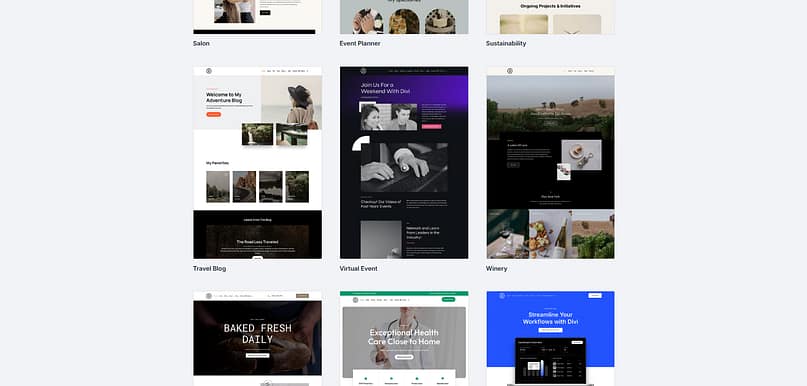
The reason it earns a place on a travel list anyway: its travel blog layout pack is genuinely beautiful, and if your blog is photography-first, Divi's editor gives you control over practically every pixel on the page. You select an element, you shape it through the settings panel, and the level of detail available is real.
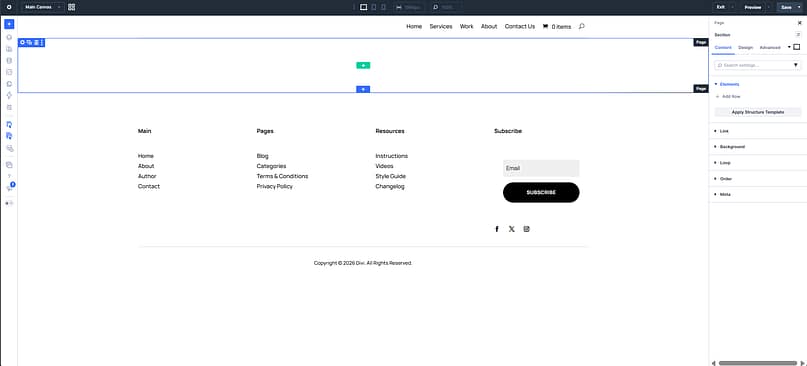
That same editor is also my warning. It's heavy machinery. If you design websites for a living, that granularity is power. If you're a travel blogger trying to get something solid published between trips, selecting and styling every element one at a time can wear you down. I'd also like the path from Quick Sites (the starter-site generator) through the layout packs to actual page editing to feel more connected than it does. The tool isn't bad. It's just a lot, and it expects you to learn it.
- Travel blog layout pack: a coordinated set of travel page designs, and one of the prettier ones out there.
- Granular design control: every element on every page is customizable, ideal for photography-led brands.
- Quick Sites starter: generates a full starter website you then make your own.
- Unlimited sites on one license: the price covers as many websites as you want to build.
4. SeedProd: The Easiest Start on This List
SeedProd was a late discover for me, but this is what I found once I did: this is a genuinely good tool, and I've watched it grow from a beginner-friendly landing page builder into something you can build a complete site with.
What keeps impressing me is how little friction there is between installing it and working on your site. Everything lives in one dashboard: your theme parts, your template kit, your editor. No bouncing between the Customizer, the block editor, and wherever else.
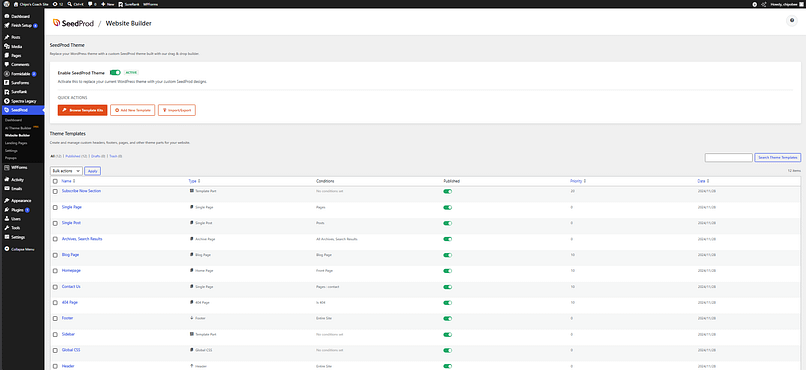
And after my 2021 marketplace experience, the thing I value most is that the template you pick is the template you get. You select it, it appears on your site looking like itself, and your only job is swapping in your photos, your words, your colors.
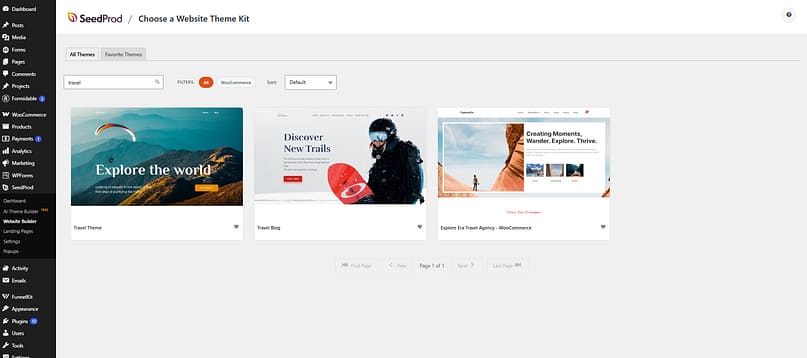
My one nitpick, and it's small: editing often happens through the sidebar rather than directly on the element you clicked. When you're deep in a writing session, you feel that extra step. It's not a dealbreaker, just a habit to build.

- Travel template kit: a ready-made travel design, so your starting point already fits the niche.
- One central dashboard: theme parts, templates, and editor all in one place, the shortest learning curve here.
- True WYSIWYG templates: what you pick is what appears, no assembly surprises.
- Free version: enough for a landing page or coming-soon page while your blog takes shape; lead generation and full-site features live in the paid tiers.
5. Thrive Theme Builder + the Travel Theme
You're probably surprised to find Thrive Theme Builder in the last spot on a Thrive Themes list. Like, what? Do I not rate our tool?
I rate it very much. That's exactly why it's last. Full disclosure, same as always: I work for Thrive Themes. But I also build with this tool for real. My own personal website runs on Thrive Theme Builder and Thrive Architect, has for years, and I designed every part of it myself. So while I wrote the four reviews above, this was the measuring stick in the back of my mind the whole time.
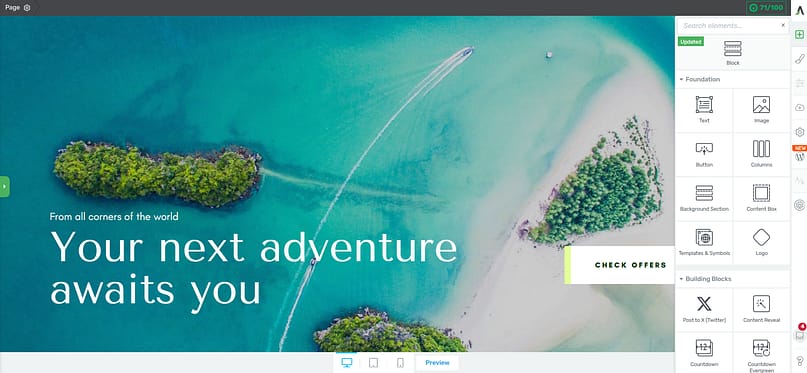
And here's the detail that matters most for this article: I've used the Travel companion theme myself, and not even for a travel site. I turned it into a full-on personal blog, because Thrive's themes are starting points rather than boxes.

The theme gives you the travel-shaped foundation, galleries, destination-style layouts, a structure that suits itinerary posts, and what you build from there is up to you.
Getting started is where it shines. The Site Wizard walks you through the whole skeleton, logo, brand color, header, footer, homepage, blog templates, menu, step by step. The bones of a cohesive travel site in under 30 minutes is realistic. Filling it with your photos and stories takes longer, let's keep it real, but you're filling a finished structure, not assembling one.

What I value most day to day is that everything stays connected. Destination guides, blog list, about page, homepage, all built from linked templates, so a global change to your colors or typography updates everywhere at once. And when the blog starts earning, the business layer is native: Thrive Architect for landing pages, and the wider Thrive Suite for opt-in forms, quizzes, courses, and A/B testing. The other tools on this list can add some of that with plugins. Here, it's what the ecosystem exists for.
If you're keeping a personal travel diary, this is honestly more than you need, and Astra or SeedProd will serve you well. But if the plan is for the blog to eventually pay for the travels, this is where I'd start.
- The Travel companion theme: galleries, destination layouts, and itinerary-friendly structure out of the box.
- Site Wizard setup: a guided path through header, footer, homepage, and blog templates, no hunting for settings.
- Connected templates: site-wide design changes happen once, not page by page.
- A native business layer: opt-ins, landing pages, quizzes, courses, and A/B testing through Thrive Architect and Thrive Suite when you're ready to monetize.
The ThemeForest Travel Themes Worth a Look (From Someone Who Got Burned There)
Now, you already know my history with ThemeForest. I told you the whole story earlier, and I stand by my caution.
But I also think it would be unfair to pretend the marketplace has nothing good in it. It does. There are travel themes on there with ratings and reviews that have been earned over years, and if I'm being honest with you about what I'd build on, I should be honest about what the community rates too.
So here's my deep personal disclaimer before we look at them: I have not used these themes. What follows is me being observant, going through their demos and their listings the way you would, and telling you what I like, what I don't, and what to check before you buy. And my warning from 2021 applies to everything in this section: you'll either need a page builder, a decent understanding of the WordPress editor, or a lot of patience, because the demo and what you get aren't always reality.
Trawell: The Community Favorite
Trawell is the travel blog theme you'll see recommended most in travel blogger communities, and its numbers back that up: 4.92 stars from 88 ratings at the time of writing, plus Envato's own WordPress-requirements quality badge.
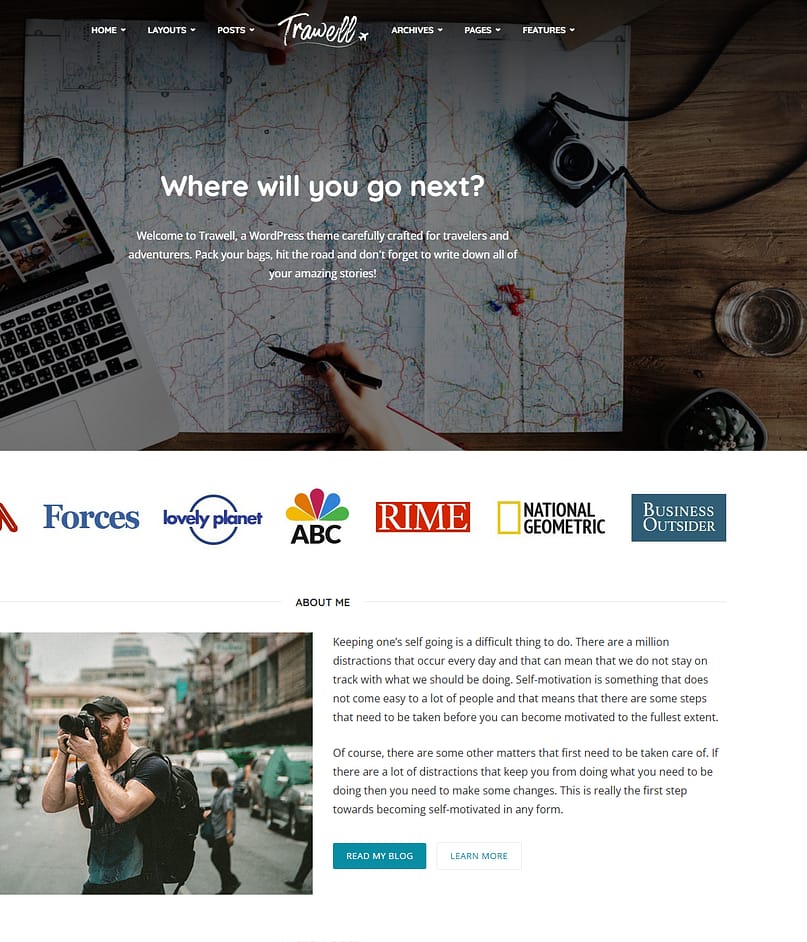
Going through the demo, I get why people like it. It opens with a full-screen "Where will you go next?" hero over a map-and-camera photo, and the whole homepage already reads like a finished travel blog: an about section, featured stories, category layouts. There are also several demo variations (a blog version, a guide version organized by destination), so you can start from the shape that matches your content.
Price: around $69 one-time, which typically includes 6 months of support.
Ofelia: The Budget Editorial Option
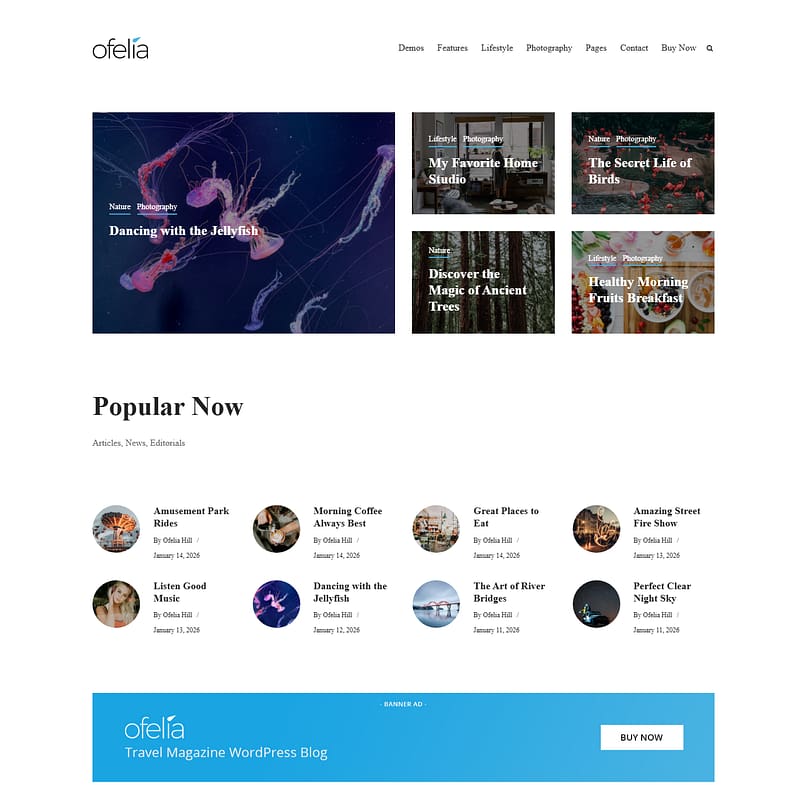
Ofelia is a travel and personal blog theme with a clean, magazine-style look. Its rating is a perfect 5 stars, though from a much smaller pool (11 ratings at the time of writing), so weigh that accordingly.
The demo won me over more than I expected. The homepage is an editorial grid where the photography gets room to breathe, there's a "Popular Now" section for your best content, and, this is the detail I appreciated most, there's a banner ad slot built right into the homepage layout. For a travel blogger planning to monetize with display ads or affiliate banners, that placement being native to the theme is genuinely useful.
Other Themes You'll Keep Seeing (My Quick Takes)
A few more names you'll run into while researching. I haven't built with these, so I'd rather give you a straight answer than a fake review.
None of these are bad choices. They just aren't the tools I've used, and I'd rather you hear about the ones I have.
Free vs. Paid: The Reality Check
Can you start a travel blog for free with this list? Yes. Astra's free theme, Hello Elementor with the free Elementor builder, or SeedProd's free tier will all get a simple site online. That's a real option while you find your voice, and I'd take any of them over a cheap marketplace theme.
But let me keep it real with you: monetization is where the free tiers run out. Opt-in forms, theme-level customization, and landing pages live in the paid plans of every tool here. So my advice is to start free if the budget is tight, and budget for one paid tool the moment your blog starts earning. Put that money into the builder, not into a pile of plugins.
FAQ: WordPress Themes for Travel Blogs
Before you go, here are the questions I hear most from people choosing a theme for their travel blog, answered the same way I'd answer them over coffee.
What is the best free WordPress theme for a travel blog?
Astra's free version and Hello Elementor are the two I'd pick between: Astra if you want travel starter templates out of the box, Hello Elementor if you plan to build with Elementor's free page builder. Both are lighter and better supported than most free "travel themes" you'll find in the directory.
Do I need a travel-specific theme for a travel blog?
No, and honestly, a travel-specific theme can box you in. What you actually need is a fast base with good gallery support and easy customization, plus a travel starting point so you're not designing from zero. A page builder ecosystem with a travel template gives you both, and it still fits if your blog grows beyond travel. I've used Thrive's Travel theme to build a site that had nothing to do with travel.
What's the difference between a theme and a page builder?
The theme controls your site's overall design: headers, footers, blog layouts. A page builder is the tool you use to edit individual pages. Some products handle both jobs, like Thrive Theme Builder and SeedProd, which is part of why I lean toward ecosystems over standalone themes for travel blogs.
Are ThemeForest travel themes worth it?
Sometimes, if you're experienced with WordPress. In my own experience, the theme I bought in 2021 needed extra plugins and hours of setup before it looked anything like the demo, and cleaning up after removing it took even longer. Marketplace themes aren't scams. Just know the demo is a best-case scenario, not what comes out of the box.
How much does a travel blog website cost to run?
With the tools on this list: you can start at $0, then expect roughly $60 to $200 per year for a paid builder once you're monetizing, plus hosting (typically $5 to $15 per month) and your domain. The paid tier starts earning its keep once you're collecting emails or selling anything.
Can I change my WordPress theme later without losing my posts?
Your posts and pages survive a theme switch, but layouts, widgets, and theme-specific elements usually need rebuilding. I've been through this cleanup myself, and it lingers. It's worth choosing a base you can grow with instead of planning to switch later.
Your Next Step
You don't need to overthink this. Pick based on the blog you're building, not on which demo looks prettiest. If you're starting lean, go with Astra or Hello Elementor. If you want the fastest clean launch, SeedProd. If you want full design control for your photography, Divi. And if you're building the kind of travel blog that eventually pays for the travel, start with Thrive Theme Builder and the Travel theme. You can see the Travel theme demo here.
Whichever way you go, you now know the thing I had to learn the hard way in 2021: the demo is a starting point, and the real work is making the site yours. Choose a tool that makes that part easier.


