

TL;DR: Pick the Right Popup Types and Watch Your Results Improve
Not all popups are created equal. The difference between one that actually converts and one that just annoys people usually comes down to timing and relevance. This guide cuts through the noise. I'll walk you through the popup types I've seen work best, explain how each one functions, and tell you when to use them.
3 Key Takeaways:
- Match the popup to the moment: There's no magic bullet popup. The best results come from pairing the right one with where your visitor is in their journey. Context is everything.
- Good popups don't interrupt, they add value: When a popup feels relevant and well-timed, it actually improves the experience. Think of it as a well-placed suggestion, not a brick wall.
- Segmentation and targeting are where it gets interesting: You can do basic popups, sure. But if you want to turn a decent conversion rate into a genuinely great one, you need to get smart with targeting.
Read the full guide if you want a clear strategy for using popups that actually deliver.
So, you've built a great website and you're pulling in traffic. But are those visitors actually turning into leads, subscribers, or customers?
If you aren't using your popups correctly (or not using them at all), you're leaving real growth on the table. I've seen it countless times: businesses with fantastic content and products, but a leaky bucket when it comes to capturing interest.
This guide is here to help you figure out which popup types to use for different goals, whether you're trying to improve popup conversion rates or find the best popup for lead generation, and more importantly, why each one works.
Here's the simple truth: a well-placed popup can gently nudge a visitor toward the next logical step in their journey with you. It's a direct conversation starter, a way to offer something valuable, or just a gentle reminder. Get it wrong, and you're just another annoying website. The real secret? Understanding the different kinds of website popups and using them with intention.
Popup Types at a Glance: Quick Reference Guide
Here's my quick rundown of the most common popup types and what each one does best. Use this table to find a good fit for your immediate challenge, then read the full breakdown below.
Popup Type | Primary Use Case | Key Benefit | Best For |
|---|---|---|---|
Lightbox | Capture emails, offer discounts, announce news | High visibility, clear call to action | General lead capture, promotions |
Exit-Intent | Prevent abandonment, recover sales, offer final deal | Recapture leaving visitors, reduce bounce rate | Cart abandonment, subscription offers |
Scroll-Trigger | Deliver content upgrades, segment audience | Engages active readers, contextually relevant | Blog readers, content-focused sites |
Timed Delay | Offer value after engagement, build anticipation | Non-intrusive, allows initial content consumption | New visitors, content delivery |
Welcome Mat | Full-screen takeover for high-impact offers | Maximizes attention, forces decision | High-value offers, immediate lead capture |
Slide-In | Soft call to action, subtle promotions | Less intrusive, good for secondary offers | Blog sidebars, subtle lead generation |
Gamified | Boost engagement, offer interactive discounts | Increases fun, higher interaction rates | E-commerce, special promotions |
Content Lock | Offer premium content in exchange for email | Builds high-quality email lists, value exchange | Gated content, resource libraries |
Bar/Ribbon | Announce sales, shipping, urgent messages | Persistent visibility, non-disruptive | Site-wide announcements, urgent updates |
This Is Why Generic Popups Don't Work
You've probably clicked away from a popup that felt irrelevant, poorly timed, or just plain obnoxious.
And I'll tell it to you straight: that experience is annoying for visitors and it actively hurts your conversion rates and how people perceive your brand.
The problem usually isn't the popup itself.
It's a lazy, one-size-fits-all approach applied where it simply doesn't belong. When you treat every visitor the same way, you end up with fewer opt-ins and a lot more frustrated users. It's like shouting the same generic offer at everyone who walks into a store, regardless of what they're looking for. It just doesn't work.
To avoid those frustrations and get the right tools for the job, you might want to check out my top WordPress popup plugin recommendations.
And This Is What Happens Your Popup Strategy Goes Wrong
Here's what that looks like: someone lands on your site, genuinely interested in what you do. They start reading, and within seconds, a poorly timed, totally unrelated popup takes over the screen. Most people just leave.
That's a missed lead and a wasted marketing effort.
When you ignore the nuances of popup types, you end up pushing away the very people you're trying to reach. It's a bit like inviting someone to dinner and then immediately trying to sell them a vacuum cleaner before they've even sat down.
These Are the Popup Best Practices for User Experience and SEO
You want your popups to help, not hinder. Good popups add value, and that extends to how they affect your site's overall user experience and its search engine ranking. Google has been pretty clear about penalizing intrusive interstitials on mobile, so getting this right isn't just about being nice to visitors; it's about making sure your site gets seen. This section covers popup design best practices to keep your site healthy and your visitors engaged.
To make sure your popups are always helpful and never annoying, check out our essential popup best practices.
The Core Popup Types: How and When They Appear
Before getting into specific use cases, it helps to understand the fundamental categories. These define how a popup shows up on screen, which has a direct impact on how visitors respond.
Overlay Popups (Lightbox): For When You Need Full Attention
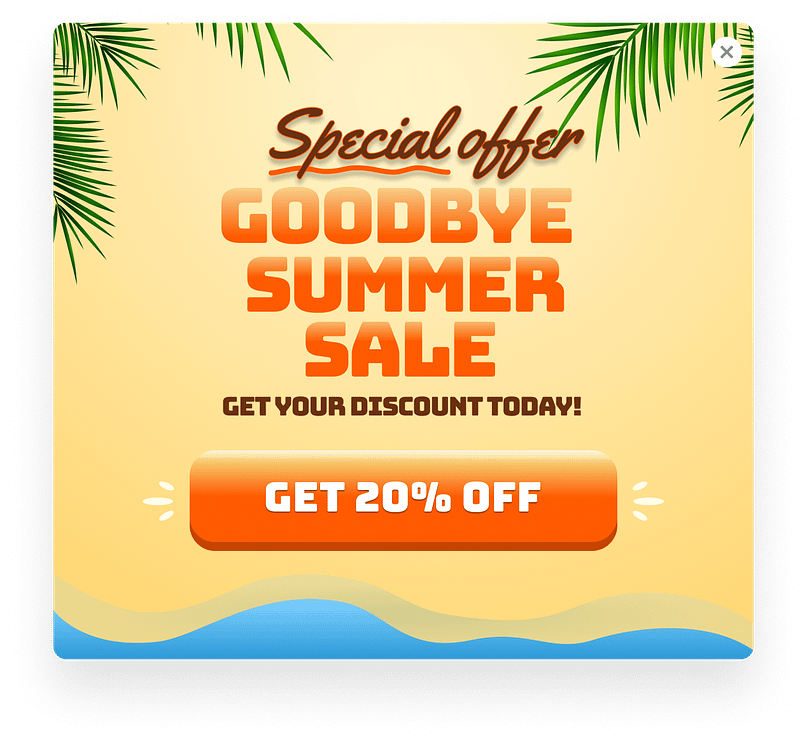
Lightbox Popup Example
Overlay popups appear in the center of the screen with the background content dimmed behind them. That makes your message impossible to miss. Use them when you've got a strong offer or an important announcement that genuinely warrants the interruption — not for every little thing. Think of them for general lead generation, a big product launch, or a limited-time sale where you really want to grab attention.
(For some real-world inspiration on capturing those leads, check out these expert-analyzed lead gen landing page examples.)
Key Characteristics:
- Appears centrally, dimming background content.
- Demands immediate attention.
- High visibility for your message.
Examples:
Slide-In Popups: A Gentler Approach
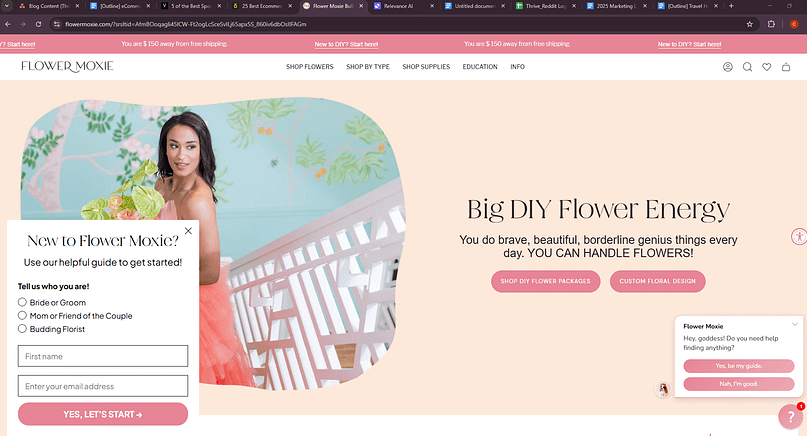
Slide-in popups come in from the corner of the screen, usually the bottom right, without covering the main content. They work well when you want to present an offer without breaking someone's reading flow. Think of them as a tap on the shoulder rather than a roadblock. I often recommend these for blog sidebars or subtle lead generation, like offering a related resource without being too pushy.
Key Characteristics:
- Slides in from the corner (typically bottom-right).
- Doesn't obstruct main content.
- Less intrusive than an overlay.
Examples:
Bar Popups: Always Visible, Never Pushy
Bar popups sit as a thin strip at the top or bottom of the page and stay visible as visitors scroll. They're a solid choice for site-wide announcements, active promotions, or anything that needs persistent visibility without getting in the way. Things like "free shipping on orders over $50" or "20% off all courses this week" are a natural fit. They're there if you need them, but they don't demand immediate attention.
Key Characteristics:
- Fixed strip at the top or bottom of the browser.
- Stays visible as the user scrolls.
- Non-disruptive, persistent visibility.
Examples:
Popup Triggers: Timing Is Everything
Getting the right popup in front of someone is one thing. Getting it in front of them at the right moment is what actually moves the needle. This is where your marketing strategy really comes into play.
Timed Popups: Let Visitors Settle In First
Timed popups appear after a visitor has spent a set amount of time on your page. The idea is simple: give people a chance to read something before you make an ask. Set the delay based on how long your content typically takes to consume, and you'll find the offer lands better. For a blog post that takes 3 minutes to read, you might set a timed popup for 60-90 seconds. This shows respect for their time and interest.
Key Characteristics:
- Activates after a predetermined time duration.
- Allows initial content consumption before interruption.
- Timing can be adjusted based on content length.
- Examples:
Scroll-Triggered Popups: Reach Readers When They're Engaged
Scroll-triggered popups activate once someone scrolls a certain percentage down the page. If a visitor is deep into your content, they're clearly interested. That's a good time to offer a related resource, a content upgrade, or a subscription — you're catching them at peak interest. For a long-form article, a scroll-triggered popup at 50-70% can be incredibly effective for building your email list.
Key Characteristics:
- Activates after a visitor scrolls a specific percentage down the page.
- Targets engaged readers who are actively consuming content.
- Offers contextually relevant information or upgrades.
- Examples:
Exit-Intent Popups: One Last Chance Before They Go
Exit-intent popups fire when a visitor's mouse moves toward the browser's close button or address bar, a reliable signal they're about to leave. This is your last opportunity to re-engage them with a discount, a free resource, or a reason to stick around. Done well, these recover visitors who would otherwise disappear for good. They're particularly useful for cart abandonment, offering that final nudge to complete a purchase. If you're wondering how to use exit-intent popups well, a clear, last-minute offer is key.

Key Characteristics:
- Activates when a visitor shows intent to leave the page.
- Offers a final opportunity to re-engage or convert.
- Good for reducing bounce rates and recovering sales.
- Examples:
For a step-by-step guide on setting these up, you'll want to read how to create an exit-intent popup in WordPress.
Entry Popups: High Impact, High Risk
Entry popups appear the moment someone lands on your page. They can work for urgent announcements or age verification, but they need to be handled carefully. If the offer isn't immediately compelling, you'll likely just irritate people before they've had a chance to see what you're about. I generally advise caution here; they're the equivalent of a bouncer asking for your ID the second you step out of the taxi.
Key Characteristics:
- Appears immediately upon page load.
- High visibility, but also high potential for disruption.
- Best for urgent, universal messages or legal requirements.
- Examples:
Click-Triggered Popups: Only When Someone Asks
Click-triggered popups appear when a visitor clicks a specific link, button, or image. Because the visitor initiated the interaction, they're already interested, which makes these some of the most effective popups you can use. They're great for content upgrades, lead magnets, or product details tied to a specific element on the page, and they let visitors self-select their interest without cluttering your page.
Key Characteristics:
- Activates only when a visitor clicks a specific element.
- Indicates strong user interest and intent.
- Very good for delivering requested information or offers.
- Examples:
Popup Types by Goal: Matching the Format to the Purpose
Beyond how popups appear, what they're designed to accomplish shapes how you build and target them. This is where you start thinking about your sales funnel and how each popup contributes.
Lead Capture Popups: Growing Your Email List
Lead capture popups have one job: collect email addresses. They usually offer something in return, an ebook, a discount code, access to exclusive content. Use these to build your list and open a direct line of communication with potential customers. This is foundational for any marketing strategy, and often the best popup for email list growth or a reliable popup for newsletter signup.
Key Characteristics:
- Primary goal is to collect email addresses.
- Often includes an incentive (lead magnet, discount).
- Crucial for building an email list and nurturing leads.
- Examples:
Cart Abandonment Popups: Recovering Lost Sales
These target visitors who've added items to their cart but are heading for the door without buying. A timely offer of free shipping, a small discount, or even a simple reminder of what they left behind can bring a surprising number of them back. If you run an online store, these are worth setting up. They're like a friendly store clerk asking if you forgot anything, and are the ideal popup to recover abandoned carts.
Key Characteristics:
- Targets users who have items in their cart but are leaving.
- Offers incentives to complete a purchase (e.g., discount, free shipping).
- Directly impacts e-commerce revenue recovery.
- Examples:
Discount Popups: Driving Immediate Action
Discount popups present a promo code or time-sensitive offer to visitors. They're particularly useful during sales events, seasonal promotions, or when you want to give first-time visitors a nudge to buy. Keep the offer clear and the design clean. A simple "10% off your first order" can be very effective.
Key Characteristics:
- Presents a promotional code or special offer.
- Aims to drive immediate purchases or sign-ups.
- Good for promotions, sales, and first-time incentives.
Examples
Content Upgrade Popups: Value in Context
Content upgrade popups offer something closely related to the page someone is already reading, a checklist, a template, a deeper-dive PDF. Because the offer is directly tied to what they're already interested in, the conversion rate tends to be noticeably higher than a generic signup form. If someone is reading your guide on "how to start a podcast," offering a "podcast launch checklist" is a natural fit.
Key Characteristics:
- Offers a highly relevant resource related to the current content.
- High conversion rates due to context and perceived value.
- Excellent for building a segmented email list based on interests.
- Examples:
This is a classic example of using content upgrades to rev up your conversion rates.
Notification Popups: Keeping Visitors Informed
Not every popup needs to be about lead generation. Notification popups can announce site-wide changes, confirm actions, or point people toward something they might otherwise miss. The goal here is clarity and a smooth user experience, not conversion. Think "Our offices will be closed on X date" or "New article published!"
Key Characteristics:
- Communicates important information or announcements.
- Focuses on user experience and clarity, not direct conversion.
- Can be site-wide or specific to certain actions.
- Examples:
For more in-depth insights into making these announcements effective, don't miss our guide on notification bars.
Gamified Popups: Making the Offer Fun
Gamified popups turn a standard offer into something interactive, a spin-the-wheel, a scratch card, a chance to win a discount. They tend to get higher engagement because there's an element of fun involved. If you're in e-commerce or running a special promotion, these can stand out in a way that a plain lightbox won't. People love a little game, and the perceived value of a "win" can feel higher than a flat discount.
Key Characteristics:
- Incorporates interactive elements (e.g., spin-to-win, scratch cards).
- Increases engagement and perceived value of the offer.
- Often results in higher opt-in and conversion rates due to novelty.
- Examples:
Welcome Mat Popups: Full-Screen, High Stakes
Welcome mat popups take over the entire screen the moment someone arrives. They're impactful, which also means they're easy to get wrong. Reserve these for your most compelling offers, the ones that are genuinely worth interrupting someone's browsing for. A free course, a major download, or an exclusive event registration might qualify.
Key Characteristics:
- Full-screen overlay that appears upon entry.
- Commands complete attention for high-impact offers.
- Best for major announcements, lead magnets, or immediate calls to action.
- Examples:
You Need to Avoid These Major Popup Mistakes
Knowing what to do is one thing, but knowing what not to do can save you a lot of headaches and lost conversions. I've seen plenty of businesses make these common mistakes, and they almost always lead to frustrated visitors and missed opportunities.
Over-Frequent Popups: Annoying Your Visitors Into Leaving
Showing the same popup to the same visitor over and over again is a surefire way to drive them away. It's like having someone repeat the same sales pitch every five minutes.
The Fix: Use frequency capping. Most good popup tools let you set rules for how often a popup appears to a specific visitor, or how long they should wait before seeing another. Once someone has seen or interacted with a popup, give them a break.
Irrelevant Offers: Shouting Into the Void
A generic "Sign up for our newsletter" popup shown to everyone on every page rarely works well. If the offer doesn't connect with what the visitor is currently interested in, it just feels like noise.
The Fix: Segment your audience. Tailor your offers to the content they're viewing, their referral source, or their past behavior. A content upgrade on a blog post, a discount on a product page, or a cart recovery offer for someone about to leave checkout are all examples of relevant offers.
Getting super specific with who sees what is a game-changer, and advanced lead generation tactics can show you how to truly master it.
Hard-to-Close Popups: Trapping Your Audience
Nothing is more frustrating than a popup that covers content and has a tiny, hidden, or non-functional close button. It makes visitors feel trapped and disrespected.
The Fix: Always include a prominent, clearly visible 'X' button. Make sure it's easy to tap on mobile. Also, allow visitors to dismiss the popup by clicking outside of it or pressing the 'Esc' key. Respecting their choice makes a big difference.
Intrusive Mobile Popups: Earning Google's Displeasure
Google has been very clear about penalizing mobile sites that use intrusive interstitials, especially those that appear immediately on entry and block content. This isn't just about user experience; it affects your search ranking.
The Fix: Prioritize mobile-first design for your popups. Make sure they don't cover too much screen space, are easy to dismiss, and don't fire immediately on entry unless absolutely necessary (like for age verification). Bar popups and slide-ins are generally safer bets on mobile.
Lack of Testing: Leaving Money on the Table
If you just set up a popup and never look back, you're guessing. You don't know if your headline could be better, if a different offer would convert more, or if a slight change in timing would make a huge impact.
The Fix: A/B test everything. Test different headlines, calls to action, images, offers, and even the popup types themselves. Even small tweaks can lead to significant improvements in popup conversion rates.
Ignoring Analytics: No Plan, No Results
Your popups are generating data, but if you're not reviewing it, you're missing opportunities to improve. How many people see it? How many convert? Where do they drop off?
The Fix: Regularly review your popup performance data. Look at impression rates, conversion rates, and how different popups perform across different pages or segments. Use these insights to refine your strategy. I like to set a reminder every month to check the numbers.
If you're ready to plug those leaks and see a real difference, we've got plenty of tips on how to increase conversion rates across your entire site.
Advanced Popup Strategies: How to Get More from What You've Built
Once you've got the basics in place, the real gains come from refining how you target and test. This is where you move from just having popups to having a smart, data-driven visitor engagement system.
Use Thrive Leads to Put This Into Practice
To run the kind of targeted, well-timed popup strategy I've described here, you need a tool that can handle the complexity without requiring a developer every time you want to make a change. I've seen many businesses get stuck here, trying to patch together solutions.
Build Any Popup Type Without Writing Code
Thrive Leads has a drag-and-drop editor that lets you design any popup type, from a simple lightbox to a two-step opt-in, without touching a line of code. Pick a template, customize the look, connect your offer, and you're ready to go. It makes experimentation easy, which is key to finding what works.
Target the Right People with Precise Display Rules
Beyond basic triggers, Thrive Leads lets you show popups based on categories, tags, specific posts, user roles, referral sources, and previous visitor behavior. That level of control means your popups reach the right people at the right time, rather than firing indiscriminately. This is how you put that segmentation into practice.
Run A/B Tests with Built-In Tools
Thrive Leads has A/B testing built in, so you can compare popup types, designs, offers, and triggers directly against each other. The data makes it straightforward to spot what's working and cut what isn't. You get clear winners instead of guesswork.
Connect to Your Existing Marketing Tools
Thrive Leads connects with major email marketing services, CRMs, and other platforms. Every lead you capture flows automatically into your existing workflows, so nothing gets lost and your follow-up stays consistent. Your email list actually grows, and your sales funnel keeps moving.
Track Performance in One Place
The built-in reporting shows you impression rates, conversion rates, and other key metrics in a clear format. You get the data you need to make informed adjustments without digging through multiple dashboards. That visibility is invaluable for refining your strategy over time.
Frequently Asked Questions About Popup Types
Still have questions? Here are the ones I hear most often, along with quick answers to help you make smart choices for your site.
Make Your Popups Work for You, Not Against You
Choosing the right popup types isn't about throwing everything at the wall to see what sticks. It's about understanding your visitor's journey, anticipating their needs, and offering value at the right moment. When you approach popups as a strategic tool for visitor engagement and conversion rate improvement, you stop seeing them as a necessary evil and start seeing them as a useful part of your marketing.
You've got the knowledge now. You understand the different types, their triggers, and how to align them with your goals. Start small, test often, and let the data guide your decisions. You'll be surprised at how much more your website can do when you use these tools with intention.
If you're ready to take control of your lead generation and make your website work harder, exploring a tool like Thrive Leads is a good next step.


