


TL;DR: Your Content Strategy Needs a Map, Not Just a Pile
You're putting in the work, creating genuinely great content, but it's not getting the traction it deserves. Why? Often, it's because your content is scattered, making it hard for Google and your readers to understand your expertise. This article dives into SEO silos, a strategic way to organize your website content that makes it clearer, more authoritative, and ultimately, more effective at driving conversions.
Here are the three big takeaways:
- Modern silos are about smart internal linking, not rigid folders. Forget old-school, inflexible structures. Today, it’s about creating clear, connected pathways for both search engines and humans.
- They boost authority and user experience. By grouping related content, you signal deep expertise to Google and make it easier for visitors to find what they need, keeping them engaged longer.
- Silos are conversion-focused. The real power of a well-built silo is guiding readers naturally toward a next step – whether that’s an opt-in, a product purchase, or a booked call.
If you’re serious about making your content work harder for your business, stick around. This isn't just about SEO; it’s about building a better experience for everyone.
7+ years in marketing and I've seen this way too many times: someone puts in the hard work, creating genuinely great blog posts, doing their keyword research, and even offering helpful products. But then… crickets.
And it’s not because the content is bad. Nope, not at all.
The problem is the content is scattered. Google can’t quite figure out what it’s all about, visitors get lost in the noise, and conversions just stall.
The fix, more often than not, is something I call SEO silos.
Grouping related content and linking it with real intent makes your site easier to navigate for everyone – search engines and humans alike. This structure helps your content rank better and guides readers naturally toward the next smart step. I’ve used this exact strategy to help businesses significantly grow their organic traffic and improve conversions, sometimes without even rewriting a single post.
If you’re investing your time and energy into creating great content, this is how you make it actually pay off.
If you're wondering what 'great content' even means, we've got a quick guide that breaks down what content marketing really is.
Before we dive deeper, here’s the quick version of what I’ve learned (and constantly remind myself) about SEO silos:
- When I build silos, I’m not just filing away blog posts. I’m creating a map that tells Google, "Hey, I know this subject inside and out."
- I lean on soft silos – that means smart internal links – because they’re flexible and human-friendly. Rigid folder structures? That’s a bit of a throwback to 2010 SEO.
- A silo isn’t finished just because the content is neatly organized. For me, the real win is when that structure moves readers closer to action: an opt-in, a product purchase, or a booked call.
- And yes, Google agrees: internal links are "super critical" for SEO. John Mueller said it, and Search Engine Journal echoed it. That’s why I treat them like VIP passes, pointing people straight to the pages that matter most.
Think of these points as your compass. Keep them in mind, and the rest of the strategy will click into place.
What Are SEO Silos and Why They Still Matter
An SEO silo is essentially a way to organize your website content so that related pages are grouped together, linked strategically, and focused on a single topic or theme. It’s like creating dedicated sections in a library, making it simple for both search engines and your visitors to understand your site and find their way around.
The core problem silos solve is the "disjointed array of unrelated information" that many websites become. Without a clear structure, your content might be brilliant, but it’s just a jumble. Silos help communicate your subject expertise to search engines, showing them you've comprehensive coverage on a particular area.
Historically, SEO siloing started with a more rigid, physical approach – think strict folder structures in your URLs. Over time, as search engines got smarter and websites became more dynamic, the concept evolved. Today, it’s less about locking content away and more about creating clear, interconnected pathways through smart internal linking. This evolution means modern siloing is about clarity and connection, not confinement.
The most effective (and practical) way I’ve found to do this today is through internal linking. This means connecting related content so it flows naturally, helping both readers and search engines understand how everything fits together.
I recently saw a guide from Search Engine Land that mentioned internal links "tell search engine bots what’s important," helping your fresh content get visibility faster. Even outside the expert panels, Nate Matherson from Positional pointed out that internal links do more than just help rankings – they shape your site’s structure, guide visitors, and spread authority to the posts you care about most.
Building a solid content strategy is key to making all this work, so you might want to check out how to plan your content marketing blueprint like a pro.
The Modern Approach: Understanding and Implementing Soft Siloing
The most practical and effective way to structure your site today is through soft siloing. This approach uses internal links to connect related content. It’s flexible, pretty easy to set up in WordPress, and doesn’t ask you to restructure your entire site from the ground up.
You can reinforce this structure by:
You might see examples online that recommend using strict folder-style URLs like /email-marketing/subject-lines/ (this is known as a "hard silo"). That approach still works, and it makes the hierarchy crystal clear to search engines. But you don’t need it to build an effective silo structure. What truly matters is how your content connects, not just how your URLs look.
This kind of structure helps Google crawl your site more efficiently, understand your content hierarchy, and recognize your authority on specific topics. But just as importantly, it helps your visitors stay engaged because they can easily find what they’re looking for and what comes next.
What’s the Difference Between Silos, Content Hubs, and Topic Clusters?
The jargon can get messy. Silos, clusters, hubs – they sound similar, but how you use them shapes both your SEO and your user experience.
- Traditional silos kept content locked in tight categories, often discouraging cross-links between groups to concentrate signals. It was neat and tidy, but it also meant readers (and Google) hit dead ends if they wanted to explore related ideas.
- Topic clusters opened those walls. You still get a central pillar page with supporting content, but the structure encourages contextual cross-links – reflecting how people actually browse and how Google now interprets meaning across topics.
This table breaks down the differences for you:
Type | How It's Structured | How It Links | Best For | Example |
|---|---|---|---|---|
SEO Silos | Content is sorted into clearly defined topics (like categories) | Mostly links within its own topic | Building focused authority on a few distinct areas | A nutrition site with separate silos for "Keto," "Vegan," and "Intermittent Fasting" |
Topic Clusters | One broad topic with a main guide plus several supporting articles | Links between the main post and all related ones | Covering a single topic in depth across multiple angles | A "Complete Guide to Freelancing" linked to posts on pricing, client management, taxes, and tools |
Content Hubs | One central page that links to a variety of posts (often evergreen) | Can link in/out, across topics or categories | Creating a beginner-friendly portal or a resource library | A "Start Here" page on a site for online entrepreneurs with tools, tutorials, and templates |
My take? Go hybrid. Build silos deep enough to show authority, but flexible enough to cross-link where it genuinely helps the reader’s journey. Semrush has argued that rigid silos feel outdated in a modern search environment, and I couldn’t agree more.
And when you're ready to display your content in a more dynamic way, you'll find our guide on how to display blog posts in WordPress really helpful.
Types of SEO Silos
When we talk about SEO silos, people often picture different things. It helps to break down the main types you’ll encounter. Each has its own strengths and weaknesses, and understanding them helps you choose the right approach for your site.
1. Physical Silos (Folder Structure)
This is the classic, old-school approach. Physical silos are built directly into your website’s URL structure. Think of URLs like /email-marketing/subject-lines/ or /keto-diet/recipes/.
- How it works: Your content lives in distinct subfolders, creating a clear, hierarchical path.
- Pros: It makes the hierarchy crystal clear to search engines and can be very effective for brand new sites.
- Cons: It’s rigid. If you ever need to restructure your topics, it can be a real headache involving redirects and potential SEO disruption. Neil Patel explains this as the "classic" model – simple, but not always practical if you already have a site full of content.
2. Virtual/Soft Silos (Internal Linking)
This is the modern alternative and my preferred method. Instead of forcing content into folders, you create the structure through strategic internal links.
- How it works: You link related content together using text links within your articles, related posts sections, and navigation menus. The URLs themselves don't necessarily reflect a deep hierarchy.
- Pros: It’s incredibly flexible and much easier to retrofit onto existing WordPress sites. Bruce Clay, Inc. – the agency that literally coined the term siloing – notes that this approach is more adaptable. It’s also scalable and user-friendly without locking you into a rigid URL strategy.
- Cons: You need to be diligent with your internal linking strategy to make sure the structure is clear to search engines.
3. Hierarchical Silos (A Hybrid Approach)
This approach combines elements of both physical and virtual siloing. You might use a physical folder structure for your main topic categories (e.g., /blog/category-name/) but then rely on soft siloing through internal links within those categories.
- How it works: You use a clear URL structure for top-level categories, and then use internal links to connect sub-topics and supporting content within those categories.
- Pros: You get some of the clarity of physical silos for your main topics, combined with the flexibility of virtual silos for your deeper content.
- Cons: It can be slightly more complex to plan initially, as you’re managing two layers of structure.
I get asked a lot: "Do I need to change my URLs to build silos?" The short answer is no – not if you’re focusing on soft siloing. What matters is how your content connects, not just how your URLs look.
Key Benefits of Implementing SEO Silos
Some people think you don’t need to worry about structure anymore because search engines can "figure it out." That’s only partly true. Google is more advanced now, but it still relies on clear signals to understand what your site is about and how everything connects.
A clear site is one of the best ways to provide those signals. A good SEO silo structure helps with that in several important ways:
- Enhanced Search Engine Understanding & Authority: When your content is grouped by theme and covers related subtopics, it tells Google you’re serious about the subject. This deep coverage helps Google recognize you as an expert, which can significantly improve your rankings for relevant keywords.
- Improved User Experience & Navigation: Readers find what they need faster. When related articles are linked in the right places, people are more likely to keep reading and exploring your site. This engagement signals value to both users and search engines.
- Better Keyword Rankings: By concentrating internal links and thematic relevance around specific topics, you strengthen the authority of your pillar pages and supporting content. This focused effort often translates directly into higher rankings for your target keywords.
- Efficient Link Equity Distribution: Internal links act like pathways for "link juice" (or PageRank) to flow throughout your site. Siloing helps distribute this equity strategically, boosting the authority of your most important pages and making sure that valuable pages aren't left isolated.
- Easier Site Management & Scalability: A clear structure makes it simpler to plan new content, identify gaps in your existing coverage, and maintain your site over time. You know exactly where new posts belong, making your content strategy more scalable as your site grows.
But Aren’t SEO Silos Outdated?
There’s been some pushback on siloing in recent years, especially the rigid, old-school version where content was locked into isolated buckets with no cross-links. That’s not what we’re talking about here.
Modern siloing is about clarity, not confinement. You can (and should) link across silos if it makes sense for the reader – just do it intentionally. You’re creating content journeys that help people go deeper into a topic and move toward the next logical step. It’s not about building walls. It’s about building structure.
The goal isn't isolation – it's momentum. The goal isn't just SEO – it's conversions.
And that’s why SEO silos, when done right, still matter and still work. Rigid, no-cross-link silos can feel artificial and even hurt user experience if you overdo it. Semrush points out that this kind of confinement can limit both authority flow and user satisfaction. A smarter approach is link-led: keep the topical clarity of a silo, but allow contextual cross-links when they improve the journey. That way you get the best of both worlds – authority and usability.
The Modern Silo Strategy: Balanced, Contextual, and Conversion-Focused
SEO silos work best when they do more than just organize your content – they should guide your visitors through a natural journey that builds momentum and leads to action.
People don’t browse your site in straight lines. They explore, they jump between ideas, and they follow what feels relevant. That’s why your silo structure should focus on flow, not just hierarchy.
Ask yourself:
- How do visitors move from one piece of content to the next?
- Where do they get stuck or drop off?
- What’s the natural next step after reading this post?
If you’re not sure how people are navigating your site, tools like MonsterInsights can help you visualize user journeys, track engagement, and identify which pages are doing the heavy lifting – and which ones need a boost.
Here’s what a modern, conversion-focused silo looks like:
Example: A Silo That Converts
Let’s say your site teaches people how to sell online courses.
One silo could focus on email marketing.
You’d have:
- A WordPress page that introduces the topic and links to deeper subtopics (we call this a pillar page).
- Supporting content, organized like a grid or content hub, such as:
- How to write better subject lines
- What to include in your course launch sequence
- Opt-in ideas for course creators
- Email automation tips
Each post links back to the pillar, and also to other posts in the silo when it adds value – like linking from subject lines to launch sequences.
The result? A content experience that’s easy to follow, builds topical authority, and creates more opportunities to convert.
Want to build out this kind of structure? Here’s how to create a content hub that works in 2025.
Structure Meets Strategy
If your content is well-organized but doesn’t lead anywhere, it’s just a blog archive. But when each post nudges the reader toward a useful next step – a lead magnet, a signup, or a product – you’re turning content into a system. A good way to do this is to think of your blog as a funnel.
The right tools can make that structure easier to build and maintain. With Thrive Architect, you can:
When your content structure supports your conversion goals, every page starts working harder.
How to Build SEO Silos: A Step-by-Step Guide
If you’re working with WordPress and already publishing content regularly, you don’t need to start from scratch. You just need a smart structure that organizes what you've – and gives every new piece of content a clear place to live and a purpose.
Here’s how to do that, step by step:
Step 1: Define Your Core Topics (Silo Themes)
Start with your content pillars – the main topics your audience cares about and that support your business goals.
Ask yourself:
- What do I want to be known for?
- What content do I already have (or plan to create)?
- What should this content lead to – an offer, a lead magnet, a product?
Take the Thrive Themes blog, for example. We have hundreds of posts, and we definitely can’t leave those unorganized. So we created four silos based on our ultimate business goals – and to help readers quickly find content that speaks to what they’re building:
Build Your Website | Build Your Business | Build Your Mailing List | Build Your Funnels

Each of those categories acts as a silo: grouping content, guiding the journey, and naturally leading into the next step – whether that’s reading another post, signing up, or checking out a tool.
Before you lock them in, use keyword research to validate and refine each theme with keyword research and intent data. Then, map a primary conversion for that silo (whether that’s a lead magnet, a product, or a booking). That’s what makes this more than "neat filing."
Step 2: Build Your Pillar Pages (Silo Heads)
Each silo needs a central page – a pillar page – that introduces the topic and connects all the related content within that silo.
This page acts as the anchor. It gives readers an overview, helps them find what they’re looking for, and sets the stage for the journey ahead.
Your pillar page should:
- Give a clear summary of the topic.
- Link to all supporting content in that silo.
- Include CTAs that match the reader’s intent – like a lead magnet, product, or next step.
- Be designed to guide, not overwhelm.
Take a look at one of the pillar pages on Ali Abdaal’s (a 6-figure earning course creator and productivity expert) website. It introduces the core topic, links to related videos and blog posts, and guides the visitor through a natural learning journey – all while staying visually clean and easy to navigate.
If you’re using Thrive Architect, you can easily create your pillar pages too. It’s simple to add content blocks, highlight related resources, and place CTAs exactly where they make the most sense – without relying on a developer. I like to add a "Latest in this Topic" dynamic post list so the page updates itself, and a primary CTA block (built in Thrive Architect) that matches what the reader is searching for.
Step 3: Create and Organize Supporting Content
Supporting content dives deeper into the subtopics covered in your silo. These are often the posts that pull in search traffic – and they’re what help build out your topical authority.
Each post should:
If you're starting from scratch, think in "question clusters." What does your audience want to know within this topic?
If you're working with existing content, use an internal linking audit to identify and fix broken or missing links. Tools like All in One SEO make this easier with their built-in Link Assistant, which helps you spot internal linking opportunities across your site without manually digging through every post.
Take a look at how Monday.com’s “Product Development Life Cycle” page handles supporting content. The pillar page introduces the core topic and then displays related posts covering Agile methodologies, Kanban, Scrum, and other relevant subtopics.
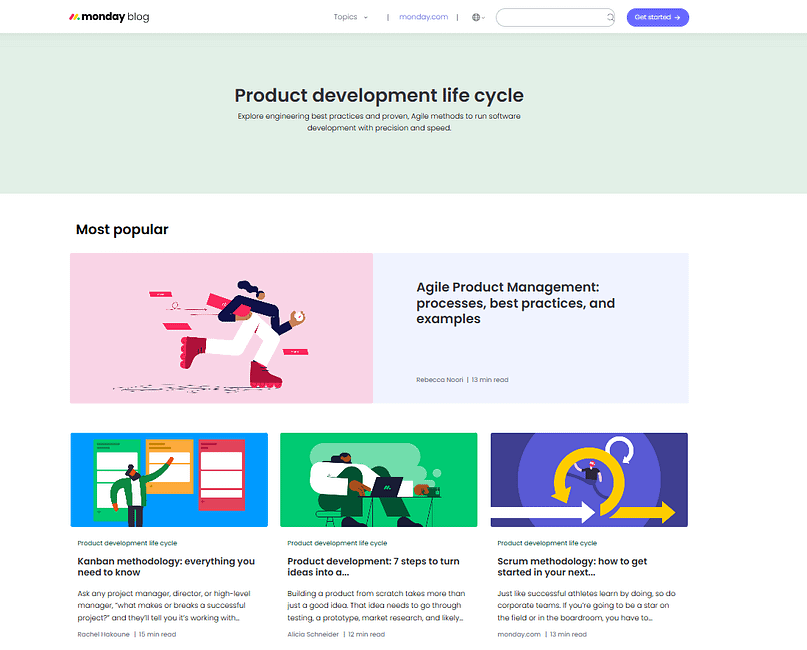
The content is neatly organized in a grid layout that makes it easy for readers to explore related topics – a strategy that improves both user experience and SEO.
If you’re using Thrive Architect, you can choose from pre-designed content blocks that make it easy to showcase supporting content in a clean, consistent layout. You can also mix and match elements like:
The goal isn’t just to organize your posts – it’s to guide the reader through your silo in a way that makes sense and encourages them to keep exploring.
Step 4: Plan Smart Internal Linking (Soft Siloing)
This is where your silo structure really starts to work. Internal links are what connect your content – guiding both readers and search engines through a topic in a way that feels intentional and helpful.
Make sure every supporting post links clearly back to the pillar page and to each other where relevant (but don’t force it).
You can also reinforce your silo using:
💡Thrive Architect gives you multiple ways to handle this – from inserting a simple text link or button to using styled “related posts” blocks that match your silo theme and keep readers engaged. And if you look carefully, you’ll see I’ve deployed that strategy throughout this article.
"Do I need to change my URLs to use silos?" Not at all. Focus on internal links, content structure, and user experience. That’s what really makes silos effective – not your URL format.
Keeping It Working: How to Maintain and Scale Your SEO Silos
SEO silos aren’t a one-and-done setup. As your site grows, so does your content – and if you don’t revisit your structure regularly, it’s easy for things to get messy behind the scenes.
Here’s how to make sure your silos keep performing and evolving as your business does.
Audit Your Silos Regularly
At least once a quarter, check in on your silo structure. Things shift over time – and if you’re not watching, your content can drift out of alignment.
You don’t need anything fancy. A simple doc or spreadsheet that tracks your pillar pages, supporting posts, key internal links, and CTAs (or conversion paths) will do the trick.
Tools to make this easier:
Keep Pillar Pages Fresh
Your pillar pages should evolve over time. As you add new content:
Automate Content Updates Where Possible
One of the best ways to keep your pillar pages fresh without constant manual updates is to use dynamic post lists or content grids that automatically pull in the latest supporting content. If you're using Thrive Architect, you won’t have to worry about this – our post lists update automatically as new content is published (unless you manually program them not to).
This approach keeps your pillar pages relevant and aligned with your growing content – without adding extra work to your plate.
Refresh Supporting Content Too
Supporting posts are where most traffic lands – so don’t let them go stale.
Revisit them to:
This is especially important if you’ve changed your product lineup, updated your brand voice, or refined your audience targeting.
Track What’s Working (and What’s Not)
You can’t improve what you’re not measuring.
Pay attention to silo-level performance:
Tools like Google Analytics, Google Search Console, and MonsterInsights can help you spot what’s working – and where to double down.
Remember: the goal isn’t just traffic. It’s traffic that turns into action.
Ready to Make Your Silos Convert Even Better?
A great silo structure gets people to the right content – but it’s your calls to action that move them forward.
If you’ve built out your silos and want to make sure they actually lead to clicks, signups, or sales…
👉 Check out my guide on how to improve CTA click-through rates.
It covers what makes a CTA stand out, where to place them, and how to design them for higher conversions – whether you're using Thrive Architect or just getting started with your content strategy.
A Few SEO Silo Mistakes to Avoid
Setting up SEO silos seems simple at first, but I’ve learned it’s surprisingly easy to fall into a few common traps.
One I see often is creating too many silos with too little content. It makes your site feel thin – to both visitors and search engines. It’s better to start with a few strong silos that align with your main offers, then build depth over time.
Another easy mistake? Linking only to the pillar page and forgetting about the rest. Each post should be part of a network, guiding readers through your content naturally. And while we’re here: skip the overuse of exact-match anchor text – keep your links natural and helpful.
It’s also tempting to cross-link between silos just to "spread link juice." But I’ve found that links should always enhance the reader’s journey, not distract from it.
And finally, don’t overlook CTAs. A clear silo is great – but it should also guide your reader to take the next step, whether that’s downloading a lead magnet, exploring a product, or signing up for your list.
Frequently Asked Questions About SEO Silos
Here are some common questions I hear about SEO silos and how they work in today's search environment:
An SEO silo is a method of organizing your website content into distinct, related topics. It groups pages that cover a specific subject together, using internal links to create a clear structure that signals your site's expertise to search engines and helps visitors navigate.
Final Thoughts: Why SEO Silos Are About More Than Just SEO
Structuring your content into SEO silos isn’t just about rankings – it’s about building a site that makes sense to your audience, to search engines, and to your business.
When your content is organized with purpose:
SEO silos give your content strategy structure that scales. They turn disconnected blog posts into a system – and your website into an experience that drives results.
Want to bring that structure to life without wrestling with your theme or plugins? I use Thrive Architect to build pillar pages, organize content visually, and guide readers through a journey – strategically and without code.
👉 Try Thrive Architect and start turning your content into a conversion-focused experience.


